To migrate from Kajabi to GoHighLevel, export your contacts and transactions from Kajabi as CSV files, import the contacts into GoHighLevel, move your courses with GoHighLevel's built-in Kajabi importer, then rebuild your pages, emails, forms and checkout in GoHighLevel and point your domain at it. The importer only works if your Kajabi site runs on a custom domain, which caught me out in testing, and active subscriptions can't be transferred. This guide walks through every step with screenshots from my own Kajabi and GoHighLevel accounts, including what Kajabi will and won't let you take with you.
Short version
- Kajabi exports contacts and transactions as CSV files sent by email. Offer settings can't be exported, and courses, emails, forms, pages, blog posts, community and coaching have no export.
- GoHighLevel has a native Kajabi course importer under Memberships, Courses, Products, Create New, Import from Kajabi. It logs in as a Kajabi student to copy your courses.
- The importer refused my
mykajabi.comaddress with "Imports only work with a custom domain". Connect your own domain to Kajabi first, or rebuild courses by hand. - Subscriptions don't move. Plan a switchover where members re-subscribe in GoHighLevel, and keep Kajabi running until they have.
- Kajabi costs $179 to $499 a month; GoHighLevel costs $97, $297 or $497.
What moves and what you rebuild
Before you start, it helps to know which parts of a Kajabi business come across with a file or an importer and which you will build again. I went through every section of my Kajabi account looking for export options. This is what I found, combined with what GoHighLevel can import.
| Item | Out of Kajabi | Into GoHighLevel |
|---|---|---|
| Contacts | CSV by email | CSV import |
| Transactions | CSV by email | Records only |
| Courses | No export | Kajabi importer |
| Videos | One at a time | Importer or upload |
| Offers | Settings can't be exported | Rebuild |
| Emails | No export | Rebuild |
| Forms | No export | Rebuild |
| Pages | No export | Rebuild |
| Blog | No export | Rebuild or import |
| Community | No export | Rebuild |
| Subscriptions | Can't move | Re-subscribe |
The short list of things that travel is why the order matters. Build GoHighLevel while Kajabi is still live, move people across, and only cancel Kajabi once nothing depends on it.
Step 1: Export what Kajabi lets you take
Start with the two exports Kajabi does offer. Both arrive as a download link in the inbox of the email address on your Kajabi account, not as an instant download.
Export your contacts
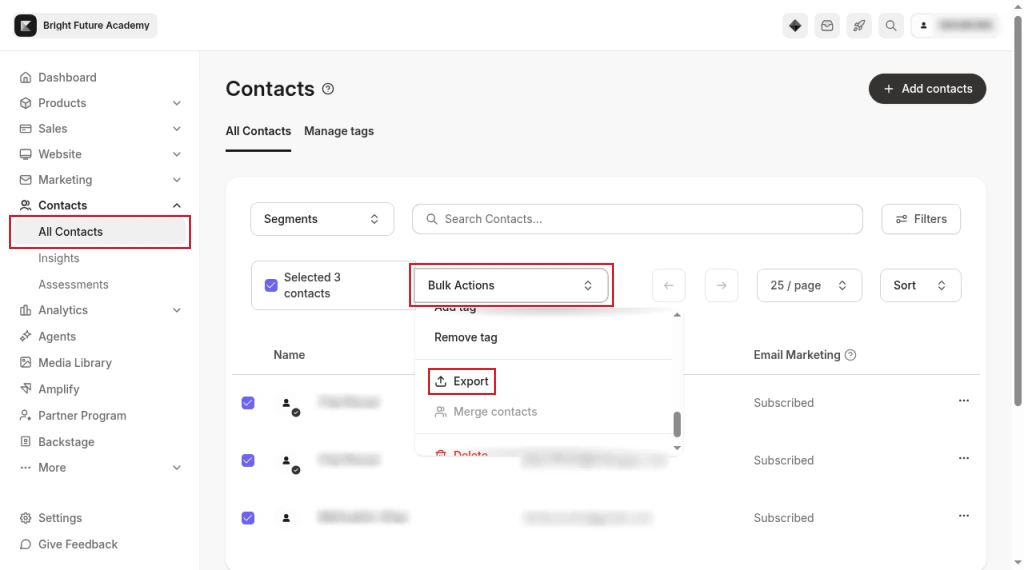
- In Kajabi, open Contacts, then All Contacts.
- Tick the contacts you want, or select all of them. You can filter or use a segment first if you only want part of the list.
- Open Bulk Actions and choose Export.
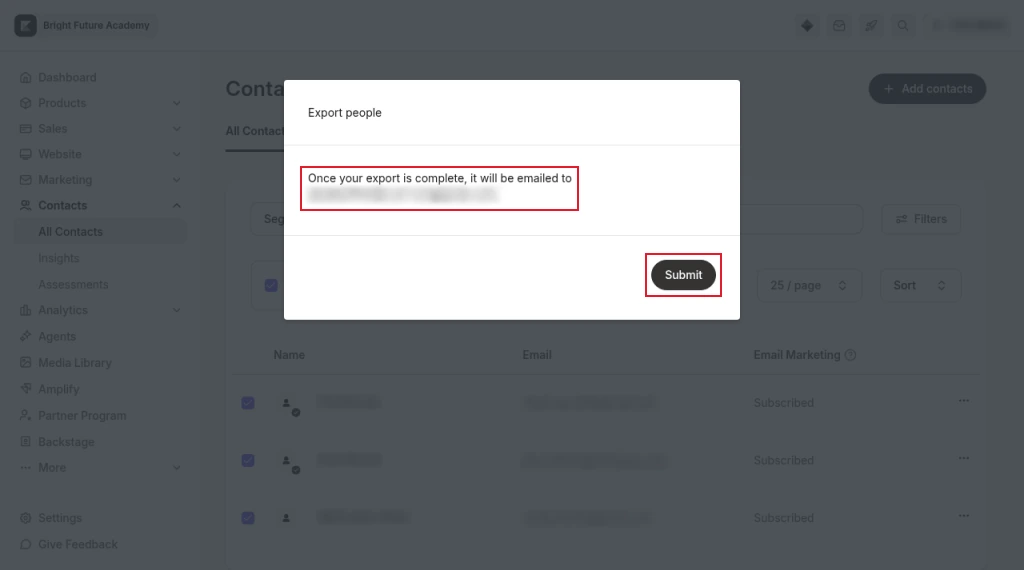
- Kajabi confirms that the export will be emailed to you. Click Submit.
- Open the email and download the CSV. Kajabi's help centre says the link expires after three days, so download it straight away and keep a copy somewhere safe.
Export your transactions
You can't import payment history into GoHighLevel as live payments, but you want it for your records, for tax, and to know exactly who is paying you for what before you move anyone.
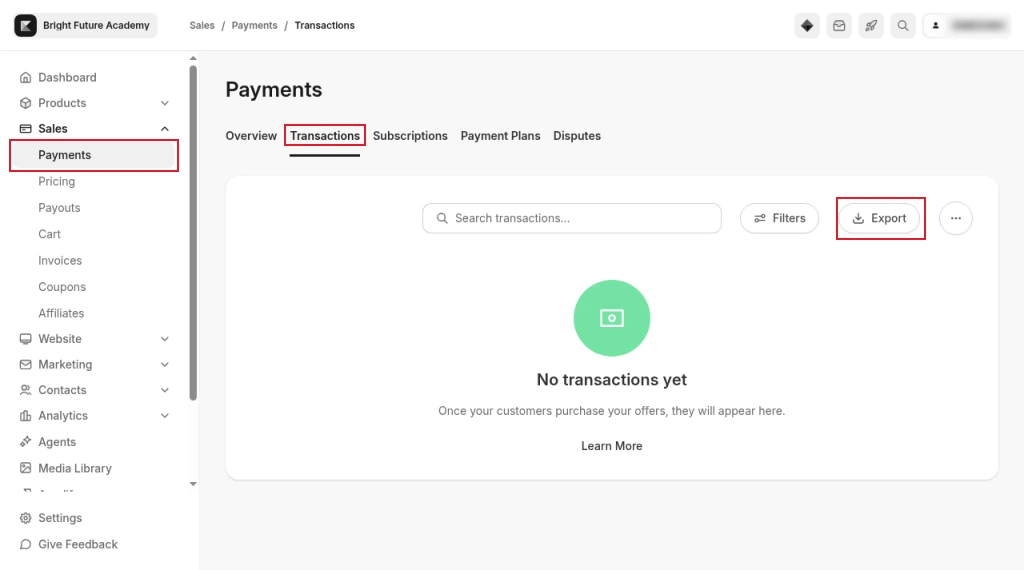
- Go to Sales, then Payments, and open the Transactions tab.
- Click Export.
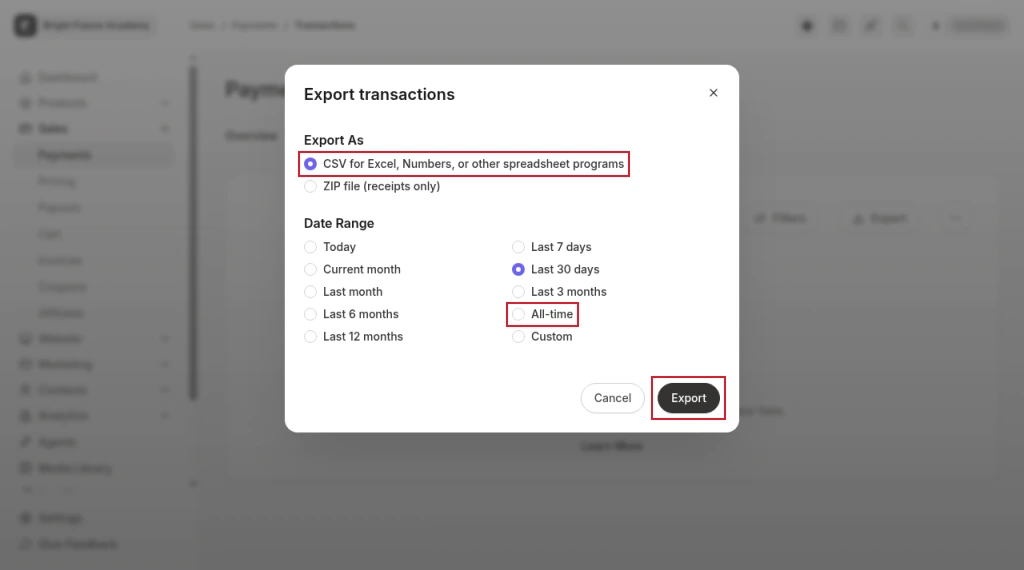
- Choose CSV for Excel, Numbers, or other spreadsheet programs, pick a date range (choose All-time for a full history) and click Export. The file is emailed to you.
Kajabi's help centre also describes a purchase report for each individual offer, exported from the offer's menu under Sales, then Pricing. It lists who bought, upsells and order bumps, which is useful when you rebuild offers later.
Save lesson videos and text you might need
There is no bulk export for course content. If the importer works for you (more on that below), it copies videos, images and text. If it doesn't, you will need the files yourself.
Kajabi's help centre describes a Download Video option in the video actions menu under each lesson's player, which saves one video at a time. Lesson text has to be copied out of the editor by hand.
What Kajabi won't export
I checked every part of the account for an export or download option. Courses, email campaigns, forms, website pages, blog posts, the community and account settings had none, and offer settings can't be exported either, so plan to rebuild each of them in GoHighLevel. A course's own menu is typical: it offers Duplicate and Share, but no export.
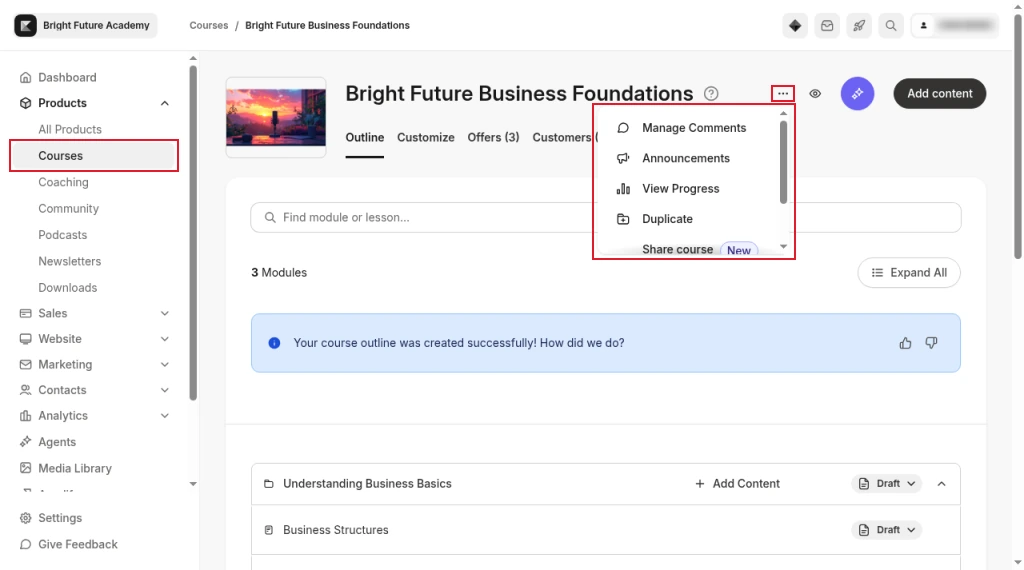
Podcasts and coaching programs were the same in my account: you can manage them, but not export them. Kajabi's help centre does let you export product and landing page templates, but only in Kajabi's own format, which GoHighLevel can't read.
Step 2: Set up GoHighLevel
Create your GoHighLevel account and the sub-account your business will live in. A sub-account is one business's workspace, with its own contacts, courses, sites and payments. If you are new to the platform, our GoHighLevel tutorial for beginners covers the first week of setup in order.
Connect Stripe under Payments, then Integrations, before you build any checkout. HighLevel's help centre notes that each sub-account connects one Stripe account, and that payments made in Stripe before you connect are not imported.
Free 30 day trial + 2 months free on annual

Moving from Kajabi? Start a 30 day trial on the plan you would actually buy, and build your new setup while Kajabi is still running.
- Free trial
- 30 days
- Annual saving
- 2 months free
- In the trial
- Full access to your plan
Step 3: Import your contacts into GoHighLevel
Clean the Kajabi CSV before you upload it. Remove columns you don't need, check that phone numbers include a country code, and keep one header row.
- In your GoHighLevel sub-account, open Contacts and click Import.
- Choose Import records from CSV, then Start CSV import, and upload the Kajabi file.
- Map each column to a GoHighLevel field. HighLevel's help centre says you can create a custom field for data that doesn't fit a standard one, or choose not to import unmapped columns.
- In the import details, add a tag to every imported contact, such as
kajabi-import. If your CSV has a column of tags, HighLevel's CSV guide says comma-separated tags in a column named Tags are added too. - Start the import, then check the result and any error file under Bulk Actions.
The tag matters later. It is how you find everyone who came from Kajabi, give them course access with a workflow, and send them your switchover emails.
I got as far as the CSV import option in my test account, but couldn't capture the mapping screens, so the mapping and details steps follow HighLevel's help documentation rather than my own screenshots.
Step 4: Connect a custom domain to Kajabi before importing courses
GoHighLevel's Kajabi importer refused my test site, which ran on a free mykajabi.com address. The error read: "Imports only work with a custom domain. Please replace https://bright-future.mykajabi.com/login with your custom domain and try again." If your Kajabi site still uses its mykajabi.com address, connect your own domain in Kajabi first. If you can't, skip the importer and rebuild your courses by hand.
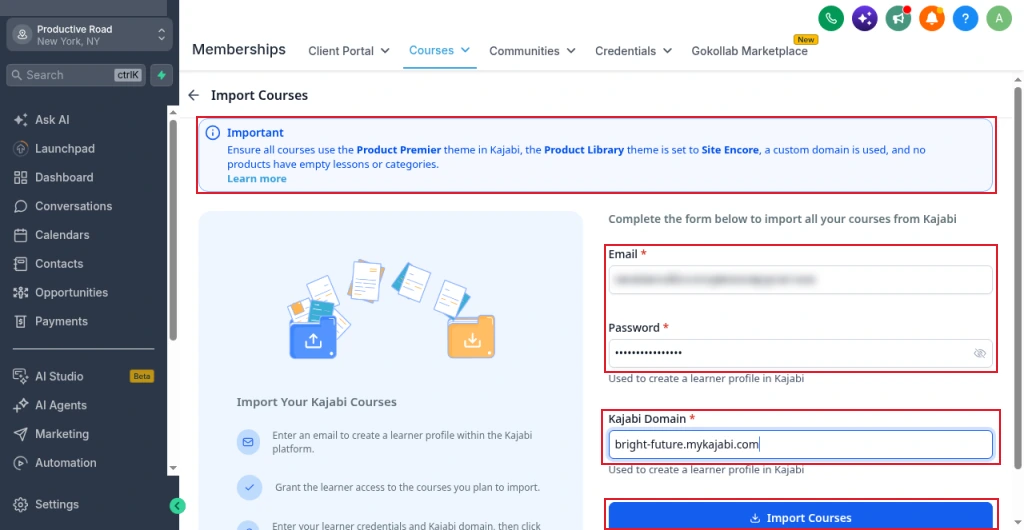
The importer screen says the same thing in its notice, along with a few other conditions: your courses should use the Product Premier theme in Kajabi, the product library should use the Encore site theme, and no product should have empty lessons or categories. Check all of those before you start.
Step 5: Create a test student in Kajabi
The importer doesn't use your admin login. It signs in to your Kajabi site as a student and copies whatever that student can see. So you need a student account with access to every course you want to move. Use an email address you control that isn't already a contact.
- In Kajabi, go to Contacts, click Add contacts and choose Add Single Contact.
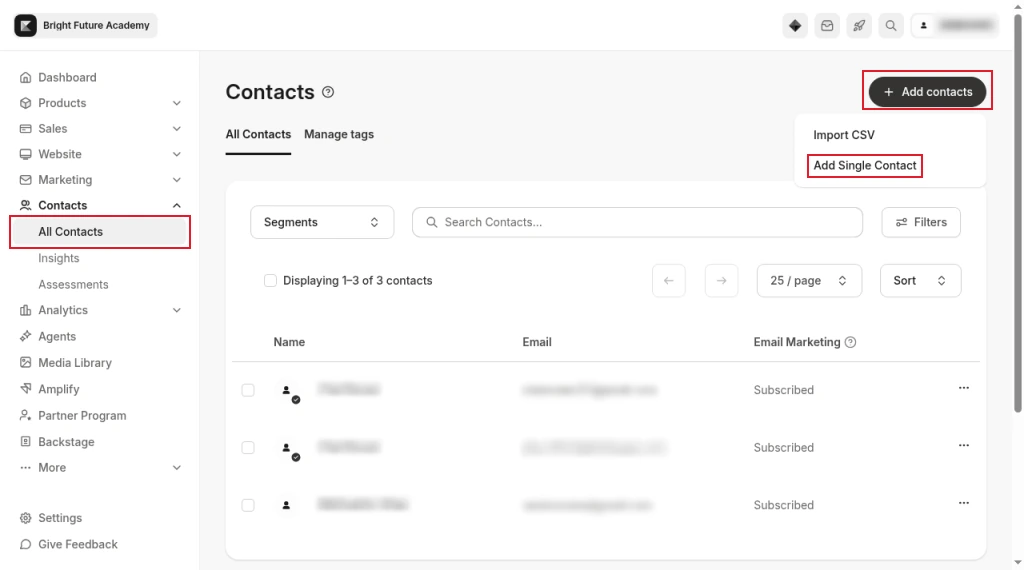
- Enter a first name, last name and email address.
- Tick Grant offers and select the offer that contains your course. Granting it here gives the student access for free. Repeat for every course you want to import, then save.
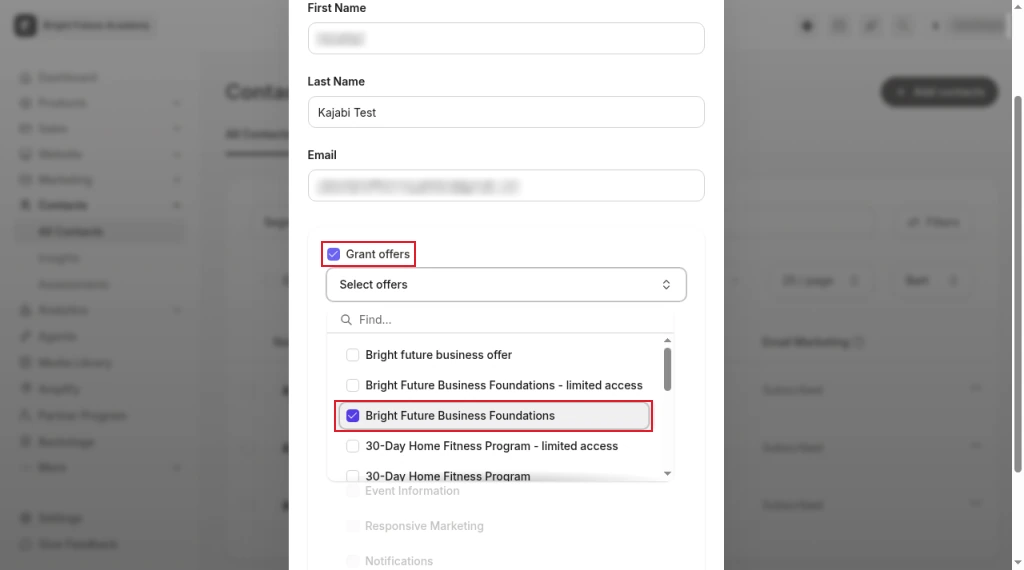
- Open the new contact and check the Products tab. The course should be listed.
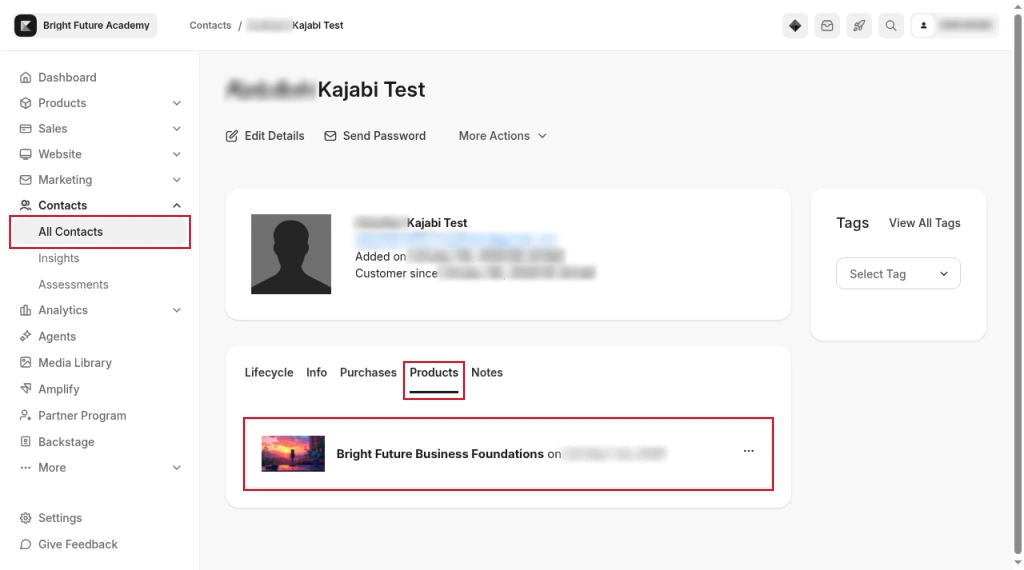
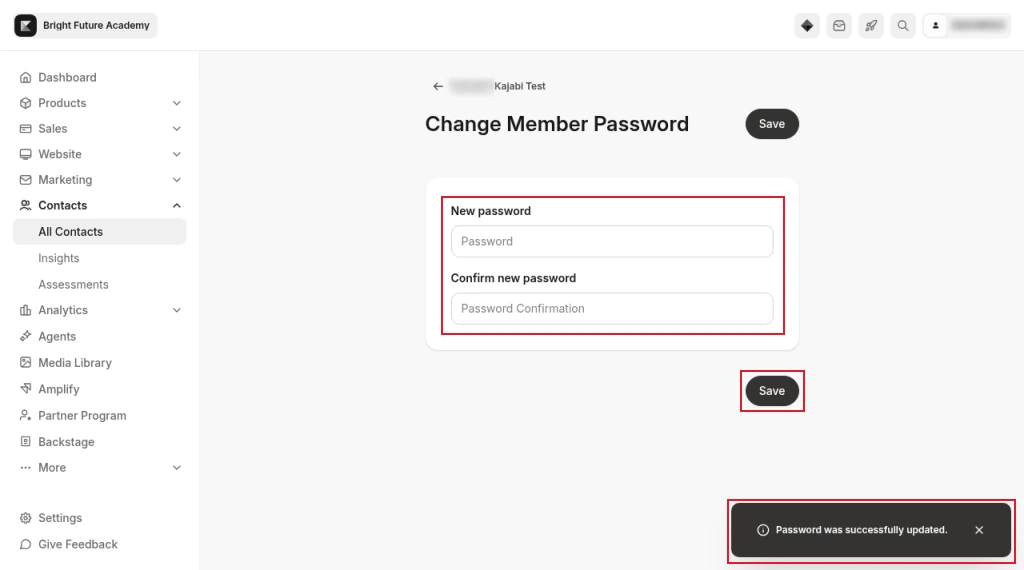
- Set a password for the student on Kajabi's Change Member Password screen, which you reach from the contact, and save it. Write the password down: the importer needs it.
Step 6: Run GoHighLevel's Kajabi importer
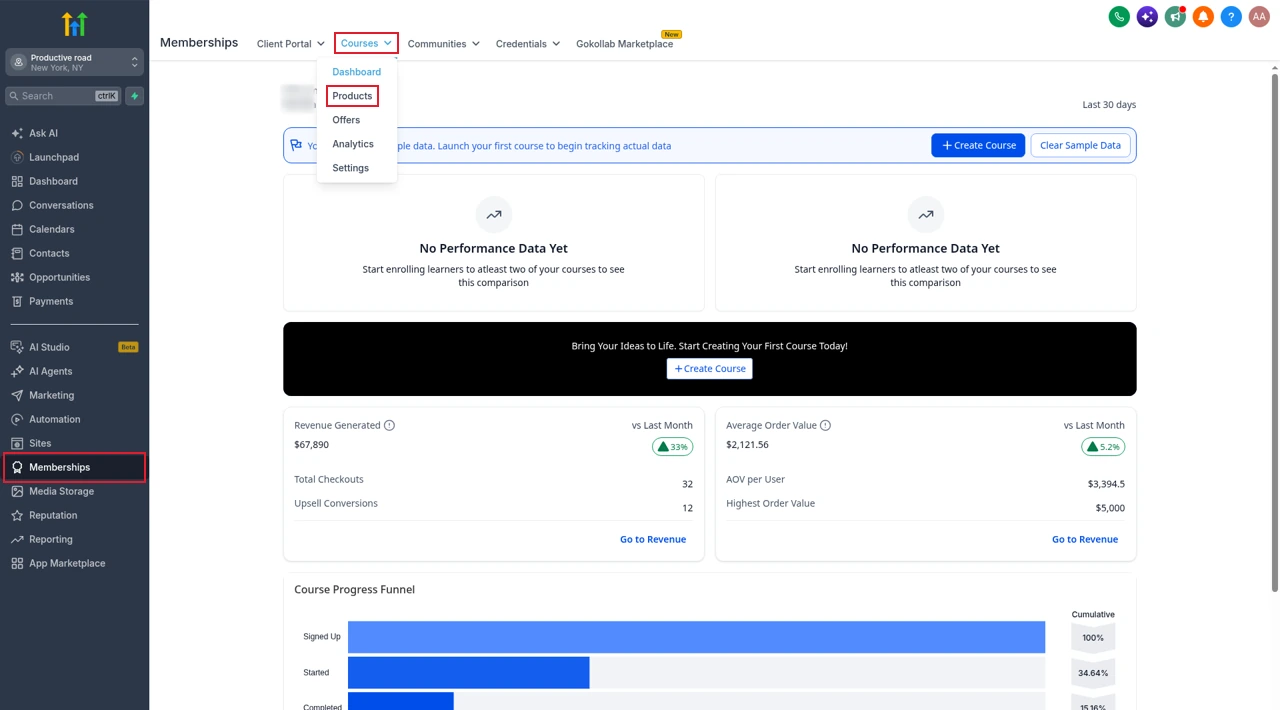
- In GoHighLevel, open Memberships, then the Courses menu, and choose Products.
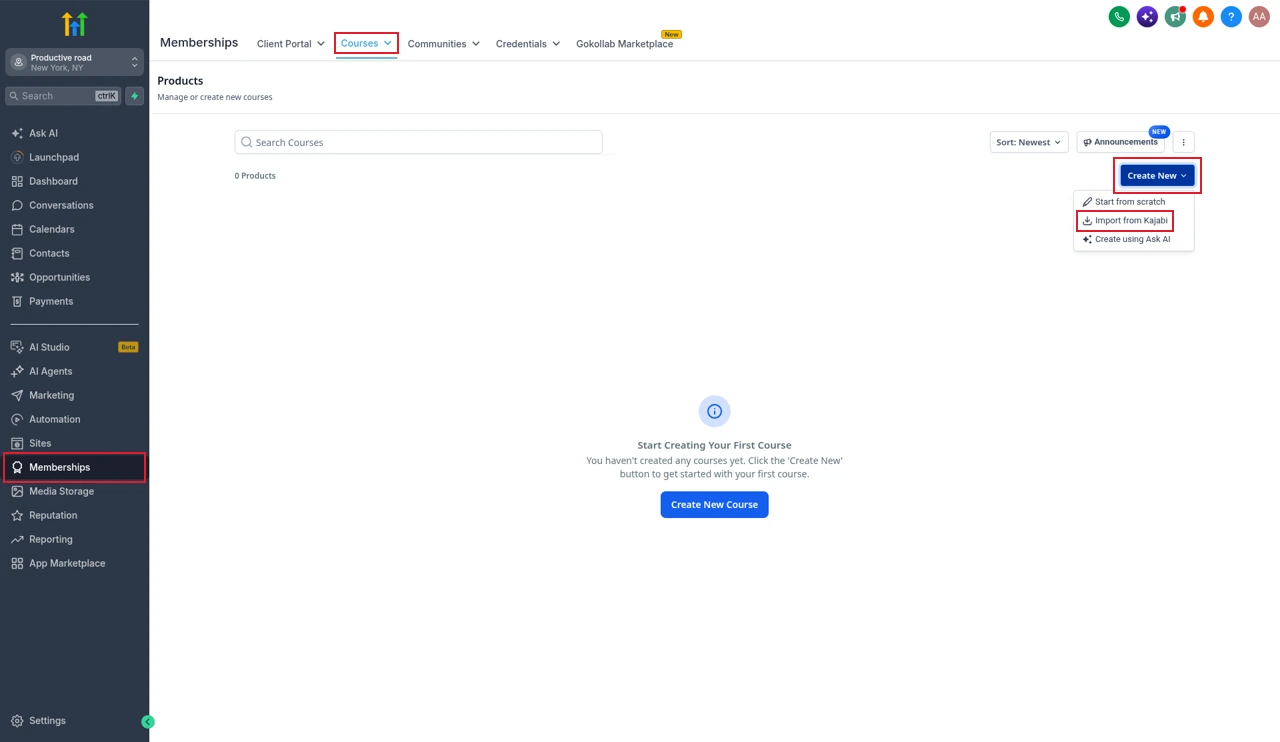
- On the Products page, click Create New.
- Choose Import from Kajabi. The other options are Start from scratch and Create using Ask AI.
- Enter the test student's Email and Password, and your Kajabi site's address in Kajabi Domain. This must be your custom domain. Click Import Courses.
- Read the Proceed with Import? agreement, tick I agree and click Continue.
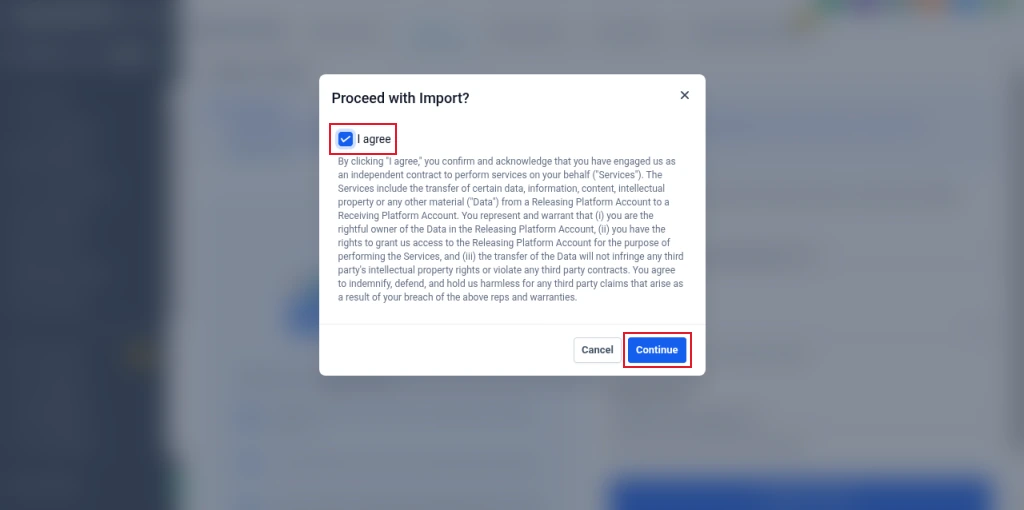
This is where my test stopped. Because my Kajabi site had no custom domain, GoHighLevel returned an Import Failed message instead of starting.
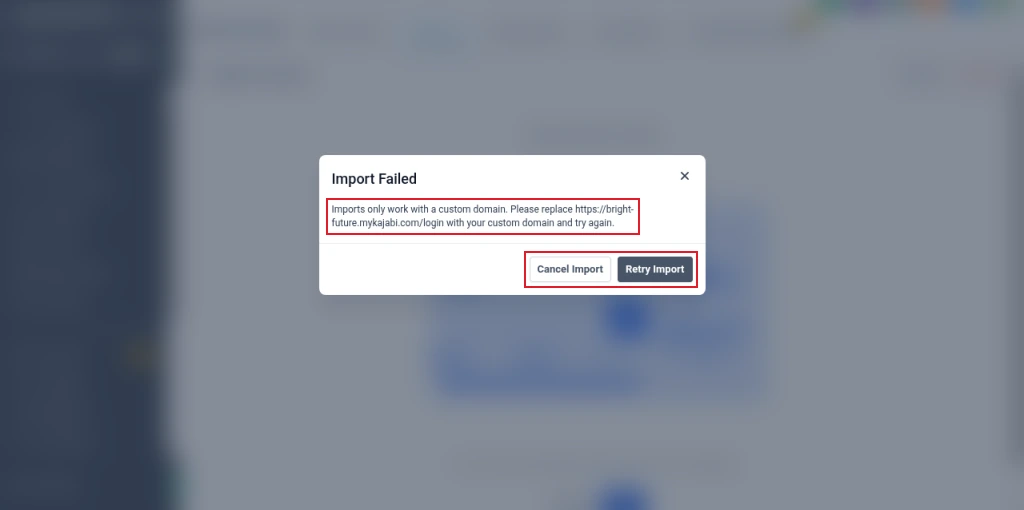
I couldn't complete a course import for that reason, so what follows comes from HighLevel's help documentation. Once the import starts, it logs in as your student and copies the courses. HighLevel says to keep the tab open and use Refresh for an accurate status. Imported courses appear under Products when it finishes.
According to HighLevel, the importer brings across published lessons with their videos, images and text, including lessons in nested categories. It does not bring quizzes, assignments, assessments or unpublished lessons. Students, their progress and your offers aren't part of the import either, as far as the documentation describes.
If you can't use the importer
Rebuild each course in GoHighLevel's Memberships with Start from scratch: create the categories, upload each video, and paste in the lesson text you saved in Step 1. It is slow for a big library, which is the strongest reason to connect a custom domain to Kajabi before you start.
Step 7: Give your students access in GoHighLevel
Imported or rebuilt, a course in GoHighLevel needs an offer before anyone can get in. Create one under Memberships, then Offers. HighLevel's help centre then suggests a workflow to grant access automatically:
kajabi-import.If different students bought different courses, use one tag per course in your CSV and one workflow branch per offer. Students start fresh in GoHighLevel, so tell them their progress won't carry over.
Step 8: Rebuild pages, checkout, emails and forms
Everything from the "won't export" list gets rebuilt. Here is where each Kajabi piece goes:
Rebuild the email sequences before you move anyone, so new leads land straight in GoHighLevel's automations once your forms point there.
What happens to active subscriptions
Kajabi has no tool to move active subscriptions out, and HighLevel says payments that already exist in Stripe aren't imported when you connect it. Card details saved in Kajabi Payments can't be exported either. Don't cancel Kajabi while people are still paying you through it.
In practice, a switchover looks like this:
- Recreate each subscription offer in GoHighLevel with the same price, or a small loyalty discount.
- Email your Kajabi subscribers with a link to subscribe in GoHighLevel, and a date when the old subscription will be cancelled.
- As each person subscribes in GoHighLevel, cancel their Kajabi subscription so they aren't charged twice.
- Keep Kajabi running until the last active subscriber has moved or their subscription has ended.
If your Kajabi offers charged through your own Stripe account rather than Kajabi Payments, those subscriptions exist in Stripe itself. Whether they keep billing after you leave Kajabi, and how access is handled if they do, depends on your setup. I haven't tested it, so confirm with Kajabi and Stripe support before you rely on it.
Step 9: Point your domain and add redirects
When everything is built and tested, move your domain from Kajabi to GoHighLevel by updating its DNS records to the ones GoHighLevel shows when you add the domain. Then add 301 redirects so old Kajabi links and search rankings point to the new pages. HighLevel's help centre covers this under Settings, then Domains & URL Redirects.
Make a list of your Kajabi URLs before you switch, from your sitemap or analytics: the home page, sales pages, blog posts and the student login. Redirect each to its new GoHighLevel address. Tell your students where the new login is, because their bookmarks will point at the old one.
Kajabi vs GoHighLevel: what it costs after the move
Price is often the reason people leave Kajabi. These are the plan prices from both companies' pricing pages.
| Kajabi | Monthly | Yearly | Contacts |
|---|---|---|---|
| Basic | $179/mo | $143/mo | 2,500 |
| Growth | $249/mo | $199/mo | 25,000 |
| Pro | $499/mo | $399/mo | 100,000 |
Kajabi adds a fee of 2%, 1% or 0.5% on Basic, Growth and Pro if you take payments through your own Stripe account instead of Kajabi Payments, on top of Stripe's own fees. Basic also caps you at 5 products and Growth at 50.
| GoHighLevel | Monthly | Best for |
|---|---|---|
| Starter | $97/mo | One business |
| Unlimited | $297/mo | Several brands |
| Agency Pro | $497/mo | Agencies reselling it |
For a single creator business, the comparison is usually Kajabi Basic at $179 a month against GoHighLevel Starter at $97. Courses, communities, funnels, websites and workflows are on every GoHighLevel plan. The catch is that GoHighLevel bills email and SMS sending as usage from a wallet, and it takes more setup to look as polished as Kajabi out of the box. Our GoHighLevel pricing guide breaks down the plans and usage costs. You can compare all three plans on GoHighLevel's pricing page.
Migration checklist
kajabi-import tag.Partner offerFree 30 day trial+ 2 months free on annual
- 30 days instead of the public 14
- Full access to the plan you choose
- Cancel any time before it ends
Usage such as SMS and email is billed from your wallet as you go.
Common questions
Does GoHighLevel have a Kajabi importer?
Yes. It is under Memberships, Courses, Products, Create New, Import from Kajabi. It logs in to your Kajabi site as a student and copies the courses that student can see. It only works with a Kajabi site on a custom domain.
Why does the Kajabi importer say it only works with a custom domain?
GoHighLevel's importer rejects mykajabi.com addresses. I got "Imports only work with a custom domain" when I tried mine. Connect your own domain to Kajabi and enter that domain in the importer instead.
What does the Kajabi importer bring across?
According to HighLevel, published lessons with their videos, images and text. Quizzes, assignments, assessments and unpublished lessons are not imported, so rebuild those in GoHighLevel.
Can I move active Kajabi subscriptions to GoHighLevel?
Not directly. There is no transfer tool, and saved card details don't move. Recreate the offers in GoHighLevel, ask subscribers to re-subscribe there, and cancel each Kajabi subscription once they have.
What can I export from Kajabi?
Contacts and transactions, both as CSV files sent to your account email. Kajabi's help centre also describes per-offer purchase reports and downloading videos one at a time, but offer settings can't be exported. Courses, emails, forms, pages, blog posts, community and coaching have no export.
Will my students keep their course progress?
No. The import copies course content, not student records. Students get access through a GoHighLevel offer and start the course fresh, so let them know before you switch.
Is GoHighLevel cheaper than Kajabi?
Usually. GoHighLevel Starter is $97 a month against $179 for Kajabi Basic, and GoHighLevel doesn't cap products. GoHighLevel bills email and SMS sending as usage on top, so add that to the comparison.
Will I lose my SEO when I leave Kajabi?
Not if you keep the same domain and add 301 redirects from each old Kajabi URL to its new GoHighLevel page. Without redirects, old links and rankings point to pages that no longer exist.
The verdict
Moving from Kajabi to GoHighLevel is mostly a rebuild. Contacts and course content come across with a file and an importer. Everything else, from offers and emails to pages and the community, is built again in GoHighLevel.
The two things that decide how smooth it goes are the custom domain and your subscribers. Get Kajabi onto your own domain before you try the importer, and plan a switchover that gives paying members time to re-subscribe. Keep Kajabi live until both are done.
I tested the Kajabi exports, the test student setup and GoHighLevel's Kajabi importer in my own Kajabi and GoHighLevel accounts. Steps I couldn't complete are based on HighLevel's Kajabi importer guide, its articles on importing contacts, the Course Grant Offer action, connecting Stripe and 301 redirects, and Kajabi's help articles on exporting contacts, transactions and backing up site content, plus Kajabi's pricing page. Menus change from time to time, so check the current screens if something looks different.
Some links on this page are partner links. How that works is explained on our affiliate disclosure page.