The short verdict
Systeme.io is the best-value all-in-one I've tested for solo creators selling courses, coaching or digital products. The free plan is genuinely usable, and the paid plans stay cheap as you grow. The catch is in the fine print: a $10,000 lifetime sales cap on the free plan, automatic upgrades on paid plans, no refunds and support by email only.
Start for free Is it worth it?A lot of Systeme.io reviews get the basics wrong. Some say the Startup plan has unlimited funnels, some say there is a 2% fee, and some say courses have no quizzes or drip. None of that is true today. I used Systeme.io in a live account, checked every limit against its pricing page, and read the help centre and terms for the rules that decide what you actually pay.
Short version
- The free plan never expires and needs no card. Paid plans are $17, $47 and $97 a month, with 2 months free on annual billing.
- Systeme.io takes 0% of your sales on every plan. Your payment gateway still charges its own fees.
- Free has a $10,000 lifetime sales cap. Paid plans upgrade automatically if you stay over a limit for 3 days.
- Email sends are unlimited on every plan, but you must authenticate your own domain first.
- Support is email only. There is no live chat or phone line.
What Systeme.io actually is
Systeme.io is an all-in-one platform for online businesses. One login covers sales funnels and checkout, email marketing, online courses, communities, a website and blog, link-in-bio pages, booking calendars, simple CRM pipelines, automations and your own affiliate program. Everything shares one contact list, so a purchase can tag a contact, enrol them in a course and start an email sequence without any glue software.
Plans are priced by how many contacts you have and how many of each thing you can build, not by features. Almost every feature is on every plan, including the free one. The company behind it is ITACWT Limited, registered in Dublin, Ireland, according to its terms and conditions.
How I reviewed it
I built in a live Systeme.io account on the free plan: a sales funnel with an order form, a newsletter, a two-module course, an automation rule, an authenticated sending domain and the MCP settings. The screenshots in this review come from that account. I then checked every price and limit against Systeme.io's pricing page, and every rule about upgrades, restrictions and refunds against its help centre and terms. How I test is explained in full on our testing process page.
Who Systeme.io is for, and who should skip it
A good fit if
- You sell courses, coaching, memberships or digital products on your own
- You want to launch without paying anything until you make sales
- Email is your main way of following up with leads
- You want funnels, email and courses on one contact list
- You plan to run your own affiliate program
Look elsewhere if
- You need two-way texting or phone calls with leads
- You run an agency and want to rebill clients for usage
- You want pixel-perfect, design-led pages
- You need deep reporting or a full sales CRM
- You want live chat or phone support
Systeme.io is built for one person or a small team selling their own products online. The further your business moves toward sales calls, text conversations and client work, the less it fits.
Systeme.io pricing and plans
There are four self-serve plans, plus a custom plan for teams that you book through a call. Annual billing gives you 2 months free on each paid plan.
| Plan | Monthly | Annual | Contacts | Sales fee |
|---|---|---|---|---|
| Free | $0 | $0 | 2,000 | 0% |
| Startup | $17 | $170 a year | 5,000 | 0% |
| Webinar | $47 | $470 a year | 10,000 | 0% |
| Unlimited | $97 | $970 a year | Unlimited | 0% |
On annual billing that works out to about $14, $39 and $81 a month. Systeme.io also advertises free migration from another platform on annual plans and on Unlimited.
What each plan allows
The plans differ mostly in counts. These are the limits that matter most, taken from the comparison table on the pricing page.
| Limit | Free | Startup | Webinar | Unlimited |
|---|---|---|---|---|
| Sales funnels | 3 | 10 | 50 | Unlimited |
| Automation rules | 1 | 10 | 100 | Unlimited |
| Workflows | 1 | 5 | 20 | Unlimited |
| Email campaigns | 1 | 10 | 100 | Unlimited |
| Tags | 1 | 10 | 100 | Unlimited |
| Courses | 1 (500 students) | 5 | 20 | Unlimited |
| Custom domains | 1 | 3 | 10 | Unlimited |
| Evergreen webinars | None | None | 10 | Unlimited |
Emails sent and newsletters are unlimited on every plan. So are sub-accounts, and each sub-account gets the same limits as your own plan at no extra cost. Unlimited adds a one-to-one kickstart session and early access to new features.
For most solo sellers the real choice is Free or Startup. Webinar only makes sense if you run evergreen webinars.
What the free plan really covers
The free plan is not a trial. It has no end date and needs no card, and it includes 2,000 contacts, 3 sales funnels with up to 15 steps, 1 course with up to 500 students, 1 community, 1 blog, 1 automation rule, 1 workflow and unlimited email sends. You can take payments from day one, and the same 0% fee applies.
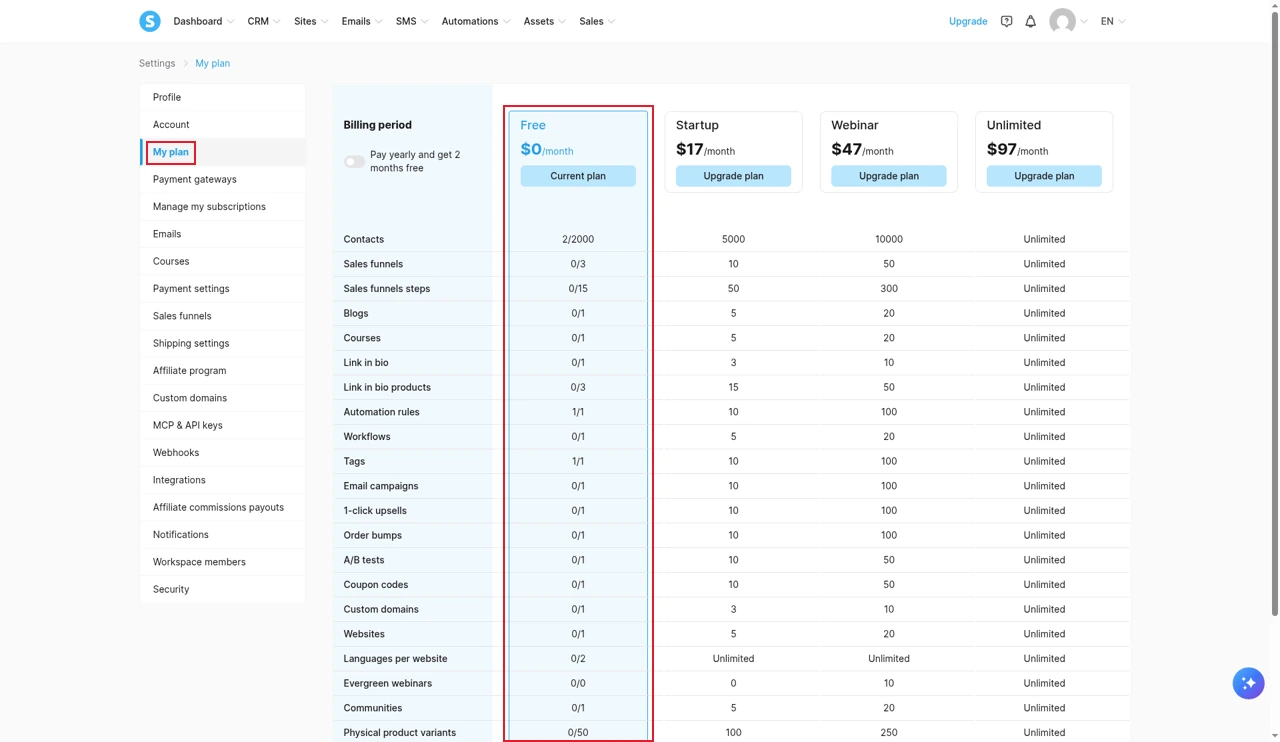
The My plan page in Settings shows how much of each limit you have used. In practice, the tightest free limits are the single tag and the single automation rule, not the contacts. One tag and one rule is enough to welcome new subscribers, but not to segment buyers from leads. That is usually the first reason people move to Startup.
Free accounts can take up to $10,000 in sales over their lifetime, not per month. A warning appears on your dashboard at $8,000. When you reach $10,000 you get an email and 3 days to upgrade, and then your payment pages stop accepting new sales. Affiliate commissions do not count toward the cap, and you are never charged automatically. Sources: Systeme.io help centre and article 5a of the terms.
The rules that change the price
The plan price is easy to compare. These rules decide what you actually pay.
Automatic upgrades on paid plans
If a paid account goes over any of its limits, Systeme.io emails you and gives you 3 days to get back under. If you don't, the subscription is upgraded to the plan that fits and billed at the new price for the rest of the period. The terms say that by continuing to use the account above its limits, you consent to the upgrade.
Contacts are the limit people cross without noticing, through a popular lead magnet or a list import. Going from 5,000 to 5,001 contacts on Startup can move you to Webinar at $47 a month. Clean inactive contacts regularly. The upgrade rule is in article 5 of the terms and in Systeme.io's help article on restrictions.
Restrictions on the free plan
Free accounts are never upgraded automatically. Instead, going over a limit starts three daily warning emails. On the fourth day the account is restricted: opt-in forms and payments stop working, no new contacts can be added, scheduled newsletters are skipped, email campaigns pause, and students lose access to your courses until you are back under the limit. If you sell courses on Free, that last point matters most.
Refunds, downgrades and PayPal
Subscriptions are not refundable, according to the terms, although Systeme.io says it is open to special circumstances and reviews refund requests case by case, according to its help article on order issues. An accidental double purchase is refunded. Downgrading goes through support, who send you a custom order form. When you upgrade by card, the time left on your current plan becomes a free trial of the new one. PayPal cannot prorate, so a PayPal upgrade charges the full new price. The double-purchase, downgrade and upgrade rules are in the subscription help article.
Inactive accounts
If you stop logging in, Systeme.io warns you at 5 months. At 6 months your customer dashboard is hidden, there is then a one-month grace period, and after that your customer data is deleted. Courses you bought as a student stay available.
Free plan forever + Paid plans from $17 a month

Test it before you pay anything. Build a funnel and a course on the free plan, then upgrade only when you hit a limit you actually need.
- Free plan
- Forever
- Paid plans
- From $17 a month
- Setup help
- Free migration on annual
Systeme.io features, tested
Funnels and checkout
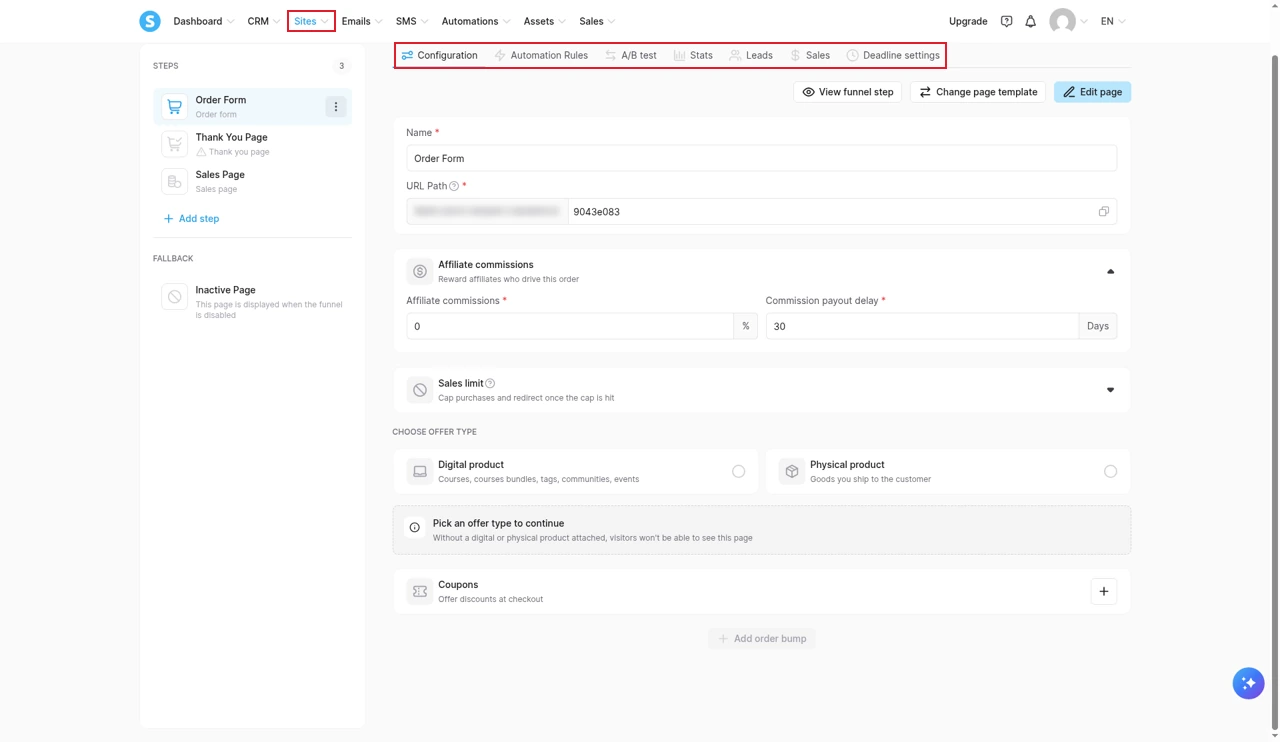
A funnel is a list of steps, such as a sales page, an order form and a thank-you page. Each step has its own settings for automation rules, A/B tests, stats, leads, sales and deadline timers. Templates get a working funnel up in minutes, and the order form step is where you attach the product, order bumps, coupons and a sales limit if you want to cap purchases.
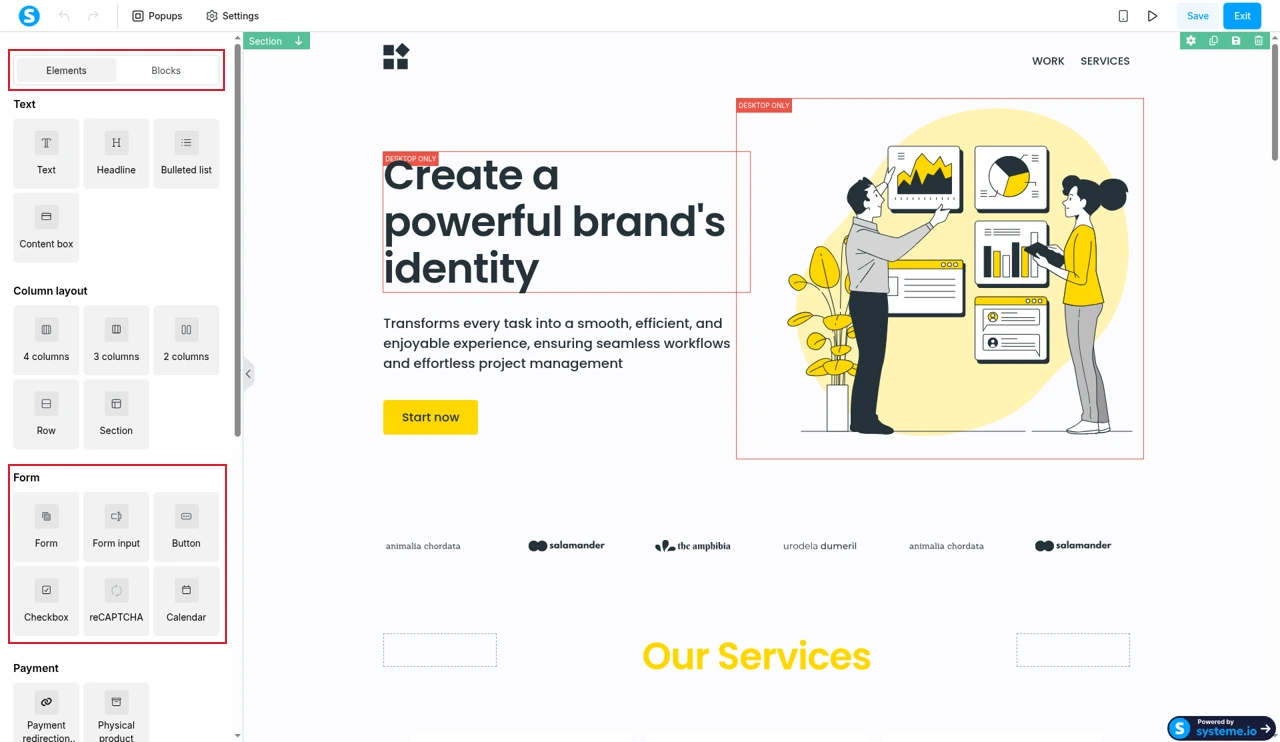
The page editor is drag and drop, with sections, rows, columns and a fixed set of elements. It is quick to learn and the templates look clean, but the design control is basic next to a dedicated page builder. That is the trade-off for how fast it is to use.
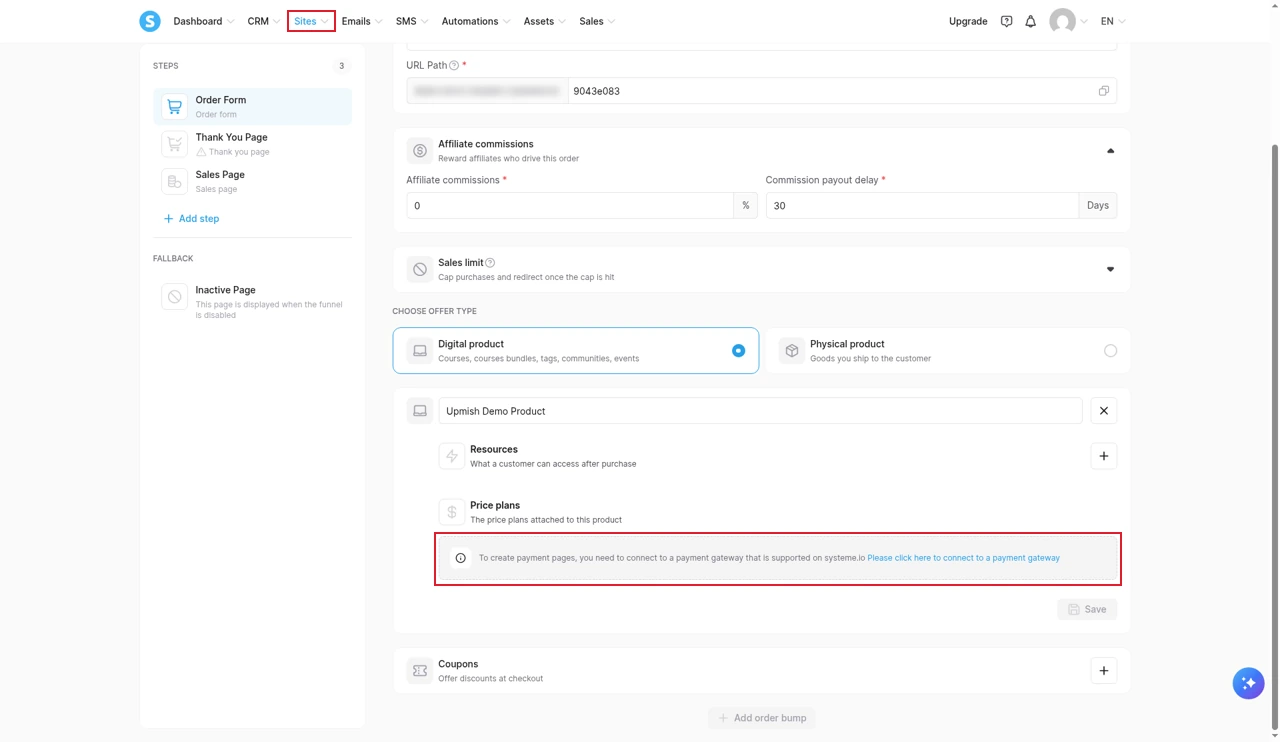
One thing to know before you plan a launch: you cannot sell until a payment gateway is connected. When I picked a digital product on the order form, the price plan section showed a notice instead of price options, telling me to connect a supported gateway first. In practice that means connecting Stripe or PayPal before anything else.
Every plan supports Stripe (including Apple Pay), PayPal, Razorpay, Flutterwave, Mercado Pago and Xendit, plus cash on delivery for physical products. One-click upsells and order bumps are included, with 1 of each on Free and 10 on Startup. A notable gap is partial refunds. Systeme.io doesn't support them for your customers, according to its refund guide, so anything other than a full refund has to be handled in your gateway.
Email marketing
Email is unlimited on every plan, which is the single biggest saving against separate email tools that charge by list size. You get newsletters for one-off broadcasts, campaigns for automated sequences, and tag-based sending. The editor is drag and drop, with a classic option.
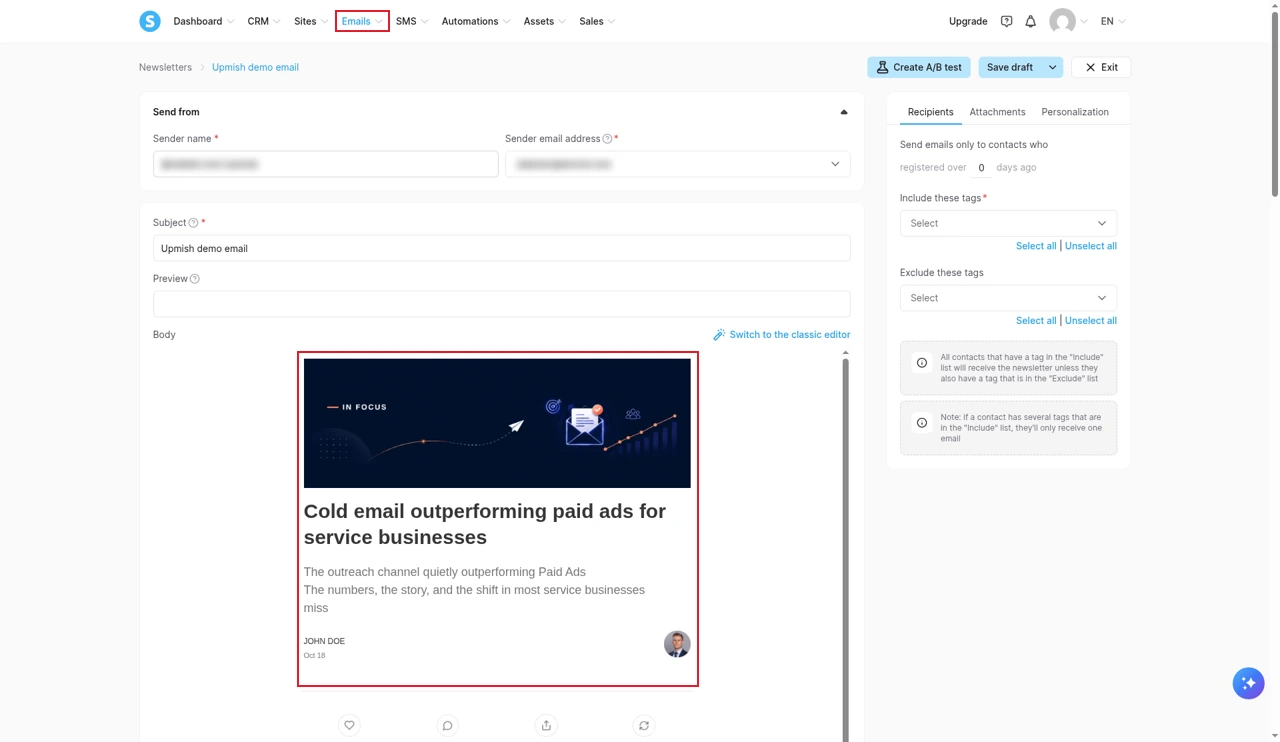
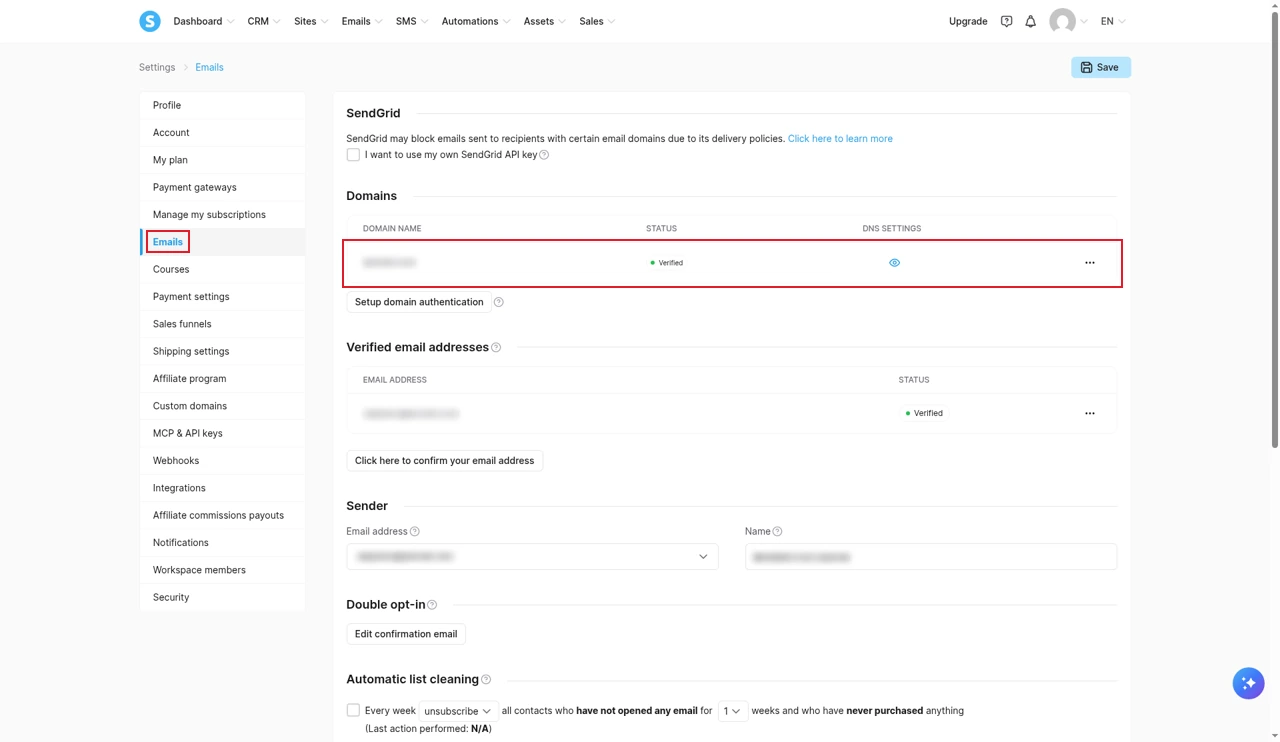
Before you can send anything, you have to authenticate your own domain. That means adding three CNAME records and a DMARC record at your domain host. Gmail, Yahoo and Proton addresses are not allowed as senders, and Systeme.io says the domain should have a live website. A domain can only be authenticated in one account or sub-account. The steps are in the domain authentication guide. It is worth doing carefully, because deliverability is a recurring complaint in user reviews.
Courses and communities
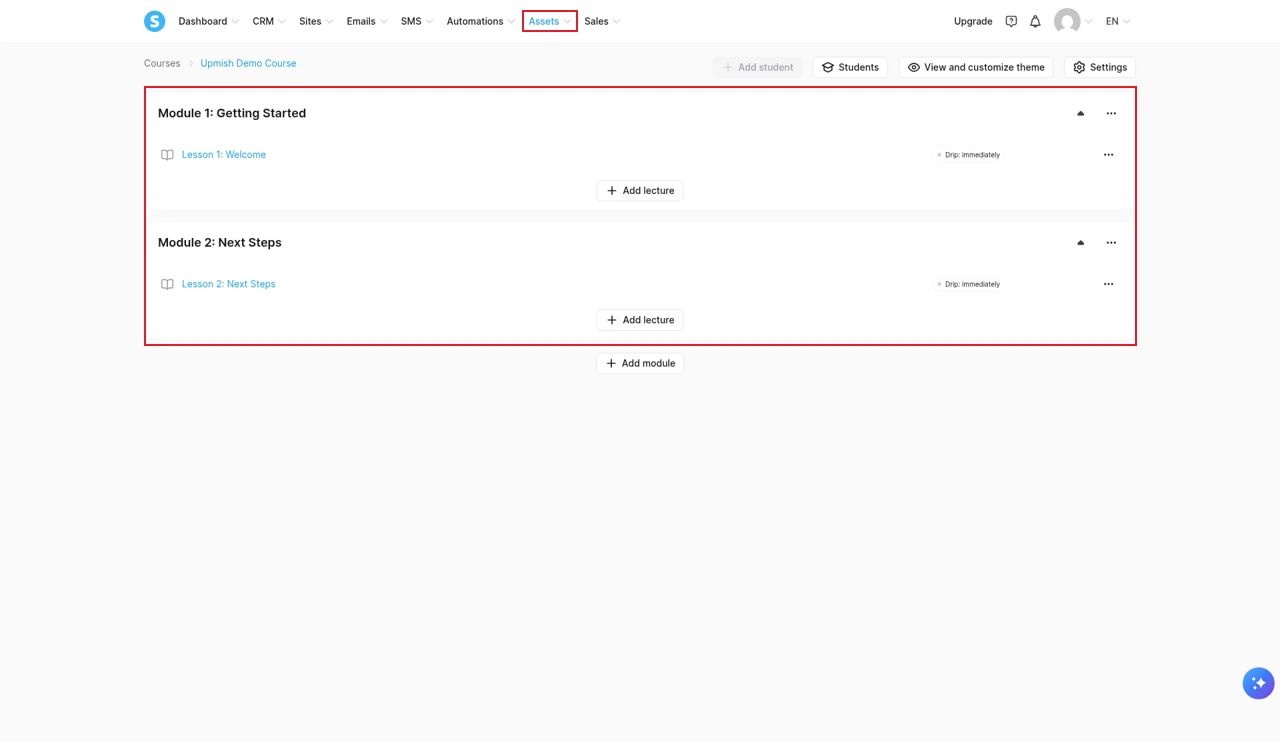
Courses are organised into modules and lectures, and each lecture can be released immediately or on a drip schedule. The free plan allows one course with up to 500 students. Starting at Startup, the number of students has no limit.
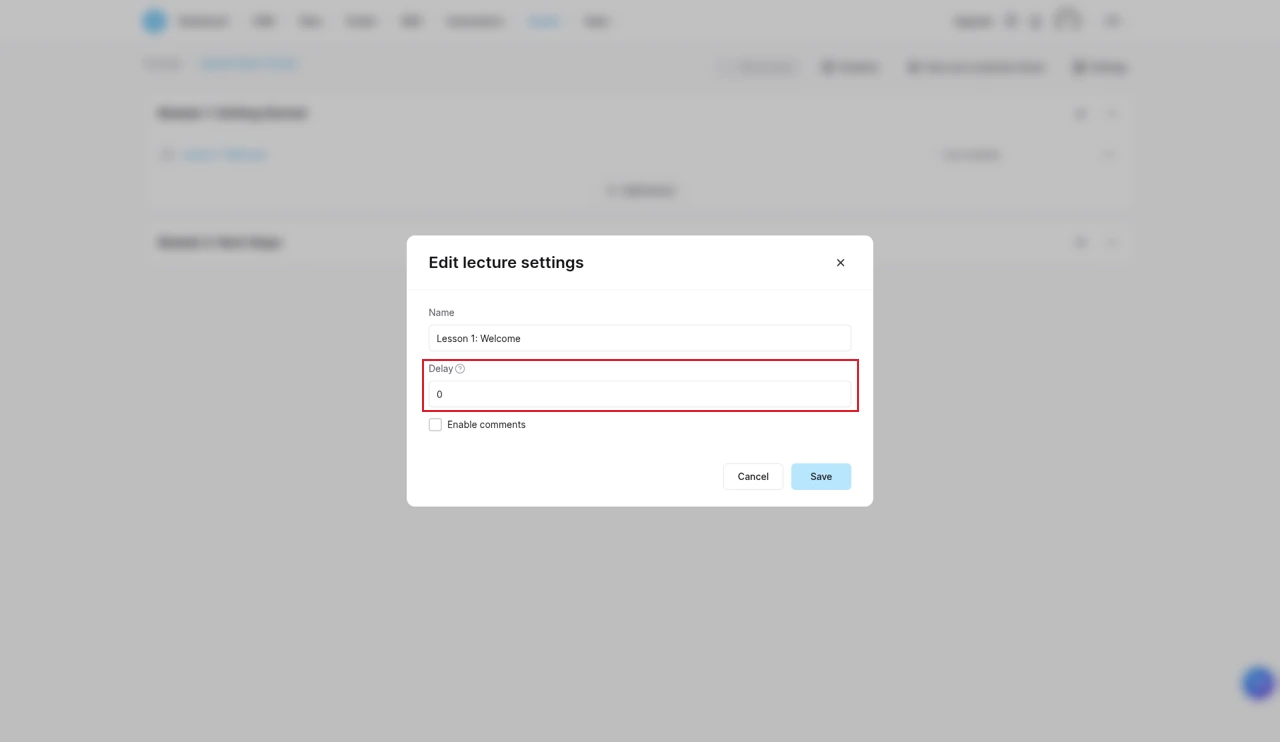
Drip timing is set per lecture with a Delay field. The course access help article confirms the delay is counted in days, and courses can also be set to full access, partial access or partial access with drip, which lets you sell several tiers from one course.
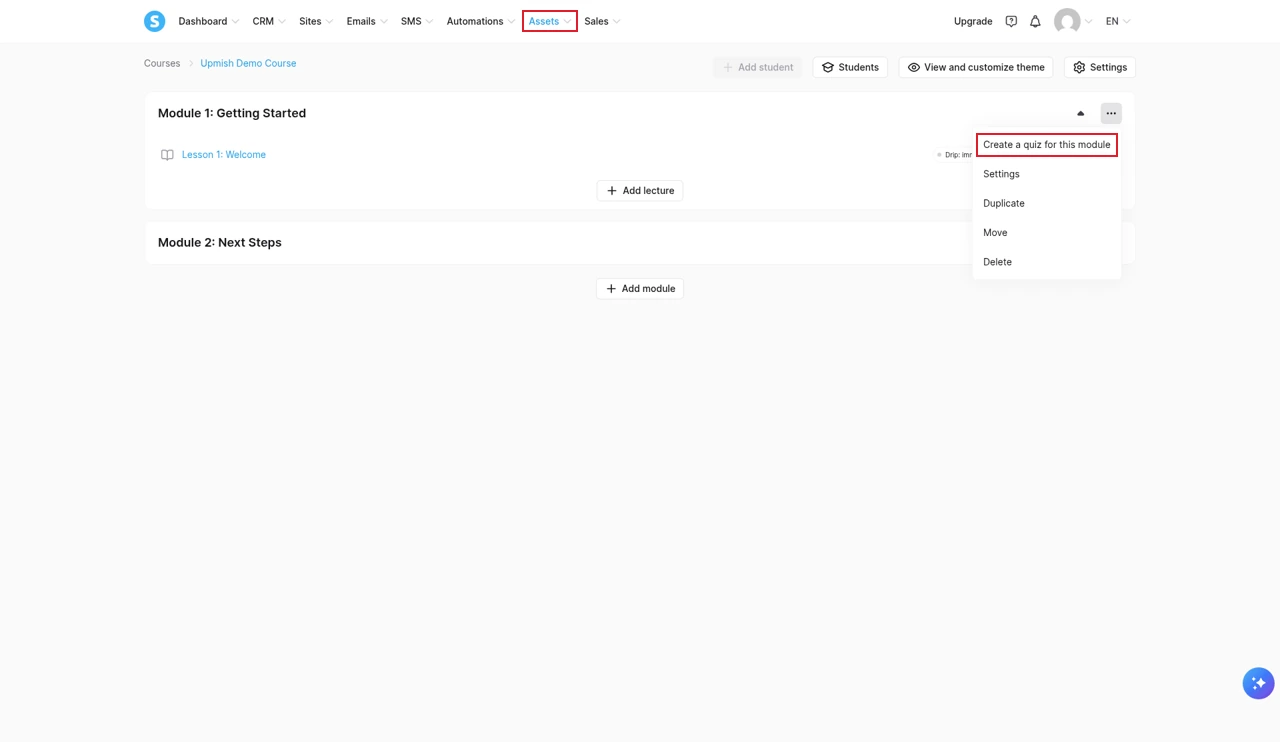
Quizzes exist, despite what some reviews say. They are added per module from the module's menu, and a quiz only opens once the student has completed every lesson in that module, according to Systeme.io's quiz guide. You have to deactivate a quiz to edit it.
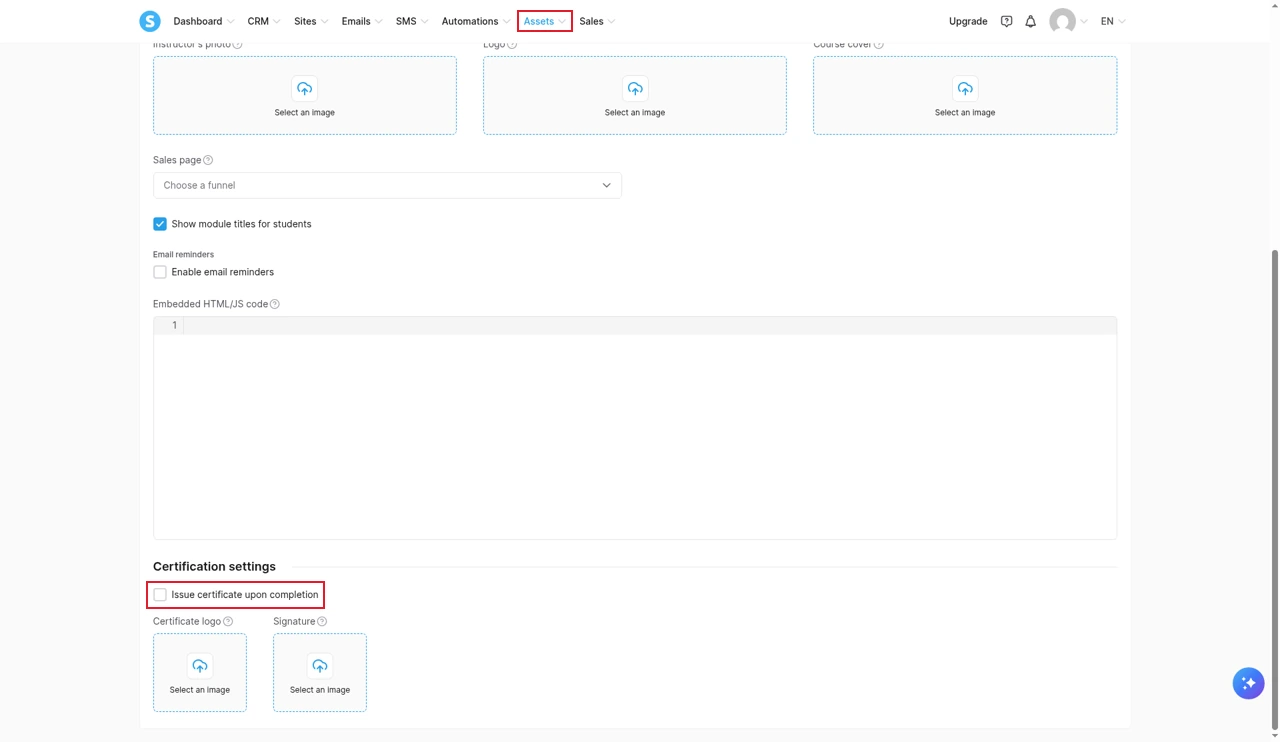
Completion certificates are a checkbox in the course settings. You can add your logo and a signature, but the rest of the certificate design is fixed, and students must mark every lecture complete before they can download it, per the certificate guide.
Communities sit alongside courses, with 1 on Free and 5 on Startup, and unlimited members. They cover the basics of a member space without a separate subscription.
Automation rules and workflows
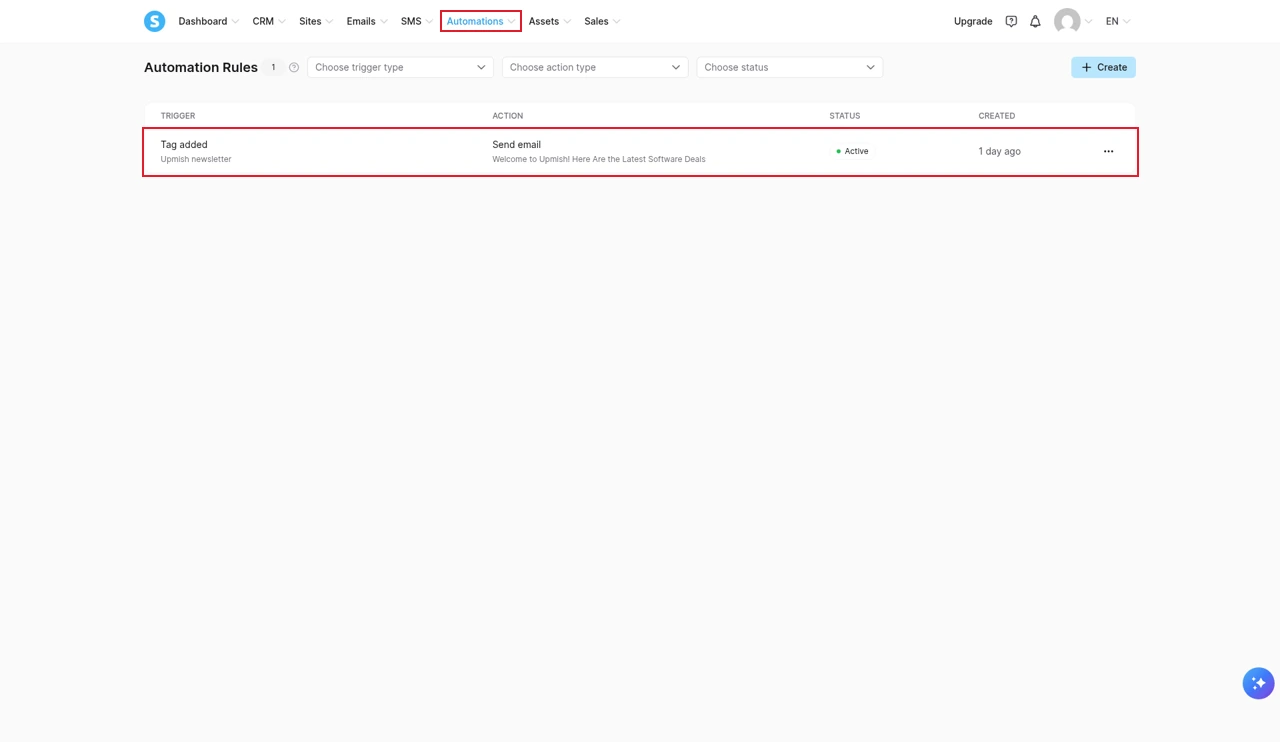
Automation rules are simple "when this, do that" pairs. Mine sends a welcome email whenever the newsletter tag is added to a contact. Workflows handle longer, branching sequences. Both count against plan limits, and the free plan's single rule is the limit you will feel first.
CRM, booking, websites and blogs
There are simple CRM pipelines on every plan (1 on Free, 5 on Startup), booking calendars with unlimited bookings, websites with a blog, and link-in-bio pages. They are useful for keeping leads organised and booking calls, but this is not a full sales CRM. Calling and a shared conversations inbox are not part of the platform.
Affiliate program
You can run your own affiliate program on every plan, with affiliates promoting your products and commissions tracked inside the platform. Systeme.io also runs its own partner program, paying 60% lifetime commission on referred plans according to its affiliate help page. I'm a Systeme.io partner, which is why the buttons on this page are partner links.
Sub-accounts and white label
Every plan includes unlimited sub-accounts, each with the same limits as your plan. That makes it cheap to keep separate brands or simple client projects apart. White label lets you resell Systeme.io under your own brand, with two rules worth knowing: you cannot sell below Systeme.io's own prices, and once white label is activated it cannot be deactivated, and the domain you use is dedicated to it. Both are in the white label guide.
SMS through Twilio
SMS works only through your own Twilio account, which you connect in settings. Messages are sent from automation rules and workflows using templates. You pay Twilio directly. The setup is explained in the SMS guide. It suits reminders and follow-ups, and Systeme.io's own SMS page says a dedicated SMS tool may be more appropriate if you need two-way conversations. Calling is not part of the platform.
AI: the MCP server
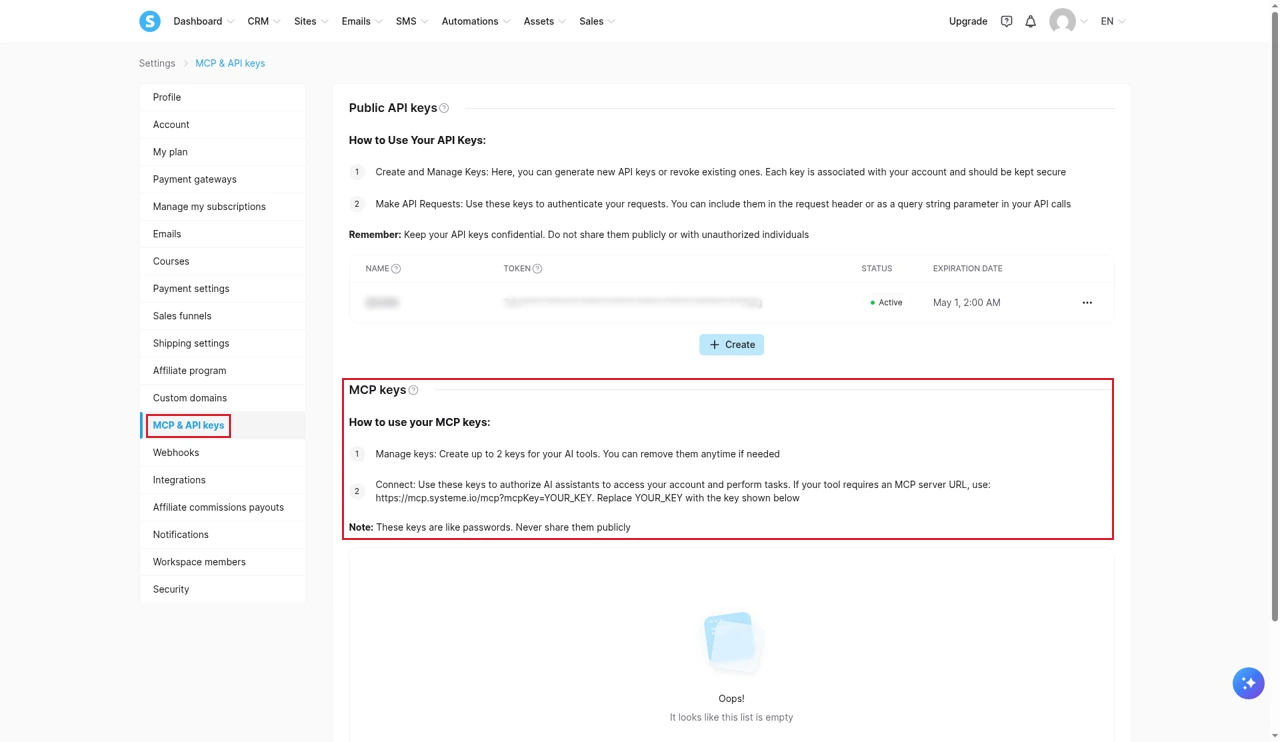
Systeme.io has an MCP server on every plan, which lets AI assistants such as ChatGPT and Claude work with your account. You create a key in Settings (up to two at a time, each valid for up to 90 days), set what each tool may do in your AI app, and sensitive actions need your confirmation, according to Systeme.io's MCP guide and its MCP page. I checked the key settings in my own account, but I haven't connected an assistant yet, so I can't judge how well it works day to day.
Ease of use
This is where Systeme.io beats most all-in-ones. The menus are short, the same task is rarely in two places, and a beginner can realistically have an opt-in page, a welcome email and a first course outline live in an afternoon. The one step that needs patience is the DNS setup for your sending domain.
The downsides come later. The page and blog editors are basic, the templates look alike, and users regularly mention small editor bugs. If your brand depends on distinctive design, you will feel the limits.
Support and reliability (is Systeme.io legit?)
Support is by email only, seven days a week. Systeme.io gives its average response time as about two hours and says plainly that it has no live chat. There is no phone line either. If you want hands-on help, a two-hour technical session costs $57, according to its support page.
On reputation, the numbers look excellent. Systeme.io holds 4.9 out of 5 on Trustpilot from more than 8,600 reviews, and the company replies to almost all of the negative ones. Many praise fast, friendly support and done-for-you migrations.
The low-star reviews are worth reading anyway, because the same themes keep coming back. A tally of complaints by Plainly Reviewed found refunds and billing at the top, followed by bugs, account suspensions, email deliverability, a clunky interface and migrations that ran late. On Trustpilot I also saw reports of forms failing without warning and of serious funnel bugs staying open for weeks. The terms give the two main grounds for blocking an account: a fair use policy, and a list of banned product categories.
So is Systeme.io legit? Yes. It is an established company with a working product and a large, mostly happy user base. Just export your contacts regularly, test your forms after any change, and keep your own sales records.
Systeme.io pros and cons
Strengths
- A free plan that never expires and needs no card
- 0% transaction fees on every plan
- Unlimited email sends on every plan
- Funnels, email, courses and communities on one contact list
- Courses with drip, quizzes and certificates
- Your own affiliate program and unlimited sub-accounts on every plan
- Quick to learn, even for complete beginners
Weaknesses
- $10,000 lifetime sales cap on the free plan
- Paid plans upgrade automatically if you stay over a limit
- Subscriptions are not refundable by default
- Email-only support with no live chat or phone
- Basic page design and generic templates
- SMS needs your own Twilio account, with no calling
- No partial refunds for your customers
Systeme.io alternatives
| If you are | Consider | Why |
|---|---|---|
| An agency or a service business | GoHighLevel | Full CRM, two-way texting, calling and client sub-accounts |
| A creator who wants a polished course platform | Kajabi | Course-first, with a more refined student experience |
| Funnel-first and running paid traffic | ClickFunnels | A more focused funnel builder |
| Looking for deeper tagging and a helpdesk | Kartra | A connected all-in-one with more depth and a higher price |
| Building a paid community first | Mighty Networks | Community features come first, courses second |
GoHighLevel is the step up when your business runs on conversations rather than email. It adds two-way texting, calling, a full pipeline CRM and sub-accounts you can sell to clients, starting at $97 a month plus usage. Our Systeme.io vs GoHighLevel comparison prices both for a solo creator and a five-client agency, the GoHighLevel review covers the learning curve, and the GoHighLevel pricing guide lists every usage fee. You can try GoHighLevel free for 30 days through our partner link.
Kartra is a deeper all-in-one with stronger tagging, a helpdesk and video hosting, but it costs more and takes longer to learn. Our Kartra review has the full breakdown.
Kajabi, ClickFunnels and Mighty Networks each do one job more thoroughly. Start from our Kajabi, ClickFunnels and Mighty Networks pages for the current offers and guides.
Is Systeme.io worth it?
For a solo creator selling courses, coaching or digital products, yes, and it is hard to argue otherwise on price. You can build and sell on the free plan, and Startup at $17 a month covers most small businesses with 5,000 contacts, 10 funnels and 5 courses.
Go in with the rules in mind. Plan to leave the free plan before $10,000 in sales, keep an eye on your limits once you pay, and don't buy an annual plan you aren't sure about, because refunds are not the default. Set up your sending domain properly on day one.
For agencies, service businesses and anyone who sells over the phone or by text, no. The missing calling, two-way SMS and sales CRM are not small gaps for that kind of business, and GoHighLevel is the better fit.
Partner offerFree plan forever+ Paid plans from $17 a month
- No credit card needed
- 2 months free on annual plans
- Free migration on annual plans
Common questions
Is Systeme.io really free?
Yes. The free plan never expires and needs no credit card. It includes 2,000 contacts, 3 sales funnels, 1 course with up to 500 students, 1 automation rule and unlimited email sends. The main catch is a $10,000 lifetime sales cap, after which you have to upgrade to keep selling.
Is Systeme.io legit and safe?
Yes. It is run by ITACWT Limited, a company registered in Ireland, and it holds a 4.9 rating on Trustpilot from more than 8,600 reviews. The recurring complaints are about refunds, bugs that take a while to fix, account suspensions and slow migrations, so keep your own backups and read the refund terms before paying.
Does Systeme.io charge transaction fees?
No. Systeme.io takes 0% of your sales on every plan, including the free one. Stripe, PayPal or whichever gateway you connect still charges its own processing fees.
What happens if I go over my plan limits?
On a paid plan you get an email and 3 days to get back under the limit. After that Systeme.io upgrades you to the next plan and bills it for the rest of the period. On the free plan the account is restricted instead: forms and payments stop, new contacts are blocked and students lose course access until you fix it.
Can I get a refund on a Systeme.io plan?
Not by default. The terms say subscriptions are not refundable, and support looks at special cases individually. An accidental double purchase is refunded. Start on the free plan and only upgrade when you hit a limit you actually need.
Is Systeme.io good for email marketing?
For a solo business, yes. Every plan includes unlimited email sends, newsletters and sequences. You must authenticate your own domain before sending, and you cannot send from a Gmail, Yahoo or Proton address. Deliverability is a recurring complaint in user reviews, so set up the domain properly.
Can I sell courses with quizzes and certificates?
Yes. Courses support a quiz at the end of each module, completion certificates with your logo and signature, drip content set in days per lecture, and partial access. The free plan allows one course with up to 500 students.
Does Systeme.io have live chat support?
No. Support is by email only, seven days a week, and Systeme.io gives its average response time as about two hours. There is no phone line. A paid two-hour technical session costs $57.
Does Systeme.io have a CRM and SMS?
It has simple CRM pipelines and booking calendars on every plan. SMS works only through your own Twilio account and is sent from automations, and Systeme.io itself suggests a dedicated SMS tool if you need two-way conversations. Calling is not part of the platform.
Should I choose Systeme.io or GoHighLevel?
Choose Systeme.io if you are a solo creator selling courses or digital products and email is your main channel. Choose GoHighLevel if you run an agency or a service business that needs two-way texting, calling and a full sales CRM.
The verdict
Systeme.io earns 8.2 out of 10 from me. For a solo creator who sells courses or digital products and follows up by email, it sits closer to nine, because nothing else gives you this much for free or this cheaply once you pay. For an agency or a business that lives on calls and texts, it sits closer to six.
The free plan is the right way to judge it. Build one real funnel, one email sequence and one course, and you will know within a week whether it fits the way you sell.
Prices, plan limits and rules are set by Systeme.io and change from time to time. The figures here are checked against Systeme.io's latest pricing page, help centre and terms. Check the current terms on their site before you sign up.
Some links on this page are partner links. How that works is explained on our affiliate disclosure page.

