To cancel GoHighLevel you need the agency account, not a sub account. The path is Settings, then Billing, then Subscriptions, then a modify link. Three retention screens sit between you and the confirmation, and the final one warns that access is removed immediately, so export first.
Short version
- Cancelling only exists in the agency view. There is no cancel button in a sub account.
- Export contacts and opportunities before you open Billing, not after.
- Expect three retention offers before the real confirmation screen.
- The final warning says access goes immediately, not at the end of the period.
- Downgrading keeps everything you built. Cancelling does not.
The short answer
Switch to the agency account. Open Settings, then Billing, then the Subscriptions tab. Click the modify or cancel link, click Show more, then Cancel Plan. Pick a reason, decline three offers, then confirm.
That is how to cancel GoHighLevel in one paragraph. The flow takes about five minutes, most of it spent saying no. The part worth knowing in advance is the ending, because the final screen states that your account is deactivated with immediate loss of access to Contacts, Conversations, Calendars, Automations, Funnels and Users. That is not the usual "keep it until your period ends" that most software gives you.
Export before you start
Twenty minutes here saves a lot of regret. Some of this exports cleanly and some of it does not export at all.
- Contacts and opportunities. Both export to CSV. Do these first, they are the most valuable things in the account.
- Funnels, websites and workflows. None of these transfer anywhere. Screenshot the layouts and the workflow structure if you want to rebuild them later.
- Conversations. Message history does not export neatly. Copy out anything specific that matters.
- Phone numbers. Start a port out to another provider before cancelling. Afterwards it becomes difficult.
- Invoices. Download whatever your accountant will want, since getting it later means going through support.
Also work out who owns the account. If you signed up and pay GoHighLevel directly, you can cancel. If an agency set you up and bills you, they own it and the option will not appear for you at all.
Free 30 day trial + 2 months free on annual

Cancelling because the trial ran out? The standard trial is 14 days. A 30 day version exists on the same features, which is usually enough to reach a real decision.
- Free trial
- 30 days
- Annual saving
- 2 months free
- In the trial
- Full access to your plan
Cancel a paid agency plan
Make sure you are on the agency account before you start. Inside a sub account, none of this appears.
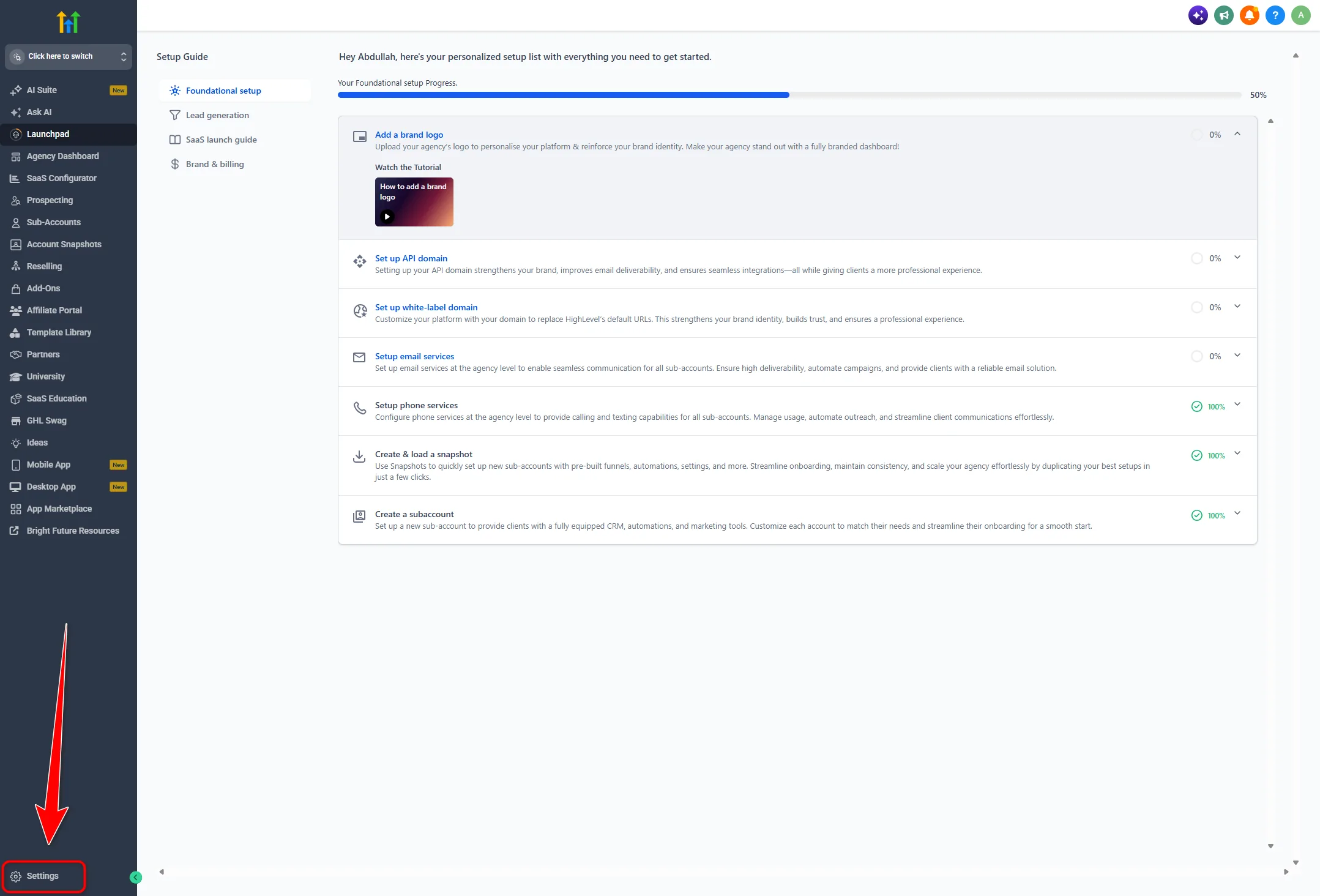
- To cancel your GoHighLevel subscription, start from the left side navigation. Click Settings, then click Billing. This opens agency billing, where your HighLevel plan is managed.
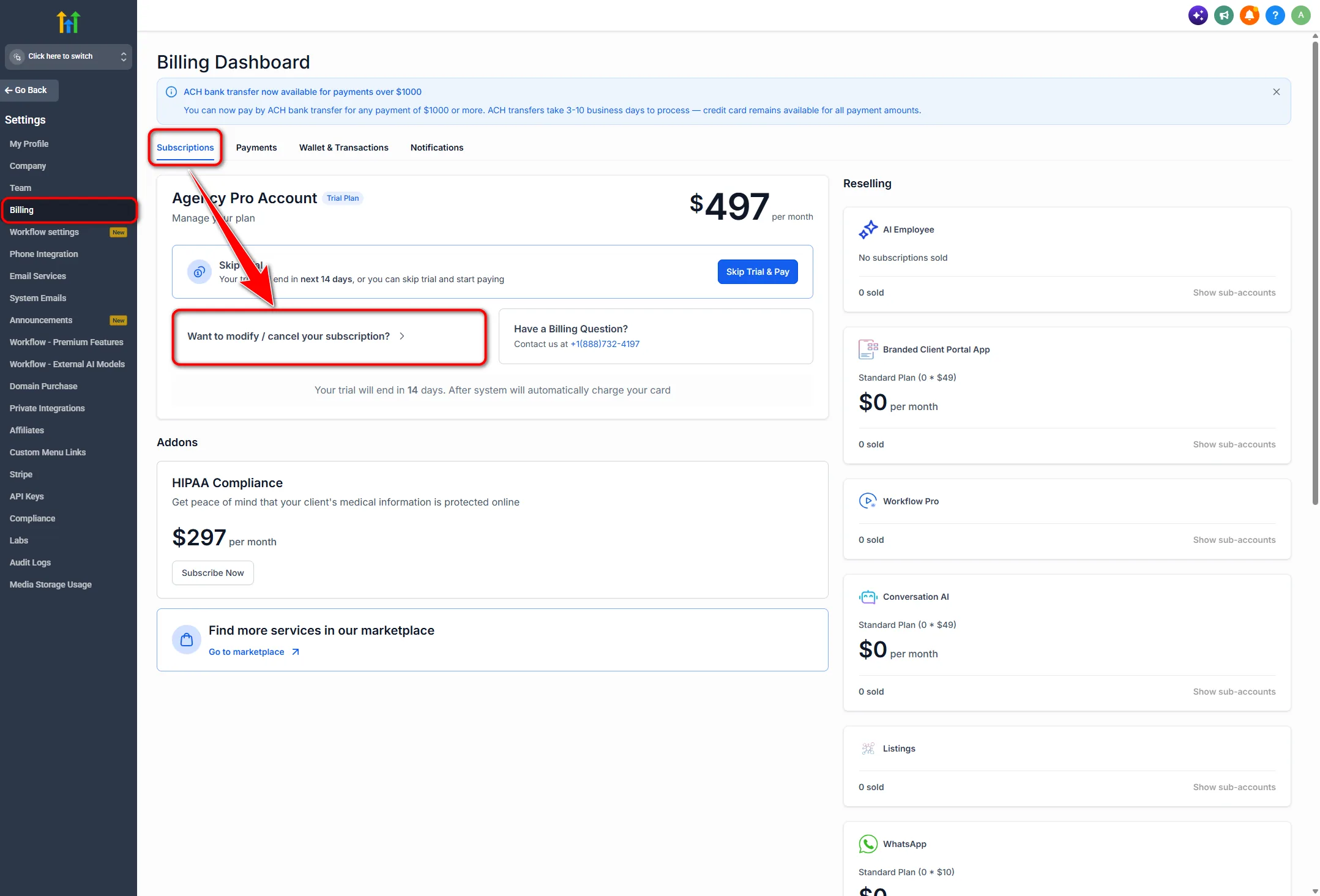
- Click the Subscriptions tab to see the active agency plan. Check the plan details before you continue, since you may see something like Agency Pro Account or Trial Plan and a price such as $497 per month.
- Click Want to modify / cancel your subscription? A modal appears titled Modify subscription followed by your agency name.
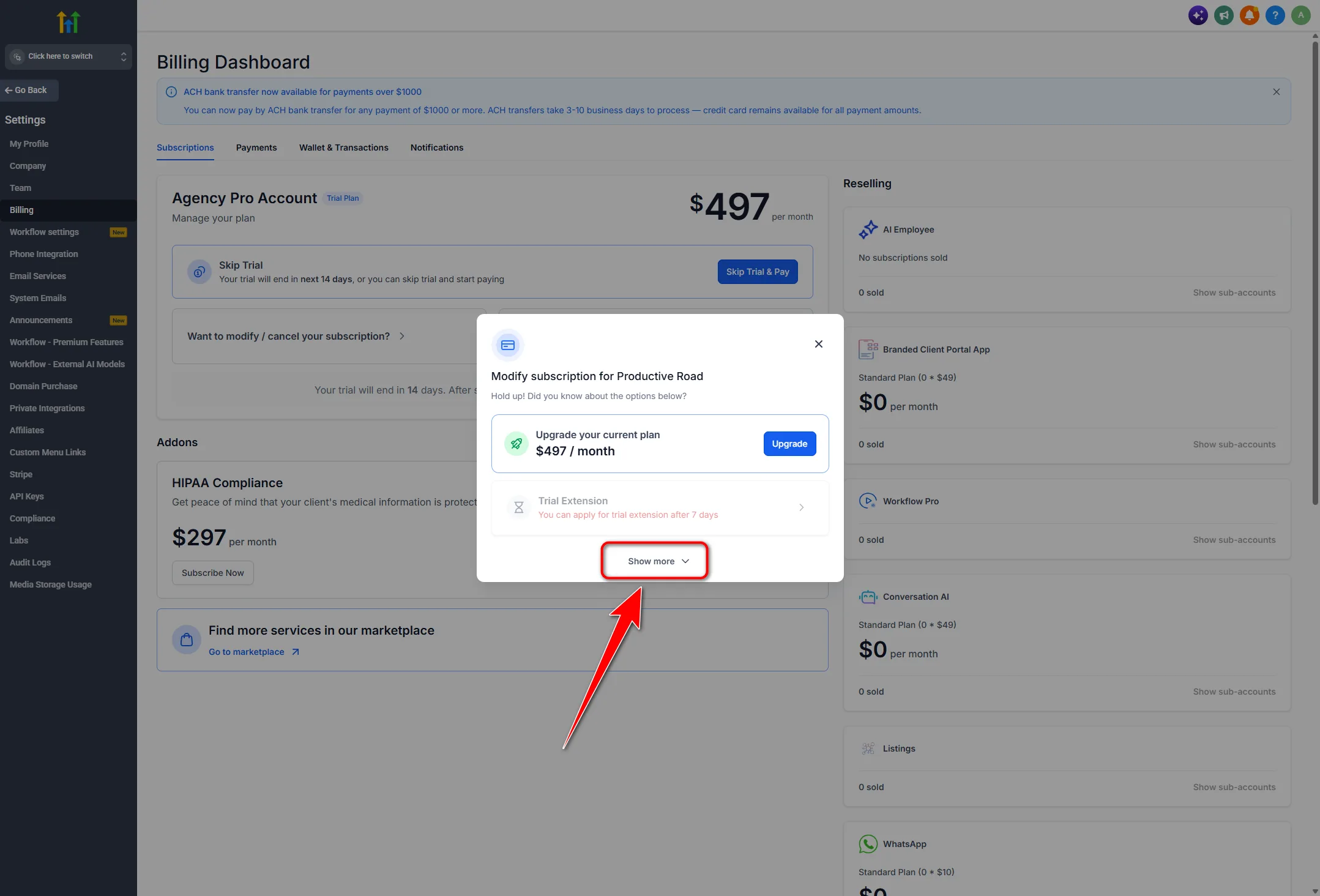
- Click Show more so every option is visible. Some stay hidden until you do, which is why people assume cancelling is not offered.
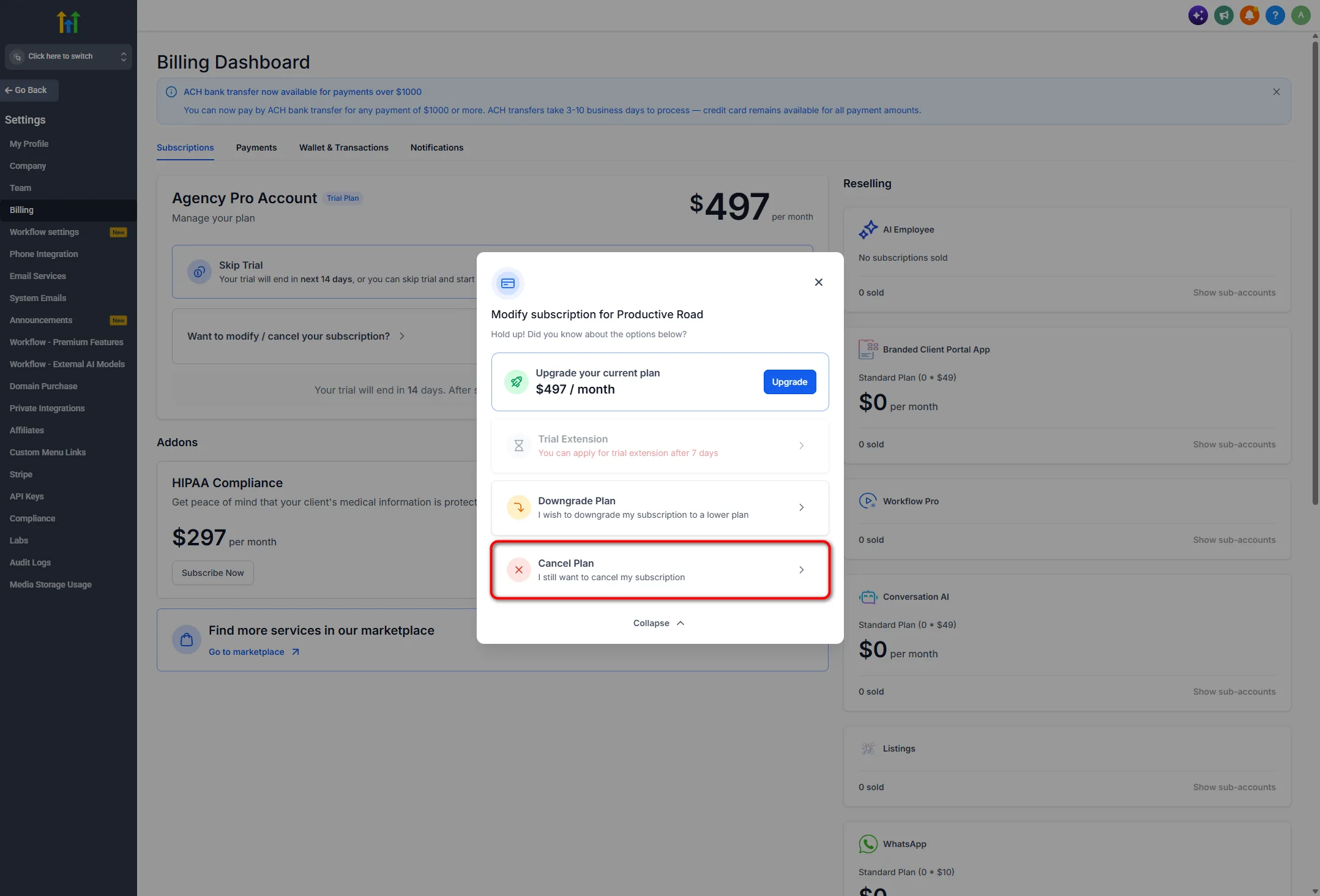
- Review the options, which include Upgrade your current plan, Trial Extension, Downgrade Plan and Cancel Plan. Stop here if you are still deciding, because a downgrade or an extension may solve the problem.
- Click Cancel Plan, or I still want to cancel my subscription, to start the flow. Nothing is cancelled yet, this only opens the questions.
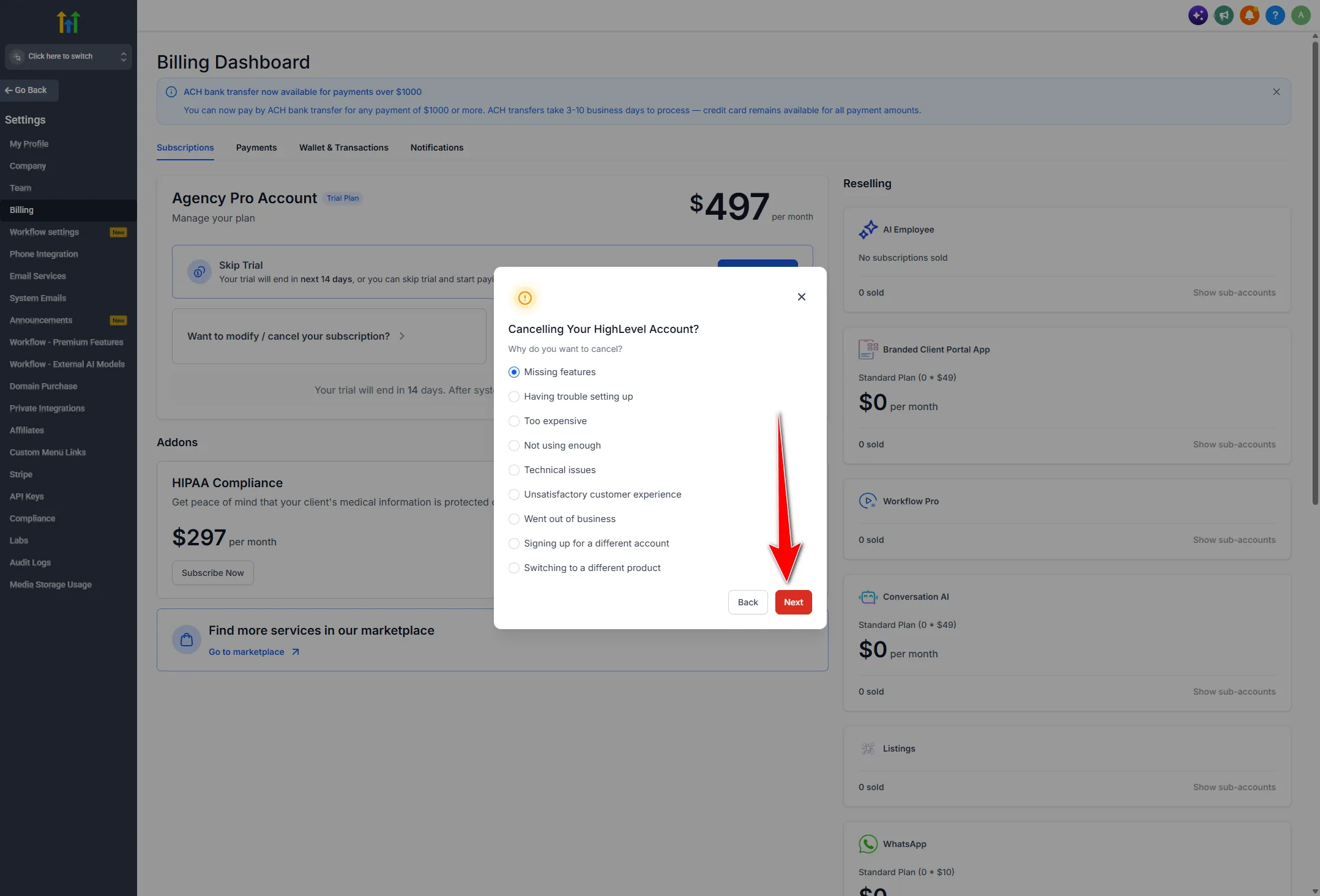
- A modal appears headed Cancelling Your HighLevel Account? Under Why do you want to cancel? select your reason. Options include Missing features, Having trouble setting up, Too expensive, Not using enough, Technical issues, Unsatisfactory customer experience, Went out of business, Signing up for a different account, and Switching to a different product.
- Click Next. Your reason decides which retention screen appears.
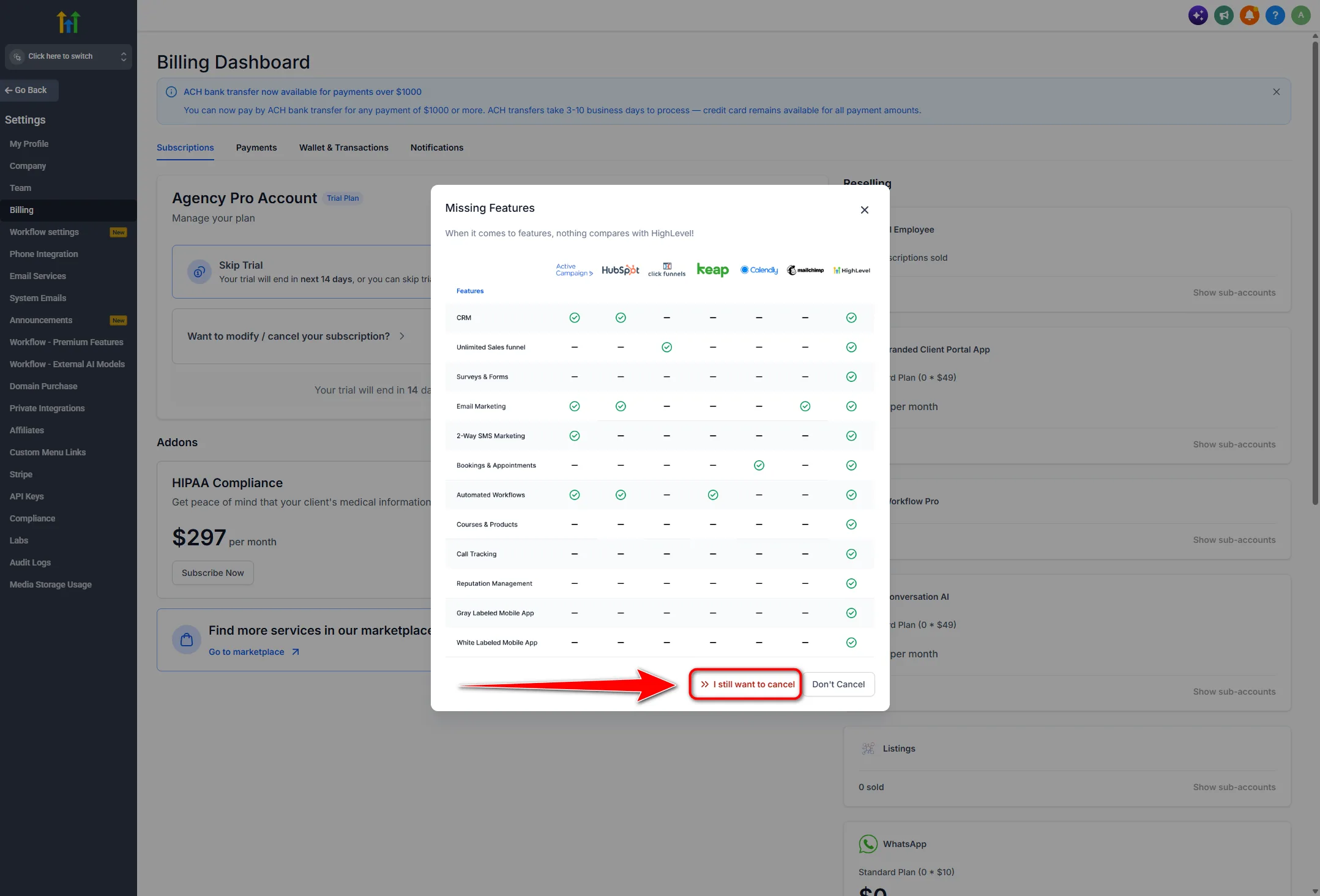
- Read the offer shown. If you chose missing features, for example, a Missing Features screen appears. Click I still want to cancel to continue, or Don't Cancel to keep the subscription.
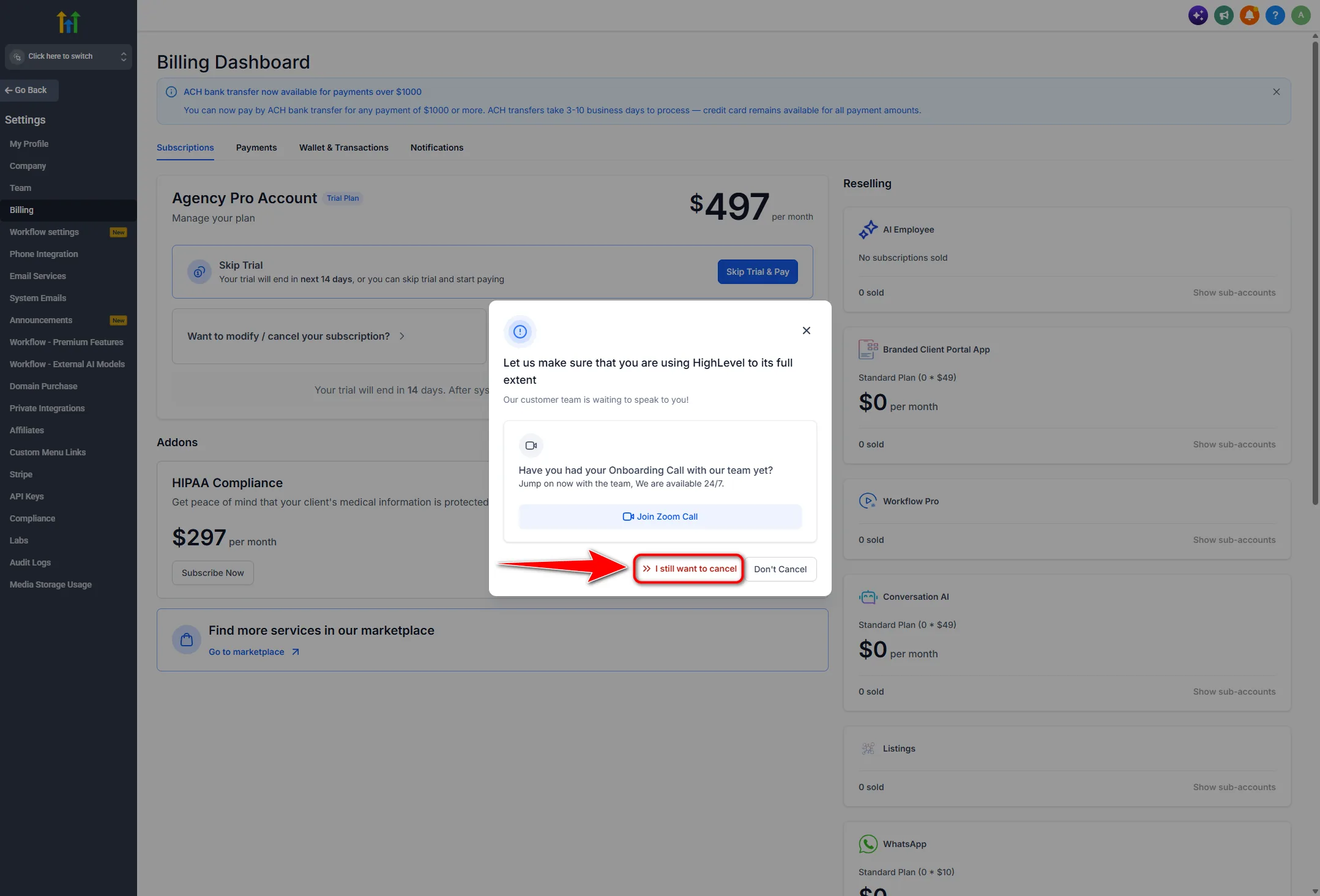
- A second screen may appear about using HighLevel to its full extent, with an onboarding offer and Join Zoom Call. Click I still want to cancel again, or take the call if help is what you actually need.
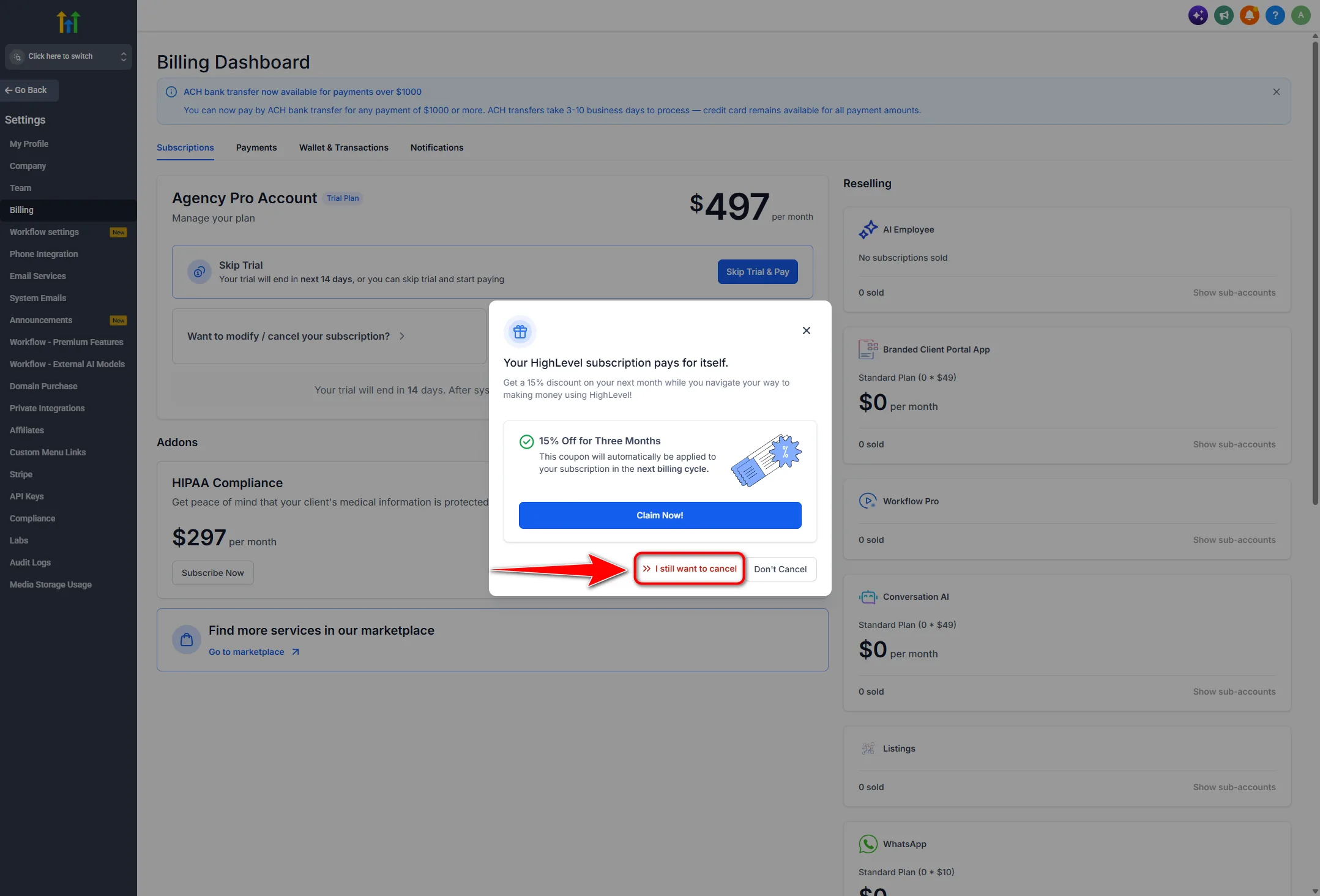
- A third screen may appear with a discount, such as fifteen percent off for three months and a Claim Now! button. Click I still want to cancel only if the offer does not change your mind.
- The final confirmation appears, warning that your account will be deactivated with immediate loss of access to Contacts, Conversations, Calendars, Automations, Funnels and Users. Read it properly.
- Click Take me back to my account to stop, or I am sure I want to cancel to finish. That last click is irreversible.
Three screens will try to keep you. None of them is the confirmation. The one that matters is the fourth, and it is the one carrying the warning.
Click Back to return. Nothing changes on your plan unless you complete that flow.
Cancel a trial
Same path exactly. Agency view, Settings, Billing, Subscriptions, then the modify link. Your plan shows as a trial rather than a paid tier.
The difference is timing. Cancel before the trial end date and nothing is charged. A day late and the first payment goes through, at which point you are cancelling a paid plan instead.
Set a reminder two days before the end rather than on the day, which gives you time to export if you decide to leave. If the reason you are cancelling is simply that two weeks was not long enough to judge it, the 30 day trial runs on the same features and is worth knowing about before you close the account.
If an agency manages your account
You cannot cancel from a sub account. The billing screen only exists at agency level, and as a client you do not have that access.
If your settings show no Billing section, or one with no subscription in it, that is your answer. Contact whoever set up the account and ask them to cancel or downgrade it, and ask for your data export at the same time.
Get the cancellation confirmed in writing, then check your own bank statement. If the agency bills you through their own system, cancelling on the GoHighLevel side does not stop that charge.
What happens to your data
The final screen is explicit. The account is deactivated and access to Contacts, Conversations, Calendars, Automations, Funnels and Users goes immediately. Immediate is the word to notice, since most software lets you finish the period you paid for.
Whether data is deleted or simply locked, and how long anything is held, is a question for GoHighLevel support rather than something to assume from a blog, including this one. If there is any chance you will come back, ask them before you cancel.
Cancelling and deleting are also not the same thing, which is where the searches for how to delete a GoHighLevel account come from. Cancelling ends the subscription and removes your access. Permanent removal of the account and its data is a separate request to support, worth making explicitly if that matters to you.
Downgrade or restart instead
Two situations where cancelling is the wrong move.
You are leaving over price. The lower tier keeps everything you built and costs considerably less. If you have stopped taking clients but still run your own business through the account, that is usually the better answer. You can compare GoHighLevel plans and prices to see what each tier includes and where the real cost sits. If the bill is the problem but the platform still works, also weigh GoHighLevel annual vs monthly before you tear the account down.
You never properly set it up. A lot of cancellations come from accounts that were opened, poked at for a week, and abandoned. If that describes yours, the platform was never really tested. Our beginner setup guide walks through a first week in the right order, and it takes a few hours rather than a month.
Partner offerFree 30 day trial+ 2 months free on annual
- 30 days instead of the public 14
- Full access to the plan you choose
- Cancel any time before it ends
Common blocks
No cancel button. Almost always because you are in a sub account. Check which level you are on. If you are at agency level and still cannot see it, click Show more inside the modify modal.
Billed by a reseller. If an agency sells the platform under their own brand, your subscription is with them and cancellation goes through them.
Password or written feedback required. Both are normal parts of the confirmation. If the feedback box has a minimum length, write a real sentence rather than filler.
You finished and nothing happened. Check your email for a confirmation and reload the Subscriptions tab. If the plan still shows active, the flow did not complete and you will need to run it again.
Common questions
How do I cancel my GoHighLevel subscription?
From the agency account, go to Settings, then Billing, then the Subscriptions tab. Click the modify or cancel link, click Show more, then Cancel Plan. Pick a reason, click through the three retention screens, and confirm on the final warning.
Can I cancel from a sub account?
No. Cancelling only exists at agency level. If an agency set up your account, you have to go through them.
Do I get a refund?
Refunds are not part of the cancellation flow. Contact GoHighLevel support directly if you have been charged for a period you will not use.
What happens to my phone numbers?
Start a port out to another provider before you cancel. Once the account closes, moving a number becomes difficult.
Should I downgrade instead?
If cost is the reason and you still use the platform, yes. Downgrading keeps everything you built.
Can I reactivate later?
Ask support before cancelling rather than assuming. Whether an account can be restored, and for how long, is their answer to give.
Is cancelling the same as deleting my account?
No. Cancelling ends the subscription and removes access. Permanent deletion is a separate request to support.
The verdict
Cancelling GoHighLevel is not hard, it is buried. Agency view, Settings, Billing, Subscriptions, modify link, Show more, then three retention screens before the confirmation that actually counts.
Take the warning at the end seriously. Access goes immediately, so export your contacts and opportunities before you open Billing rather than when you are four clicks in.
And if you are leaving over price or because you never really set it up, those are both fixable without losing the account.
Billing screens, cancellation flows and retention practices are set by GoHighLevel and change from time to time. The steps here were accurate at the time of writing. Confirm anything about refunds, data retention or reactivation with their support.
Some links on this page are partner links. How that works is explained on our affiliate disclosure page.