Kajabi is shutting down Creator Studio on 9 November 2026. Your video clips are already safe in Media Library, but your written content, transcripts and subtitle files are not. Those are deleted for good on that date unless you run an export first. It takes two minutes.
Do this now
- Go to More, then Creator Studio, and look for the retirement banner.
- Click Export my projects. Kajabi emails a ZIP to the account owner.
- Clips are not in the ZIP. They are in Media Library already, tagged Creator Studio.
- Anything you do not export is permanently deleted and cannot be recovered.
- Creator Studio shuts down on 9 November 2026. Do not leave the export until the last week.
The Kajabi Creator Studio sunset is why the feature has changed or vanished for you. If you have been looking for it and cannot find it, or you saw a banner saying it is being retired, nothing is broken on your account. Kajabi is retiring the feature. This page covers what you keep, what you lose, how to save your work, and what handles each job now.
Why Creator Studio is missing from your account
If Creator Studio has vanished from your menu, or you can see it but cannot start a new project, that is the sunset rather than a fault with your account. Plenty of people are hitting this at once.
Two separate things are happening. The add-on is closed to new purchase, so accounts without a paid Creator Studio add-on can no longer create projects at all. And the feature itself is being retired, which is why access is changing account by account rather than for everybody on the same day.
Either way, the action is the same. Get your content out before it goes.
What is safe and what is not
This is the part to understand first, because it decides how urgently you need to act.
| What you made | Status | What you do |
|---|---|---|
| Video clips | Already saved | Nothing. They moved to Media Library on 9 September 2026. |
| Blog posts, emails, social copy | Not saved | Run the export or lose it. |
| Transcripts | Not saved | Run the export or lose it. |
| Subtitle files | Not saved | Run the export or lose it. |
Kajabi is clear about this. Anything you do not export before Creator Studio is removed is permanently deleted and cannot be recovered. Clips are the only exception, because they are already in your Media Library.
Run the export even for projects you think you no longer need. It costs you nothing, it covers your whole account in one go, and there is no way to get the content back afterwards.
Export your projects now
One export covers everything. You do not need to open projects one at a time.
Creator Studio sits under More in the left sidebar, between Branded App and Expert Services. That is where it has always been, so if you are hunting for it, start there rather than assuming it moved.
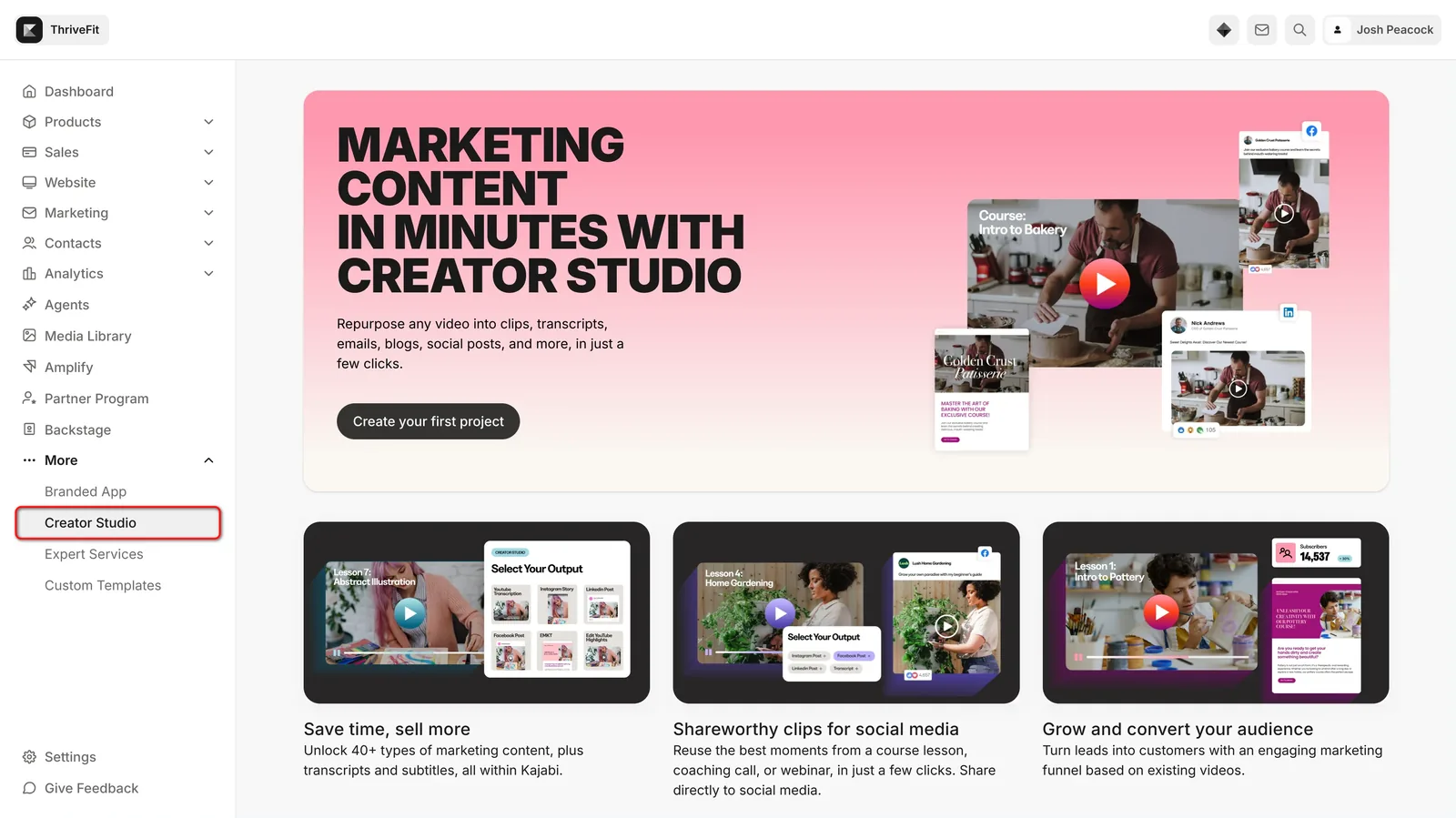
- Select More in the left sidebar of your Kajabi Dashboard, then select Creator Studio. If Creator Studio is not listed there, contact Kajabi Support, because your account may still hold content to export.
- Find the Creator Studio is being retired banner at the top of your projects list. If you do not see it, the export is not available on your account yet.
- Click Export my projects. This starts your written content export.
- Open the email titled Your Creator Studio export is ready when it arrives. Kajabi sends it to the account owner, even if someone else started the export.
- Sign in to your Kajabi account, then click Download Creator Studio export in that email.
Three things worth knowing before you start, because each one catches people out.
The email goes to the account owner. Not to whoever clicked the button. If you are an admin and the owner is someone else, tell them to watch their inbox.
Only an owner, subowner or administrator can run it. If you do not have one of those roles, you will need someone who does.
Run it again at the end. Anything still generating when you export, or anything you create afterwards, is left out. A second export picks it up, and running it more than once is safe.
Free 14 day trial + 20% off annual

New to Kajabi? Creator Studio is going, but courses, communities and email are what most people are actually there for.
- Free trial
- 14 days
- Annual saving
- 20% off
What is inside the ZIP
Your export arrives as a single ZIP file. Inside it there is a projects folder holding one folder per project, and each project folder contains:
- Written content the project generated, such as blog posts, emails, social captions and website copy, as .txt files
- Transcripts as .txt files
- Subtitle files as .srt or .vtt files
There is also a MANIFEST.txt at the top level. It lists every file in the archive, plus anything Kajabi could not include and why. Read it rather than assuming the export is complete.
Two useful details. Projects you deleted before running the export are included too, in a separate deleted-projects folder. And the export covers every site in your account, not only the one you start it from.
Where your video clips went
Kajabi moved your video clips into your Media Library on 9 September 2026. They sit alongside the rest of your video and they stay there after Creator Studio is removed.
To find them, filter your library by the Tag Creator Studio. From there you can use them anywhere in Kajabi that takes a video from your library.
Only clips that had finished processing were moved. Clips you deleted were not brought back, even though the ZIP does include written content from deleted projects.
If a clip is missing, click Export my projects to move over anything still sitting in Creator Studio. That is also how a clip that finished after 9 September reaches your Media Library. Running the export again is safe, because clips already in Media Library are not duplicated.
Open a project in Creator Studio, find a finished clip in the project's clip list, and click the download icon on that clip. Do this before Creator Studio is removed if you want a local copy.
If the export will not run
Four things go wrong, and each has a different fix.
Creator Studio is not in the More menu
Kajabi says to contact Support in this case, because your account may still hold content waiting to be exported.
Do not assume an empty menu means you have nothing to lose.
There is no retirement banner
The export has not been switched on for your account yet. Check again in a few days.
It arrives account by account rather than for everyone at once.
It says there is nothing to export yet
That message is about written content only. It has nothing to do with your clips.
Your clips are still in Media Library under the Creator Studio tag regardless of what the export says.
The email never arrived
It goes to the account owner, not to whoever clicked the button. Check with them and check their spam folder.
You also have to be signed in to Kajabi before the download link in the email will work.
What replaces each feature
Kajabi has named a replacement for each thing Creator Studio did. Some are inside Kajabi and some are not.
One thing worth clearing up, because people are getting it wrong. Adobe Express has not been removed from Kajabi. It still powers image creation and editing in Media Library, including AI image generation and Adobe Stock. Only the Adobe Express video editing that lived inside Creator Studio is going.
Clips are the one thing Kajabi has no answer for. Everything else moved somewhere.
What this now costs you
This is the part the announcement does not spell out, and it matters if you used Creator Studio for transcripts.
Transcription, translation and dubbing all run on AI Credits now. Transcription uses one credit per minute of video. Pro and Founders plans include 1,000 credits a month, Growth includes 500, and any plan can buy more from Settings, then Account Settings, then Subscription and Billing.
Work out what that means for you. An hour of video is sixty credits. If you transcribe ten hours a month, that is 600 credits, which is more than the Growth allowance. Under Creator Studio those transcripts came with the add-on. Now they come out of a credit pool.
On the add-on itself, it is closed to new purchase. Accounts without a paid Creator Studio add-on can no longer create projects at all. If you currently pay for the add-on, you can keep creating until 9 November 2026.
A short history
Worth knowing what the Kajabi Creator Studio sunset is actually ending, because it was only around for about two years.
Creator Studio started as a beta in May 2023 and launched publicly in March 2024, built with Adobe Express. The pitch was that one video became over forty pieces of marketing content in a few clicks, and Kajabi said creators had made more than 50,000 pieces of content with it before the public launch.
It sat in the More menu, between Branded App and Expert Services. For a while it was one of the features Kajabi led with.
Looking at the replacements, the direction is clear enough. The writing side moved to an AI connection rather than a built-in generator, and the video side moved out of Kajabi entirely. Whether that is better depends on whether you wanted a tool inside your platform or are happy using Claude or ChatGPT alongside it.
Current offerFree 14 day trial+ 20% off annual
Common questions
Will I lose the projects and content I created?
Your video clips are already saved to Media Library, so those are safe. Written content, transcripts and subtitle files are only saved if you run the export. Anything you leave behind becomes unavailable once Creator Studio is removed.
Why are my video clips not in the export?
The emailed ZIP holds text only. Clips are in Media Library, tagged Creator Studio, so filter by that tag to find them.
Can I still create Creator Studio projects?
Only if you pay for the add-on. The add-on is closed to new purchase, and accounts without a paid one can no longer create projects. Existing paying accounts can keep creating until 9 November 2026.
When exactly is Creator Studio being removed?
Kajabi has now confirmed it: Creator Studio shuts down on 9 November 2026. If you pay for the Creator Studio add-on, you can keep creating projects until then. After 9 November, anything you have not exported is gone for good. The 9 September 2026 date you may have seen was when clips moved to Media Library, not the shutdown.
Does Kajabi have a built-in video clipping tool?
No. Media Library handles transcription, translation, dubbing, chapters and analytics, but not transcript based clipping. You need something outside Kajabi for that.
Has Adobe Express been removed from Kajabi?
No. It still powers image creation and editing in Media Library, including AI image generation and Adobe Stock. Only the Adobe Express video editing inside Creator Studio goes away.
Do transcripts cost anything now?
They run on AI Credits rather than coming with a Creator Studio plan. Transcription uses one credit per minute. Pro and Founders include 1,000 credits a month, Growth includes 500, and any plan can buy more.
Can I still download transcripts and subtitle files?
Yes. Media Library generates transcripts for uploaded video and lets you download and edit SRT files, the same format Creator Studio produced.
The verdict
Creator Studio shuts down on 9 November 2026, and after that anything you have not exported is gone. I would not leave it to the last week.
Do one thing today. Go to More, then Creator Studio, and run the export. It takes two minutes, it covers your whole account, and it is the only thing standing between your written content and permanent deletion. Then run it once more when you are done working in there.
After that, the transition is manageable. Transcripts and translations move to Media Library, writing moves to Kajabi MCP, and clipping moves outside Kajabi. The only real gap is video clipping, and Kajabi says plainly that it has no replacement for it yet.
Details on this page come from Kajabi's own sunset documentation and are accurate at the time of writing. Kajabi has confirmed 9 November 2026 as the shutdown date in its help centre. It may still change its replacement plans, so check the help centre before relying on anything here.
Some links on this page are partner links. How that works is explained on our affiliate disclosure page.
