GoHighLevel toll-free verification is the check every LC Phone toll-free number has to pass before it can text anyone in the US or Canada. Until it is approved, your texts from that number are blocked, even though calls work fine. You fill in one form per number with your business details, how people opt in, and sample messages, then wait. HighLevel says review can take up to four to six weeks, so a rejection costs you real time. Below I cover the form step by step, what reviewers check, and every rejection code with its fix.
Short version
- Every toll-free number needs its own approved verification before it can send SMS or MMS to the US or Canada. Calls are not affected.
- Unverified, pending and rejected numbers are all blocked from texting, according to HighLevel's current guide.
- You do not need an EIN, and you do not register a brand or campaign like you do for A2P 10DLC.
- Review can take up to four to six weeks. If a rejection is fixable, you get 7 days to resubmit.
- Most rejections come from weak opt-in proof, a website that can't be checked, or agency details instead of the client's.
What toll-free verification is (and why your texts are blocked)
Carriers want to know who is sending texts from a toll-free number and why. Verification is that check. HighLevel's toll-free verification guide says each LC Phone toll-free number needs its own approved record before it can send SMS or MMS to people in the US or Canada.
Three things catch people out:
- Buying the number does not verify it. HighLevel's guide to buying a toll-free number is clear that verification is a separate step after the purchase.
- It is about texting only. You can make and take calls on the number while it waits. That is handy if you plan to put a GoHighLevel Voice AI agent on it.
- The error code tells you. If a text fails with error 30032, the message was blocked because the toll-free number is not verified. Error 30007 is different: that is carrier filtering on the content.
You find your numbers in the sub-account under Settings, then Phone System, then Manage Numbers. My test sub-account has no numbers yet, which is why the list below is empty.
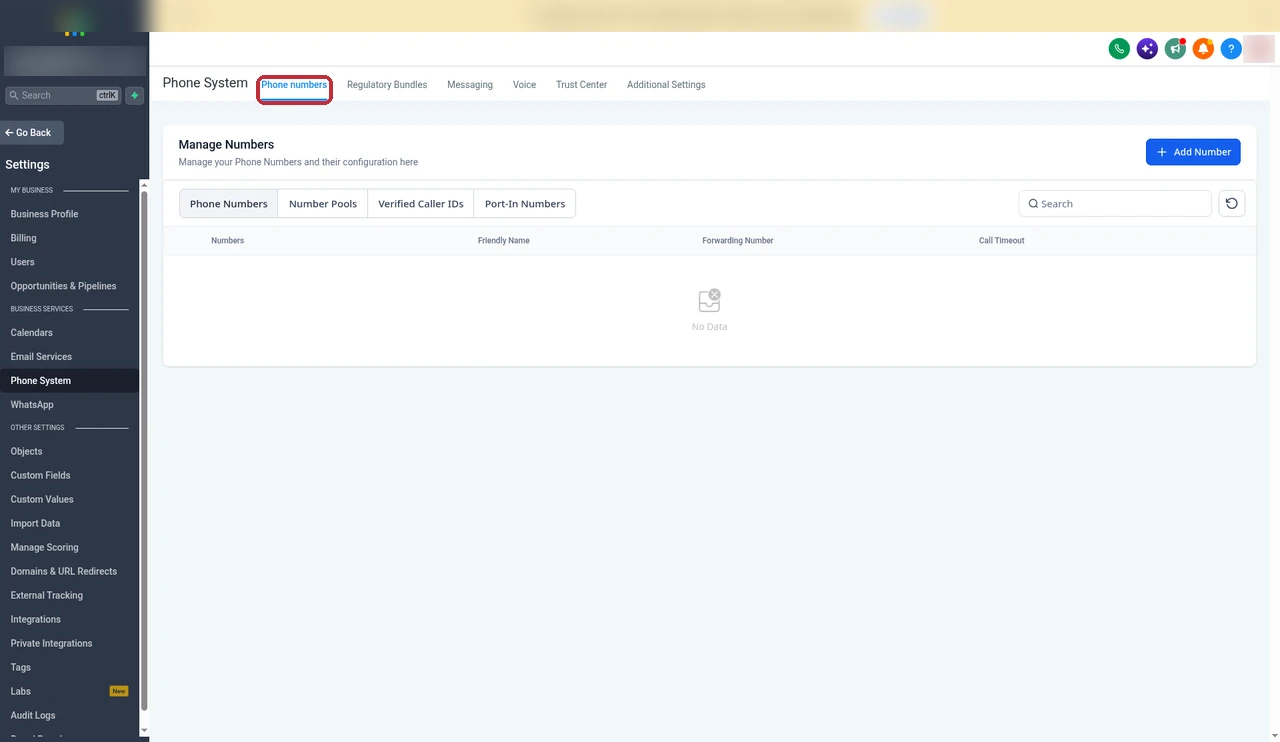
Phone numbers and texting come with every GoHighLevel plan, but each number is verified on its own. There is no bulk option in the app.
One note if you use your own Twilio account instead of LC Phone: HighLevel says you register the number through Twilio support, not through this form.
Toll-free vs A2P 10DLC: which one do you need?
These two get mixed up all the time. A2P 10DLC is for local 10-digit numbers. Toll-free verification is for 8XX numbers. You only need the one that matches the number you text from.
| Toll-free verification | A2P 10DLC | |
|---|---|---|
| Number type | Toll-free (8XX) | Local 10-digit |
| Brand and campaign registration | Not used | Required |
| EIN | Not required | Depends on business type |
| Submitted | Once per number | Brand, then campaign |
| Where | Manage Numbers | Trust Center |
If you text from a local number, follow my GoHighLevel A2P 10DLC registration guide instead. Sole proprietors and businesses outside the US can still verify a toll-free number. HighLevel's rejection guide says non-US business addresses are allowed.
What to prepare before you start
The form does not save half-finished answers well, so I get everything ready first. This is what HighLevel's guide asks for:
- Legal business name, written exactly as it appears on your website.
- Website URL, live and finished. If you have no site, a public social media profile.
- A real contact person: first and last name, email and phone number.
- Business address: country, state, street, city and postal code.
- Estimated monthly message volume.
- Proof of opt-in: a public link to an image of your sign-up form, keyword flow, paper form or verbal script.
- A use case description and sample messages that match it.
Some businesses get asked for more, such as a DBA name, entity type or a business registration number. Have those to hand too.
How to verify a toll-free number in GoHighLevel (step by step)
My account has no toll-free number, so I can't show the form itself. These steps follow HighLevel's current guide, updated on 17 September 2026. If you still need a number, open Add Number on the Manage Numbers page, set the filter's Number Type to Toll Free and buy one there.
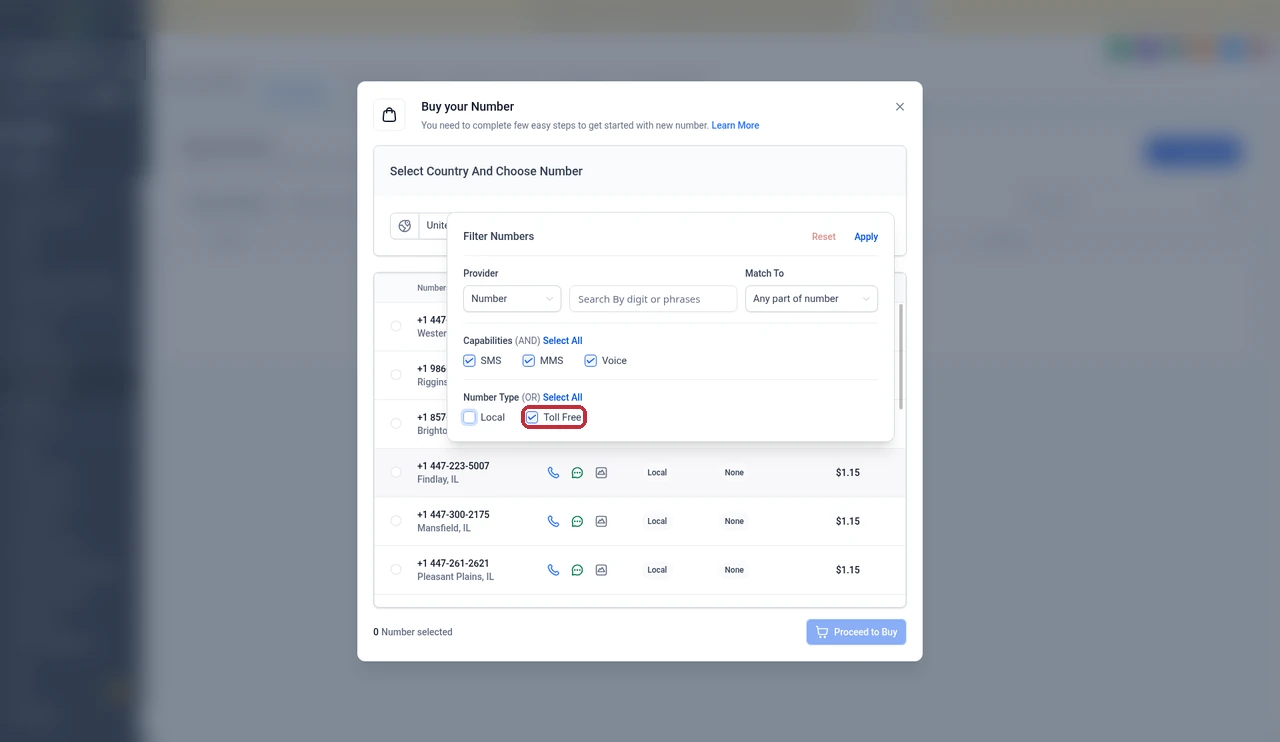
1. Open the form
- In the sub-account, go to Settings, then Phone System, then Manage Numbers.
- Find your toll-free number and click Verification Required under it.
2. Business and contact details
- Enter the Legal Entity Name. Match the name on your website, letter for letter.
- Add the Website URL, or a public social profile if you have no website.
- Fill in the contact's first name, last name, email, country code and phone number. Use a real person at the business.
3. Business location
- Pick the Country and State, then enter address line 1, city and postal code.
- Click Continue to Messaging Use Case.
4. Use case and opt-in
- Choose your Estimated Monthly Volume.
- Pick the Opt-In Type: Mobile/QR Code, Paper Form, Verbal, Via Text or Web Form.
- Select your Use Case Categories. If you will send any promotions, include Marketing.
- Paste the public Opt-In Workflow Image URL.
- Write the Use Case Description and add your sample Message Content.
5. Review and submit
- Read every field again. Open your opt-in image link in a private (incognito) window to make sure it loads without a login.
- Tick I agree to the Terms of Service and click Send Information for Verification.
- If you are asked to complete an identity (KYC) check, finish it straight away.
Political campaigns have one extra rule. From 17 February 2026, election campaigns need a Campaign Verify Auth Token, which HighLevel does not issue.
How to build opt-in proof that passes
Opt-in is where most submissions fail. The reviewer wants to see that people chose to get your texts, and how. HighLevel's guide sets these rules:
- Consent belongs to the business that sends the texts. No bought, rented or shared lists.
- The SMS checkbox must be optional and unchecked by default.
- Use separate boxes for marketing texts and for non-marketing texts like reminders.
- Show the disclosure next to the box: business name, the type of messages, how often, "Msg & data rates may apply", and how to reply HELP or STOP.
- Your privacy policy must say SMS opt-in data is not shared with third parties.
Two rules come from Twilio's pages on rejection codes 30446 and 30476. A line about SMS hidden in your terms or privacy policy is not consent. And verbal opt-in alone is not enough for marketing texts.
This is my own example, written to the rules above. Swap in your details: "I agree to receive appointment reminders and offers by text from [Business Name]. Message frequency varies. Msg & data rates may apply. Reply HELP for help or STOP to cancel." Put it next to an unchecked box, and link your privacy policy and terms right under it.
If people opt in by phone, write out the script your team reads and screenshot it. If they opt in by texting a keyword, show the keyword and the confirmation reply.
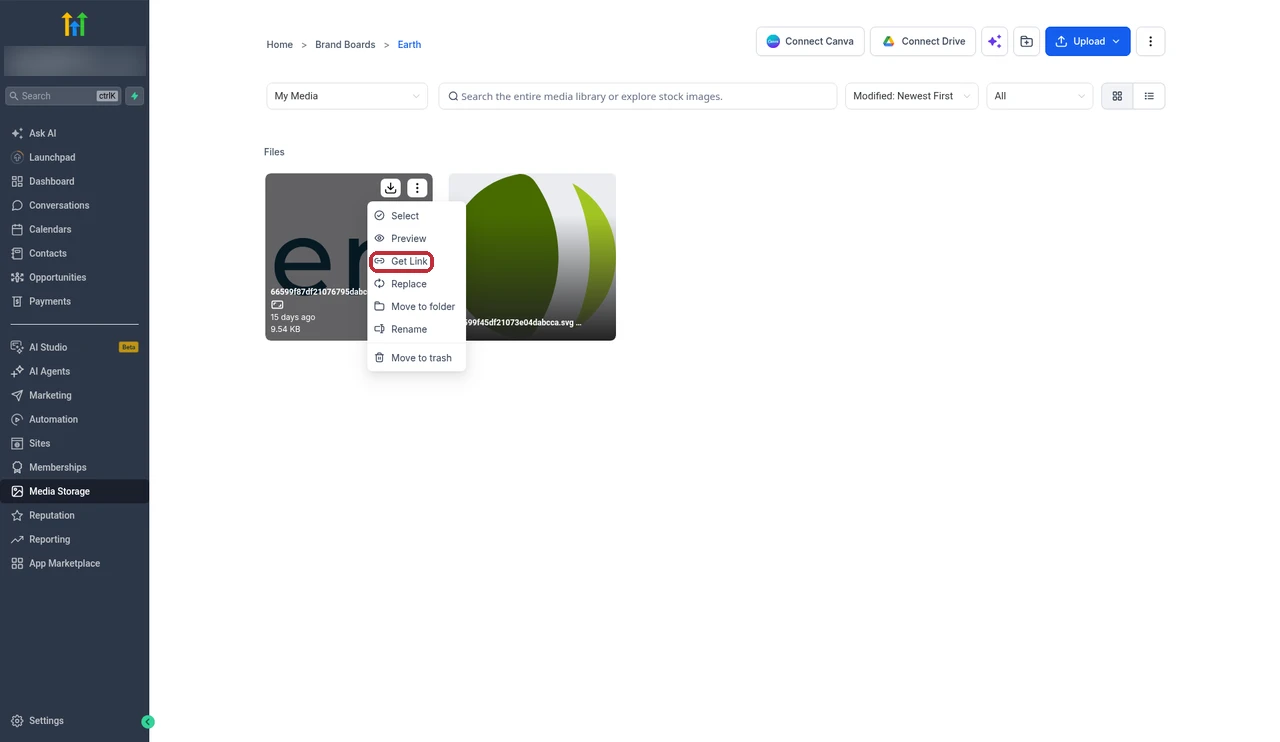
The image has to be public. HighLevel suggests hosting it in your own Media Storage: upload the screenshot, open the file's menu and click Get Link. Do not use a Google Drive link or anything behind a login, because the rejection guide lists that as a reason for code 30446.
Free 30 day trial + 2 months free on annual

Try GoHighLevel free for 30 days Set up texting and verification before you pay for a plan.
- Free trial
- 30 days
- Annual saving
- 2 months free
- In the trial
- Full access to your plan
Use-case description and sample messages that work
The reviewer reads your description, then your samples, and checks they tell the same story. Code 30496 is the rejection you get when they don't match.
A good description says who you are, who you text, why, and how they signed up. Here is an example I wrote in that shape:
"[Business Name] is a dental clinic in Austin, Texas. We text patients who opt in on our website booking form. Messages are appointment confirmations, reminders and occasional offers, about 4 a month. Patients can reply STOP at any time."
And two sample messages that match it:
- "[Business Name]: Hi Sarah, your cleaning is booked for Tue 14 Oct at 3pm. Reply C to confirm. Reply STOP to opt out."
- "[Business Name]: 15% off teeth whitening this month for existing patients. Book at [your https link]. Reply STOP to opt out."
My rules for samples:
- Start with the business name so the reader knows who it is from.
- Include opt-out wording.
- Use full https links on your own domain. Shortened links and plain http links trigger code 30449.
- If one sample is a promotion, Marketing must be one of your use case categories.
How long it takes and what each status means
HighLevel's current guide says review takes up to four to six weeks, and the timing is not guaranteed. A 2023 changelog said around 3 business days, but that is old. I plan for weeks, not days, and I don't promise a client a launch date until the number is approved.
| Status | What it means | Can it text the US or Canada? |
|---|---|---|
| Restricted (Unverified) | Nothing submitted yet | No |
| Pending Verification | Submitted, under review | No |
| Verified (Approved) | Approved | Yes |
| Rejected | Turned down, see the code | No |
Some LeadConnector pages, and sites that copied them, still say a pending number can send limited traffic. HighLevel's guide updated on 17 September 2026 says pending numbers are blocked. I go with the newer guide. Unverified numbers have been blocked since 8 November 2023 and pending ones since 31 January 2024, according to HighLevel's error code dictionary.
Rejected? Every rejection code and how to fix it
When a request is rejected, you get a code. Some codes let you fix and resubmit. Others mean the use case is not allowed at all. These come from LeadConnector's toll-free rejection guide.
Rejections you can fix
| Code | Why it was rejected | How I would fix it |
|---|---|---|
| 30445 | Business details could not be verified, or agency details were used | Use the end business legal name and a website that shows it |
| 30446 | No opt-in proof, or opt-in was forced, shared, or behind a login or Google Drive | Make the box optional and unchecked, and host the image publicly |
| 30447 | One number used for several businesses, or more than 5 numbers without a reason | One business per number, and explain why you need more than 5 |
| 30448 | Weak age check for age-restricted content | Ask for a full date of birth (MM/DD/YYYY) |
| 30449 | Shortened or http links in samples | Use full https links on your own domain |
| 30473 | Website URL could not be validated | Check the site loads publicly and matches the business name |
| 30483 | Contact is not a real person at the business | Use a named person from the business |
| 30489 | Website is unfinished or under construction | Finish the site before you submit |
| 30496 | Use case and description do not match | Make the samples match the description |
| 30505 | Opt-in was required, not optional | Let people sign up without agreeing to texts |
| 30507 | Opt-in does not match the use case | Show consent for the exact messages you send |
| 30511 | Verbal opt-in without a script | Add the script your team reads |
| 30513 | Opt-in wording is unclear | Spell out who texts, what, how often, and STOP |
| 30527 | Registration number missing or invalid | Add a valid number. In the US that is a 9-digit EIN |
| 30530 | Official registration documents needed | Upload the documents the reviewer asks for |
Codes 30527 and 30530 surprise people, because HighLevel says an EIN is not required. Both are true. Most submissions don't need one, but the reviewer can ask for registration details depending on your business type.
Rejections you can't fix
| Code | Why |
|---|---|
| 30441 | Banned content: sex, hate, firearms, tobacco or vaping, cannabis or CBD |
| 30442 | Spam or phishing |
| 30443 | Restricted industries, such as loans, third-party debt collection, gambling, sweepstakes, stock alerts, crypto, risky investments, debt reduction, credit repair, third-party lead generation and illegal substances |
| 30444 | Fraud or deceptive content |
| 30526 | High-risk domain, for example a newly registered one |
The 7-day window
After a fixable rejection, you have 7 days to edit the request and resubmit. Miss it and the request expires (error 30437). Your next try is then treated as a new submission, back at the end of the queue. So when I see a rejection, I fix it the same day.
How to appeal
If you think the reviewer got it wrong, open a ticket with HighLevel support. The rejection guide suggests the subject line "Toll-Free Verification Rejection Appeal for [Business Name or Number]". Explain clearly why your use case meets the rules and attach your proof.
Agency notes: verifying for clients
If you run an agency, these are the points that cause most rejections for client numbers:
- Submit the client's details, not yours. The legal name, website, address and contact must be the end business. Agency details get code 30445.
- One business per number. Don't share a toll-free number across clients.
- More than 5 numbers for one business needs a reason. Say why in the description.
- The client owns the consent. Their own customers have to opt in to their texts. Lists from elsewhere don't count.
Start verification as soon as a client signs. With a wait of several weeks, it is often the slowest part of onboarding. If a client needs to reach customers sooner, email or WhatsApp in GoHighLevel can cover the gap.
What it costs to text after approval
I could not find a verification fee in any HighLevel or LeadConnector document I read. I can't confirm it is free either, so check your billing before you submit.
Once the number is approved, texting is charged per segment. HighLevel's phone pricing guide lists US and Canada SMS at $0.00747 per segment, sent or received, which it shows as 10% off a $0.0083 list rate. The rate is the same for local and toll-free numbers. The toll-free number itself rents for $2.15 a month in GoHighLevel, and carriers add their own small fee per text on top of the $0.00747 segment rate (for example $0.0035 for AT&T, $0.0045 for T-Mobile and $0.0050 for Verizon). Inbound MMS to a toll-free number is $0.0200.
One thing to know: messages that reach the provider are charged even if they get blocked or are not delivered, and those charges are not refunded. So don't run a campaign from a number that is still pending. All the other phone and plan fees are in my GoHighLevel pricing guide.
Pre-submit checklist
I run through this before I click submit:
- The legal name matches the website exactly.
- The website is live, finished and on https.
- The contact is a real person at the business.
- The SMS box is optional and unchecked.
- The disclosure has the business name, message type, frequency, rates line, HELP and STOP.
- The privacy policy says SMS data is not shared.
- The opt-in image link opens in a private window with no login.
- The samples match the description and start with the business name.
- No shortened or http links anywhere.
- Marketing is ticked if any sample is promotional.
Is it worth using a toll-free number?
For a lot of small businesses, yes. There is no brand or campaign to register and no EIN to find. The catch is the wait, so the earlier you submit, the better.
- One main business line: a good fit. One number, one verification.
- Agencies with many clients: fine, but each client needs their own number and their own approval.
- You want customers to see a local number: go with A2P 10DLC instead.
- Restricted industries: check the list above first. Those can't be fixed with a resubmit.
Partner offerFree 30 day trial+ 2 months free on annual
- 30 days instead of the public 14
- Full access to the plan you choose
- Cancel any time before it ends
Common questions
How long does GoHighLevel toll-free verification take?
HighLevel's current guide says review can take up to four to six weeks, and that the timing is not guaranteed. An old 2023 changelog said around 3 business days, but that is no longer what HighLevel tells you to expect.
Can I send texts while verification is pending?
No. HighLevel's guide, updated in September 2026, says Pending Verification numbers are blocked from sending SMS and MMS to the US and Canada. Some older pages still mention limited sending while pending, but the current guide says blocked.
Do I need an EIN for toll-free verification?
No. HighLevel says an EIN is not required, and sole proprietors can verify too. Depending on your business type, the reviewer can still ask for extra registration details, such as a registration number.
Can I make calls before my toll-free number is verified?
Yes. Verification only controls text messages. Voice calls on the number are not blocked by its verification status.
What does error 30032 mean in GoHighLevel?
Error 30032 means the message was blocked because the toll-free number is not verified. The fix is to submit verification for that number and wait for it to be approved.
What happens if I don't fix a rejection within 7 days?
If the rejection is one you can fix, you have 7 days to edit and resubmit. After that the request expires, and the next submission is reviewed like a brand new one, back at the end of the queue.
Can I use a Facebook page instead of a website?
HighLevel's form accepts a public social media profile if you do not have a website. It has to be public and clearly show the same business name you put on the form.
Is toll-free better than A2P 10DLC for GoHighLevel?
Neither is better for everyone. Toll-free needs no brand or campaign registration and no EIN, so it suits small businesses that text from one main number. Local numbers need A2P 10DLC registration but look local to customers.
The verdict
GoHighLevel toll-free verification is one form per number, but it decides whether your number can text at all. Unverified, pending and rejected numbers are blocked, and review can take weeks.
Most rejections are avoidable. Use the end business's real details, show clear and optional opt-in on a public link, and make your samples match your description. If you do get rejected, fix it within 7 days so you don't lose your place.
Submit as early as you can, and keep calls, email or WhatsApp running while you wait.
Steps and rules checked against HighLevel's toll-free verification guide (updated 17 September 2026), LeadConnector's toll-free rejection guide, HighLevel's error code dictionary and phone system pricing guide. Example consent text, descriptions and sample messages are my own and not official templates. Rules and rates change from time to time, so check the current guide before you submit.
Some links on this page are partner links. How that works is explained on our affiliate disclosure page.