GoHighLevel SaaS Mode lets you sell HighLevel to your clients as your own software, at your own price, and charge them for the texts, emails and AI they use. It is also the main reason people pay $497 a month instead of $297. Most of the guides I found still describe the old Stripe-only setup, so I went through the current SaaS Configurator in my own agency account and read HighLevel's latest help docs. Here is what SaaS Mode costs, how rebilling and markup really work, the two billing systems you can pick from, how to set it up, and an honest example of the margins.
Short version
- SaaS Mode is only on the Agency Pro plan, which costs $497 a month or $4,970 a year.
- The $297 Unlimited plan can rebill phone and email at cost. Only the $497 plan lets you add a markup.
- HighLevel always charges your agency wallet first. Your own payment account then charges the client at your price, and its processing fees come out of your margin.
- There are now two billing systems. SaaS V1 runs on Stripe. SaaS V2 runs through an Agency Sub-Account and can use Stripe, NMI, Authorize.net or Square, but it doesn't prorate plan changes.
- You set it up in the agency view under SaaS Configurator: connect payments, pick a currency, build a plan, then sell it with a funnel or a sale link.
What SaaS Mode actually is
Normally an agency creates each client's sub-account by hand and bills the client outside HighLevel. SaaS Mode turns that into a product. HighLevel's pricing page says it "allows you to sell subscriptions directly from your website, automatically creating client accounts without any manual work from you. You set the price."
In practice that means three things:
- Plans you design. You decide what each plan costs, which features it unlocks and which snapshot (a ready-made setup of funnels, workflows and settings) gets loaded into the new account.
- Automatic accounts. When someone pays, HighLevel creates the sub-account, applies the snapshot and gives them access. No manual work from you.
- Usage billing. Texts, calls, emails and AI that your clients use are charged back to them, with your markup on top if you want.
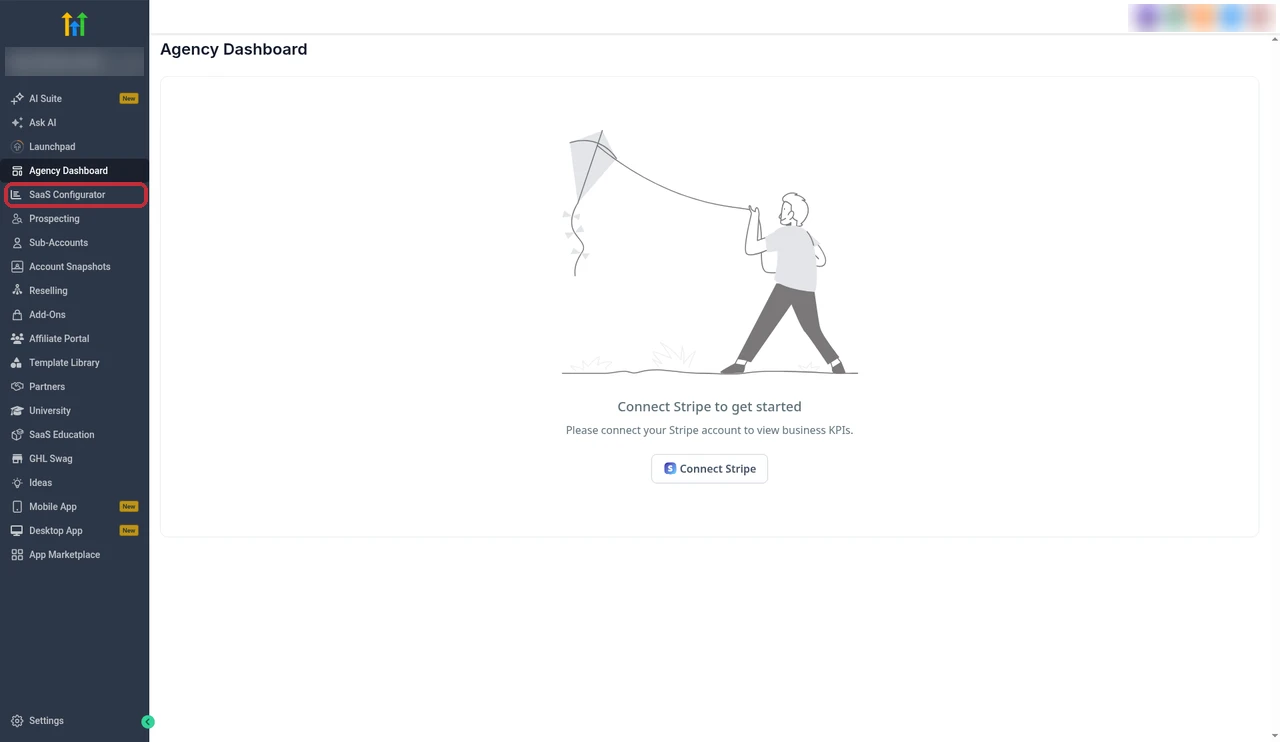
All of this lives in the agency view. In my account, SaaS Configurator sits in the left menu right under the Agency Dashboard.
If you also want your own logo on the app your clients log in to, that is white labeling, which works alongside SaaS Mode. HighLevel's pricing page says you can white label the desktop web app, and the white label mobile app is a separate $497 a month add-on.
Which plan you need: $97 vs $297 vs $497
These are the agency plans from HighLevel's pricing page, checked on 20 October 2026. I only list the parts that matter for SaaS. The full breakdown is in my GoHighLevel pricing guide.
| Plan | Price | What it means for SaaS |
|---|---|---|
| Starter | $97/month or $970/year | 3 sub-accounts, no rebilling, no SaaS Mode |
| Unlimited | $297/month or $2,970/year | Unlimited sub-accounts, rebill phone and email with no markup |
| Agency Pro | $497/month or $4,970/year | SaaS Mode, automatic sub-account creation, rebill phone and email with markup |
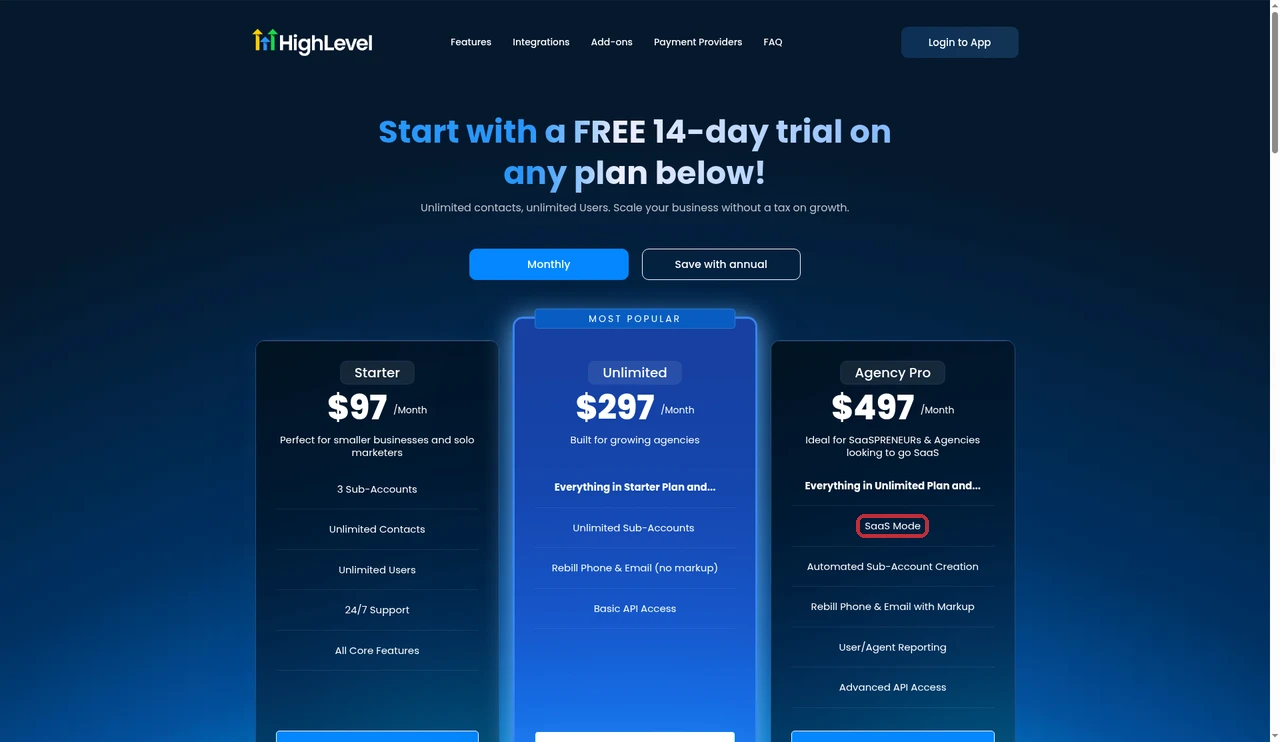
So the honest answer is simple. If you only want to pass texting and email costs to clients at cost, $297 is enough. If you want to sell your own software plans, have accounts created automatically, or make money on usage, you need the $497 Agency Pro plan.
How rebilling works
Rebilling is the part that confuses most people, so I'll go slowly. Everything here comes from HighLevel's Rebilling, Reselling and Wallets guide, updated on 30 September 2026.
The wallet flow: your agency is always charged first
A wallet is a prepaid balance. When a client's sub-account sends a text or an email, or uses AI, HighLevel takes the cost from your agency wallet. When that balance drops below your minimum, your card is charged to top it up.
With rebilling turned on, a second wallet comes in. Your own payment account (not HighLevel's) charges the client's card to fill the sub-account wallet, and the client's usage comes out of that at your price. HighLevel says it plainly: it never charges your client directly. You pay HighLevel, and you bill your client.
At cost on $297, with markup on $497
HighLevel describes three setups:
- No rebilling: your agency pays for all client usage. Any plan.
- Rebilling without markup: the client pays exactly what HighLevel charged you. $297 and $497 plans.
- Rebilling with markup: the client pays HighLevel's price times your multiplier, and you keep the difference. $497 plan only.
For an existing client, the switch is in the agency view under Sub-Accounts, then Manage Client, then the Rebilling tab.
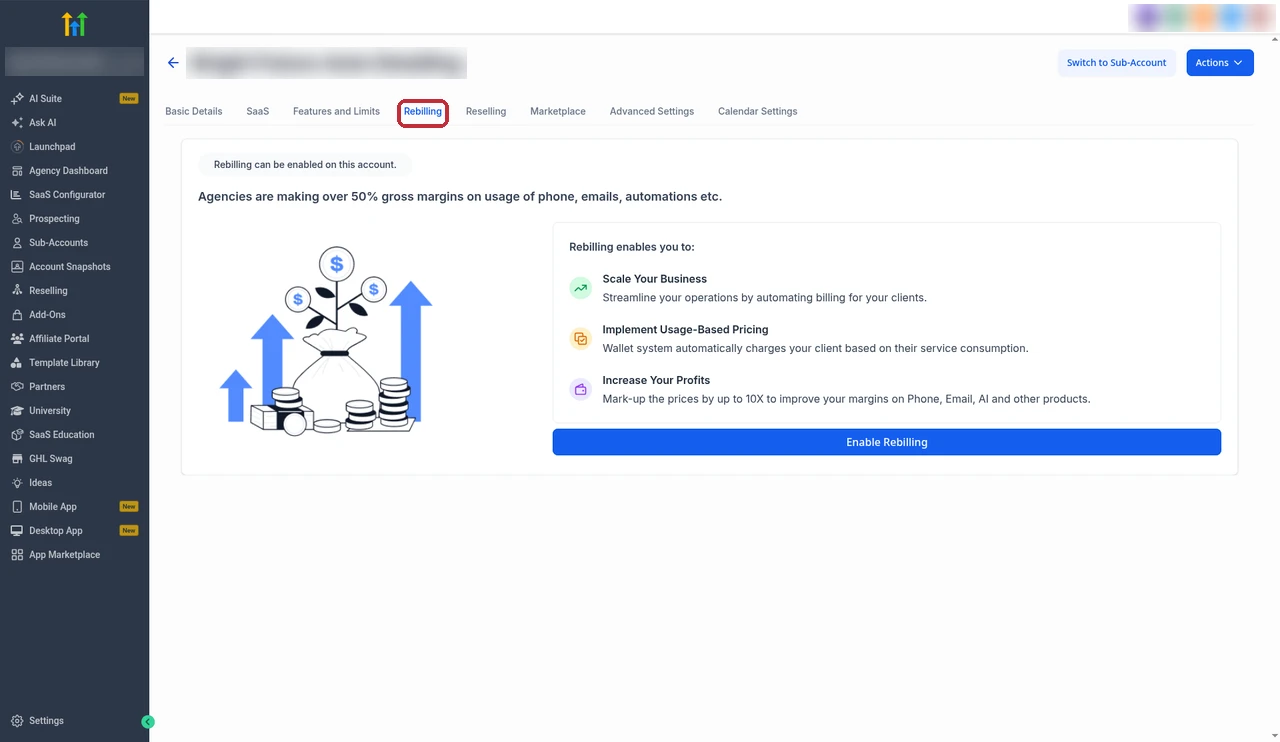
HighLevel's help docs don't publish a maximum multiplier. The Rebilling tab in my account says you can mark up prices "by up to 10X", which is the only limit I could find.
What goes through the wallet and what hits the card
Usage, such as LC Phone, email, AI and WhatsApp conversations, is taken from the wallet. Monthly items, such as the WhatsApp subscription, WordPress hosting and Yext, are charged straight to the card on file.
Payment fees and the 1.05x default
Every charge your payment account makes to a client has normal processing fees, and you pay them. HighLevel's older phone rebilling guide (last edited in 2023) says that on the $297 plan the default multiplier is 1.05x, a 5% markup just to cover Stripe charges. So "at cost" rebilling still loses a little on every top-up if your fees run higher than 5%. On $497 you set the multiplier yourself, so make sure it covers your fees before it covers anything else.
SaaS V1 vs V2: which billing system to pick
This is the change most older guides miss. HighLevel now runs two separate SaaS billing systems. Its V1 vs V2 guide, updated on 28 September 2026, says V2 is not an upgrade to V1. They run side by side, and there is no migration from one to the other.
| SaaS V1 | SaaS V2 | |
|---|---|---|
| Where billing lives | Stripe | An Agency Sub-Account in HighLevel |
| Payment providers | Stripe only | Stripe, NMI, Authorize.net or Square |
| Products made in | Stripe | HighLevel |
| Proration on plan changes | Yes, through Stripe | Not supported |
| Coupon offers when a client cancels | Yes, where supported | Not yet |
| Self-service reactivation | Yes | Not yet |
The provider list comes from HighLevel's SaaS Mode FAQs. An agency can run V1 and V2 plans at the same time, but each sub-account uses only one of them.
One thing HighLevel's own docs disagree on is switching between monthly and annual billing on V2. The newer V1 vs V2 guide says it works as part of an upgrade or downgrade, with no proration. The older FAQ says V2 only allows monthly to monthly and yearly to yearly. I'd test it on a dummy client before you promise an annual switch to anyone.
My take: if you already use Stripe and want proration and cancel offers, pick V1. If you need a different payment provider, or you want the billing to sit inside HighLevel next to your CRM and workflows, pick V2.
Free 30 day trial + 2 months free on annual

Try SaaS Mode free for 30 days Open the SaaS Configurator, build a test plan and see how rebilling works before you pay for the $497 plan.
- Free trial
- 30 days
- Annual saving
- 2 months free
- In the trial
- Full access to your plan
How to set up SaaS Mode, step by step
When you open SaaS Configurator for the first time, my account shows a "Let's get you started" checklist with four steps: connect a payment provider, select a currency, configure a SaaS plan and build a pricing page.
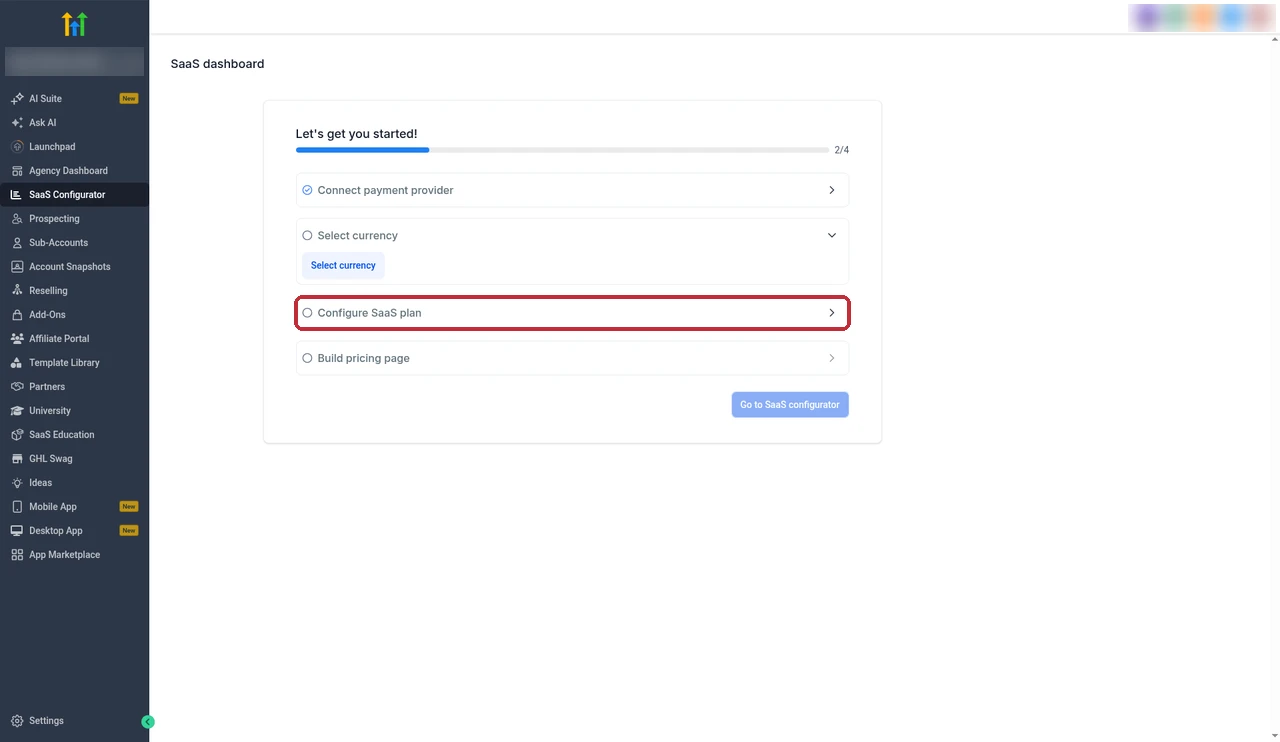
These steps follow HighLevel's SaaS Configurator guide, updated on 12 September 2026.
1. Connect payments
For V1, go to Agency View, then Settings, then Stripe, and click Connect with Stripe. For V2, go to SaaS Configurator, then Configure, click Select Sub-Accounts and add the Agency Sub-Account that will hold your billing. That sub-account needs a payment provider connected under Payments, then Integrations.
2. Create a plan category
Categories decide which plans a client can upgrade or downgrade to. Go to SaaS Configurator, then Advanced Settings, and click Add New Category. Each category has one currency, so if you sell in USD and GBP, make two categories.
3. Build a plan
Click Add Your Plan and pick the payment setup. A plan has these parts:
- Plan details: the name and description the client sees.
- Pricing: monthly, annual or both.
- Features and snapshot: which tools the client gets, and the snapshot to load. You must pick at least one feature or the plan won't save.
- Add-ons and Marketplace apps: extras the client can buy, or apps included in the plan.
- Trial and credits: a free trial and any free starting credit.
- Usage billing: how texts, emails and AI are charged, with your markup.
4. Turn on rebilling and set your markup
HighLevel says new sub-accounts created through SaaS Mode get rebilling with markup by default, using the settings in their plan. For clients you already have, use the Rebilling tab I showed above. To do many at once, select them on the Sub-Accounts page and use the bulk options that appear at the top.
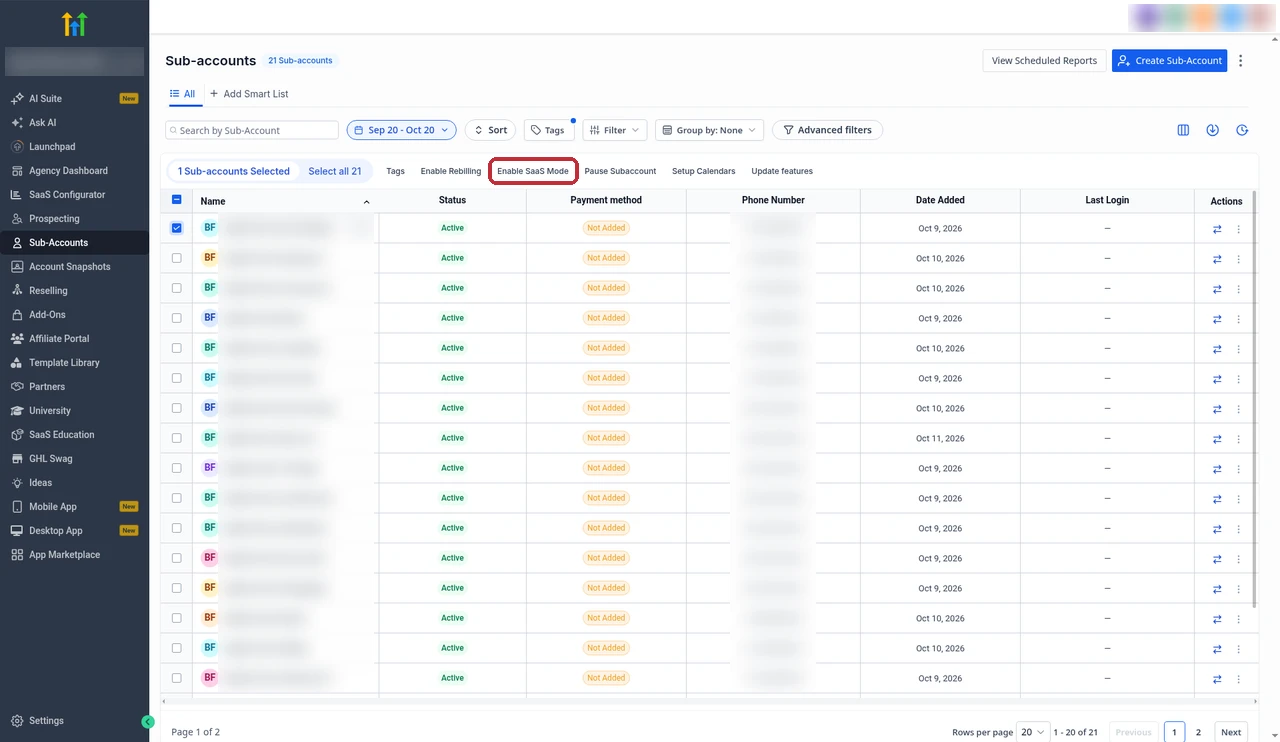
HighLevel's bulk rebilling guide warns that a bulk change replaces the markup you set on each account, so check any client with a special rate first.
5. Sell it
You have two ways to sell. The quick one is a sale link: in SaaS Configurator, open Plans & Pricing, find the plan and click Copy Sale Link. You can paste that link in an email, a proposal or a button on your site.
The other is a funnel. For V1, switch into the sub-account you sell from, go to Payments, then Products, then Import From Stripe, and add that product to an order form. For V2, the product is already in your Agency Sub-Account under Payments, then Products. One thing to watch on V1: if you change a price in Stripe, you have to import it again, because funnels keep the old price.
When a new client pays, HighLevel confirms the payment, creates the sub-account, applies the snapshot and gives them access, and the subscription shows as active or trialing.
Moving an existing client to SaaS
Don't send a sale link to a client who already has a sub-account. HighLevel's FAQ says purchases through Stripe, funnels or sale links always create a new sub-account, so you end up with duplicates.
Instead, go to Sub-Accounts, open Manage Client for that client, open the SaaS tab and choose Add a SaaS Subscription. You pick the payment setup, the customer and the plan. There is also a Special Price option, which gives one client a different price without changing your public plan. That is handy for a client who already pays you a set monthly fee.
If the client has no card on file when you turn on rebilling, it stays On Hold, and their access may be restricted until they pay. You can remove an On Hold setup from the Rebilling tab without turning off SaaS Mode.
Reselling add-ons
Reselling is the other way to earn on top of your plans. You pay HighLevel's price for an add-on and charge your client your own price, usually every month. The prices below are HighLevel's, from its pricing page:
| Add-on | HighLevel price |
|---|---|
| AI Employee Growth | $50/month per sub-account |
| AI Employee Unlimited | $97/month per sub-account |
| WhatsApp integration | $10/month per sub-account |
| Branded Client Portal App | $49/month per sub-account |
| White label mobile app | $497/month |
HighLevel says most of these "can be resold with your own markup in the Agency Pro plan". You set your price in the agency view under Reselling, where it shows HighLevel's price, your price and your profit. The AI plans are covered in my AI Employee guide, chat bots in Conversation AI, phone bots in Voice AI, and WhatsApp costs in WhatsApp pricing.
Margins: an honest example
The $497 plan price and the SMS rate are HighLevel's real prices. The $97 and $297 client prices and the 2x markup are numbers I picked to show the math. HighLevel doesn't set or suggest them.
Covering the plan. Divide $497 by what you charge each client. If you charge $97 a month, 6 clients bring in $582 and cover the plan. If you charge $297, 2 clients bring in $594. That is before payment fees and before any usage.
Markup on texts. HighLevel charges $0.00747 per SMS segment in the US and Canada, which I break down in my SMS pricing guide. At a 2x markup, your client pays $0.01494 and you keep $0.00747 per segment. That is about $7.47 for every 1,000 segments, minus fees on the wallet top-ups.
Is $497 worth it over $297? The gap is $200 a month. At the 2x example, you'd need about 26,800 text segments a month across your clients to cover that from texting alone. For most small agencies, the real money is in the plan price you charge, not the markup on texts. The markup is a nice extra, not the business model.
Mistakes I'd avoid
- Leaving the markup at a level that doesn't cover fees. Every top-up your payment account charges has a fee. A tiny markup can mean you lose money on usage.
- Sending a sale link to an existing client. It creates a second sub-account. Use Add a SaaS Subscription instead.
- Mixing currencies in one category. HighLevel shows an "Invalid price currency" error, and you can't change the currency once sale links or active subscriptions exist.
- Turning off SaaS to fix something. HighLevel's FAQ says disabling SaaS cancels the subscription and permanently deletes the client's wallet. You get the balance by email and have to handle refunds yourself.
- Picking V2 if you need proration. V2 doesn't prorate upgrades or downgrades, and there is no move from V1 to V2 or back.
- Turning on rebilling for a client with no card. The setup goes On Hold and the client may be locked out until they pay.
- Forgetting phone registration. Clients who text in the US need A2P 10DLC for local numbers or toll-free verification for toll-free ones, or their texts get blocked.
Partner offerFree 30 day trial+ 2 months free on annual
- 30 days instead of the public 14
- Full access to the plan you choose
- Cancel any time before it ends
Common questions
Is SaaS Mode included in the $297 plan?
No. SaaS Mode is only on the Agency Pro plan at $497 a month or $4,970 a year. The $297 Unlimited plan gives you unlimited sub-accounts and lets you rebill phone and email at cost, but without SaaS Mode, automatic sub-account creation or markup.
How much does GoHighLevel SaaS Mode cost?
SaaS Mode comes with the Agency Pro plan, which is $497 a month or $4,970 a year. There is no separate SaaS Mode fee. Usage such as texts, calls, emails and AI is billed on top, and you can charge that back to your clients with a markup.
Can I mark up SMS and calls on the Unlimited plan?
No. On the $297 Unlimited plan you can rebill phone and email to clients only at cost. HighLevel's older phone rebilling guide says the default there is 1.05x, a 5% markup to cover Stripe charges. Marking up usage for profit needs the $497 Agency Pro plan.
Do I need Stripe for SaaS Mode?
Not anymore. SaaS V1 uses Stripe. SaaS V2 runs through an Agency Sub-Account and, according to HighLevel's SaaS Mode FAQs, can use Stripe, NMI, Authorize.net or Square. You still need some supported payment provider to charge clients.
What's the difference between SaaS V1 and V2?
V1 keeps your plans and subscriptions in Stripe and supports proration and cancel offers. V2 keeps them in an Agency Sub-Account inside HighLevel, works with more payment providers and ties in with your CRM, but it doesn't prorate plan changes. They run side by side, and there is no migration between them.
Is there a maximum markup?
HighLevel's help docs don't publish one. The Rebilling tab in my account says you can mark up prices by up to 10X. Whatever you pick, make sure it covers your payment processing fees, because every wallet top-up you charge has a fee.
Can I white label the app?
Yes. HighLevel's pricing page says you can white label the desktop web app so clients see your logo when they log in. The white label mobile app is a separate add-on at $497 a month.
Can I move existing clients into SaaS Mode?
Yes. In the agency view, open Sub-Accounts, then Manage Client, then the SaaS tab, and choose Add a SaaS Subscription. You can set a Special Price for that client. Don't send an existing client a sale link, because a purchase through a link creates a new sub-account.
The verdict
GoHighLevel SaaS Mode is worth the $497 plan if you want to sell software plans under your own name and have accounts set up automatically. With a handful of clients on a monthly plan, it pays for itself.
If you only want to pass texting and email costs to clients, the $297 plan already does that at cost. And don't buy $497 for the markup alone, because it takes a lot of texts to cover the $200 difference. Pick V1 or V2 before you sell your first plan, set a markup that covers your payment fees, and test the whole checkout with a dummy client first.
Checked on 20 October 2026 against HighLevel's pricing page, the rebilling and wallets guide, the SaaS Configurator guide, the V1 vs V2 guide, the SaaS Mode FAQs, the bulk rebilling guide, and the screens in our own account. Prices and screens change from time to time, so check your account before you set your prices.
Some links on this page are partner links. How that works is explained on our affiliate disclosure page.