The short verdict
AI Employee is a pricing plan, not a new AI. It puts HighLevel's Voice AI, Conversation AI, Reviews AI and Content AI on one flat price per sub-account. Unlimited at $97 a month is good value for client accounts with busy phones and inboxes. For a quiet account it costs more than paying per use. Phone charges are never included.
Try GoHighLevel free for 30 days Is it worth it?GoHighLevel AI Employee is an optional add-on that covers HighLevel's AI tools for one sub-account at a time. It costs $50 a month on Growth or $97 a month on Unlimited, on top of your GoHighLevel plan. You can also skip both and pay per use. We went through every AI Employee screen in our own agency and sub-accounts and checked each price against HighLevel's help docs. This review covers what you actually get, what it costs per client, which plan to pick, what Unlimited leaves out, and how to switch it on.
Short version
- Three ways to pay: pay per use with no monthly fee, Growth at $50 a month or Unlimited at $97 a month. Growth and Unlimited are charged per sub-account where you turn them on.
- Growth includes 1,000 Conversation AI replies and 100 Voice AI minutes a month. Unlimited removes those caps, subject to fair use.
- Unlimited covers inbound calls, outbound calls and the Voice AI website widget, according to HighLevel's help docs.
- Phone charges, Agent Studio and premium workflow actions are billed separately on every plan.
- Ten client accounts on Unlimited add $970 a month to your bill. Reselling lets you pass that cost on to clients, with a markup if you want one.
What GoHighLevel AI Employee actually is
The AI tools themselves exist in every GoHighLevel account. Conversation AI answers SMS, chat and social messages. Voice AI answers and makes phone calls. Reviews AI replies to reviews. Content AI writes copy and images. Without a plan, each of these is billed per use from your wallet. AI Employee replaces that meter with a monthly price per sub-account.
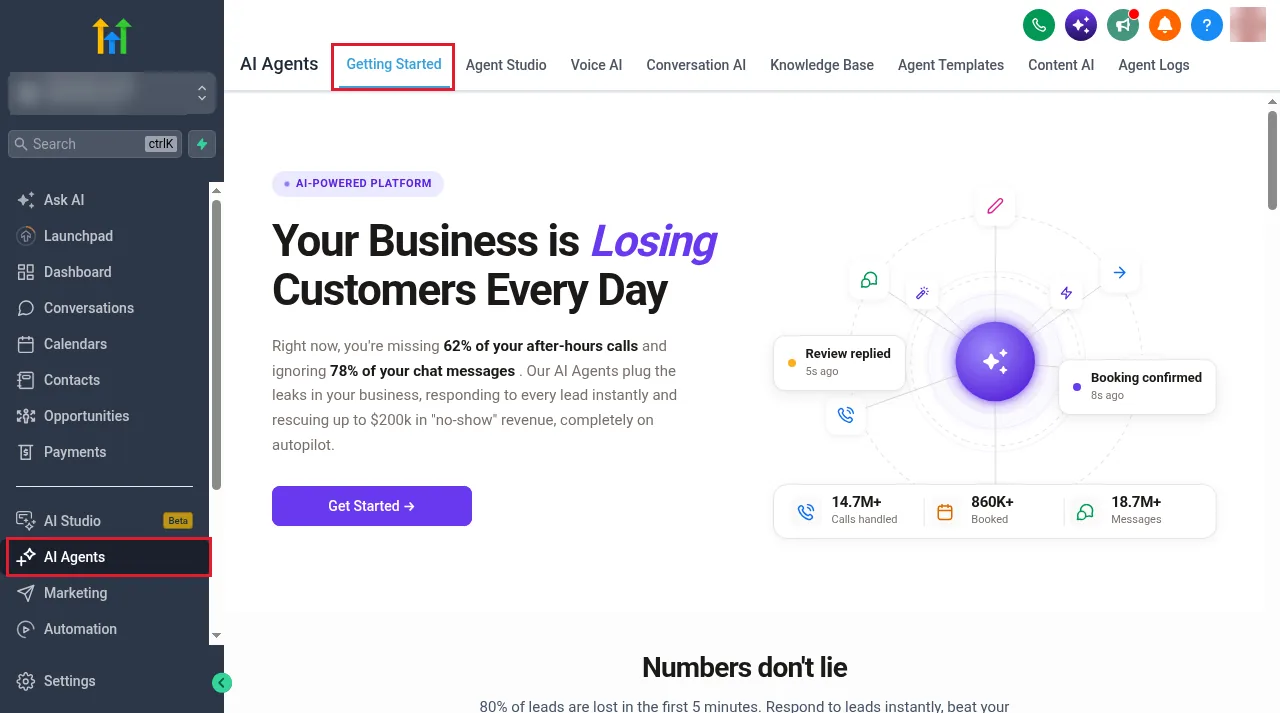
HighLevel describes AI Employee as its way to access and manage AI products across agency and sub-account accounts, priced as pay per use, Growth or Unlimited (HighLevel help: AI Employee access, rebilling and reselling). In the app, the AI tools sit under an AI Agents menu inside each sub-account. The Getting Started tab links out to the individual agents.
How we tested it
We went through every AI Employee screen in our own GoHighLevel agency and in a client sub-account on pay per use. That meant the agency AI Suite (plans, limits and usage), the company feature toggle, the reselling settings, the plan picker, and each agent builder in the sub-account. We checked every price and allowance against HighLevel's pricing page and its help articles, which are linked throughout.
We did not put a client on Unlimited and run live call volume through it, so this review makes no claims about answer quality or how many leads the AI converts. Where something was only visible on our pay-per-use account, we say so.
What's included: the AI tools, screen by screen
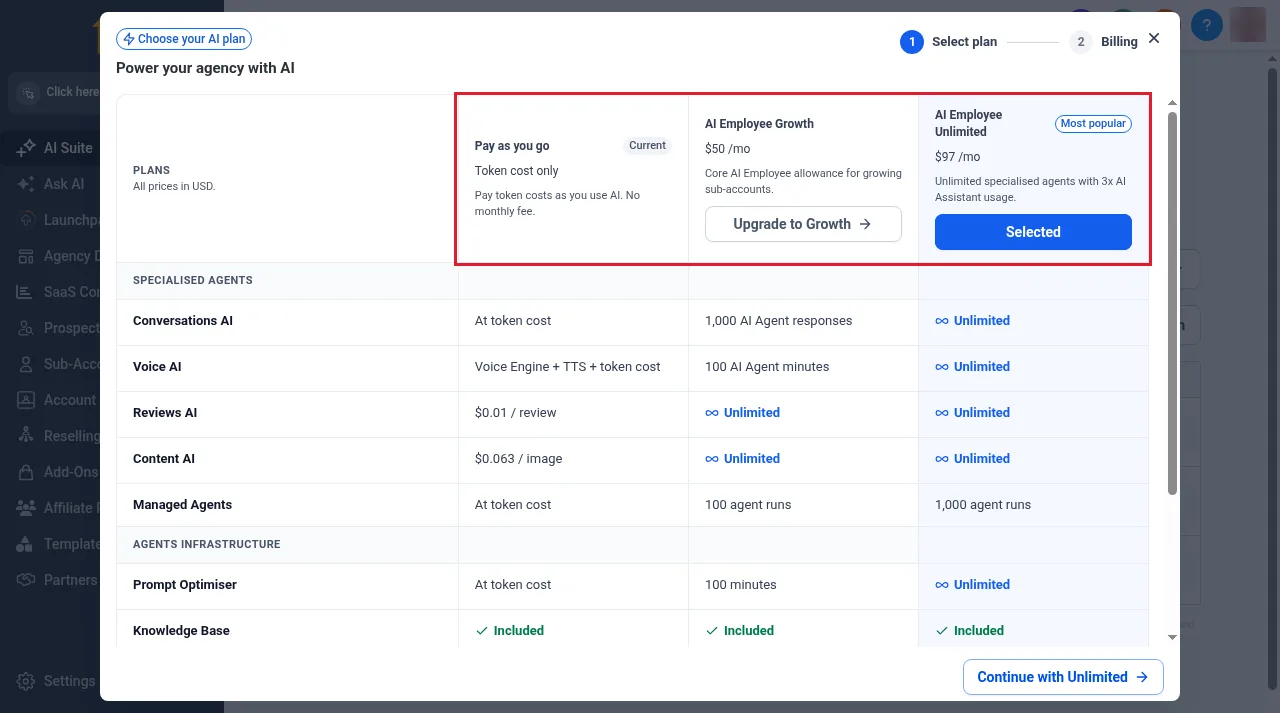
This is what AI Employee covers, in the order you meet it in a sub-account. In the plan picker, HighLevel groups these as specialised agents (Conversations AI, Voice AI, Reviews AI, Content AI and Managed Agents) plus shared infrastructure such as the Prompt Optimiser and Knowledge Base.
Conversation AI
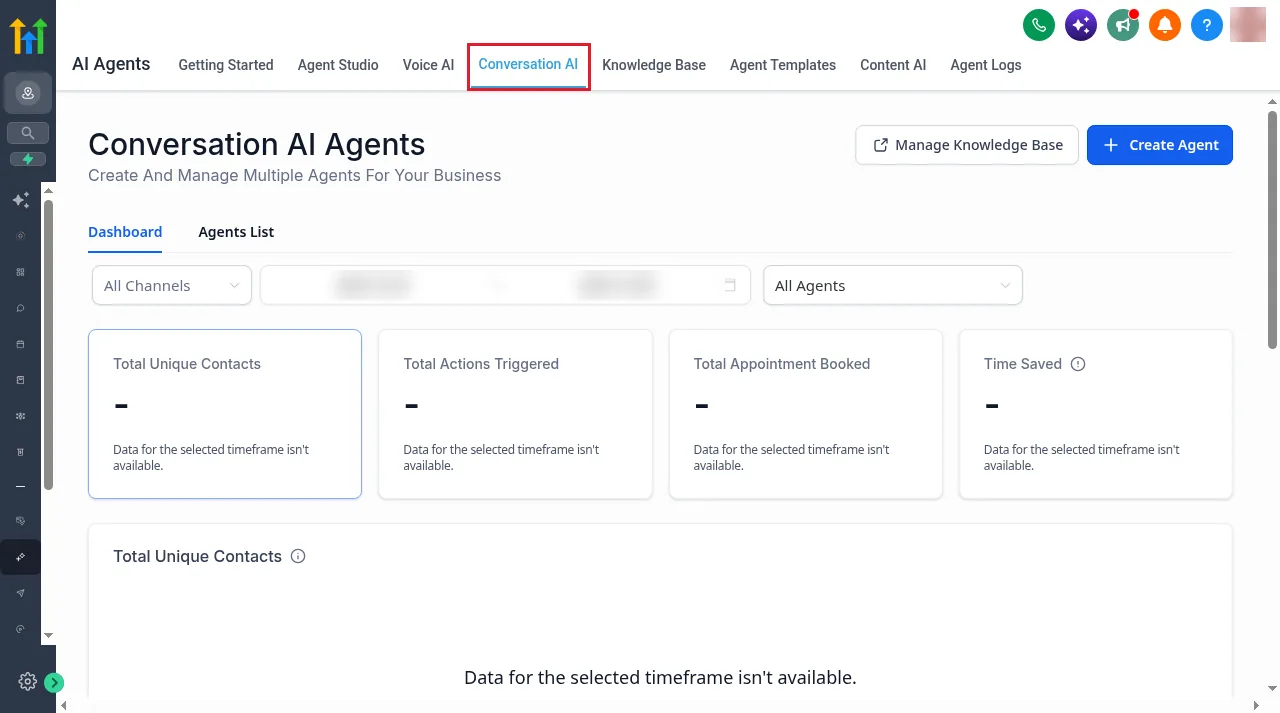
Conversation AI is the text agent. It handles SMS, website chat and social messages, and it can book appointments. The dashboard tracks unique contacts, actions triggered, appointments booked and time saved, filtered by channel and agent.
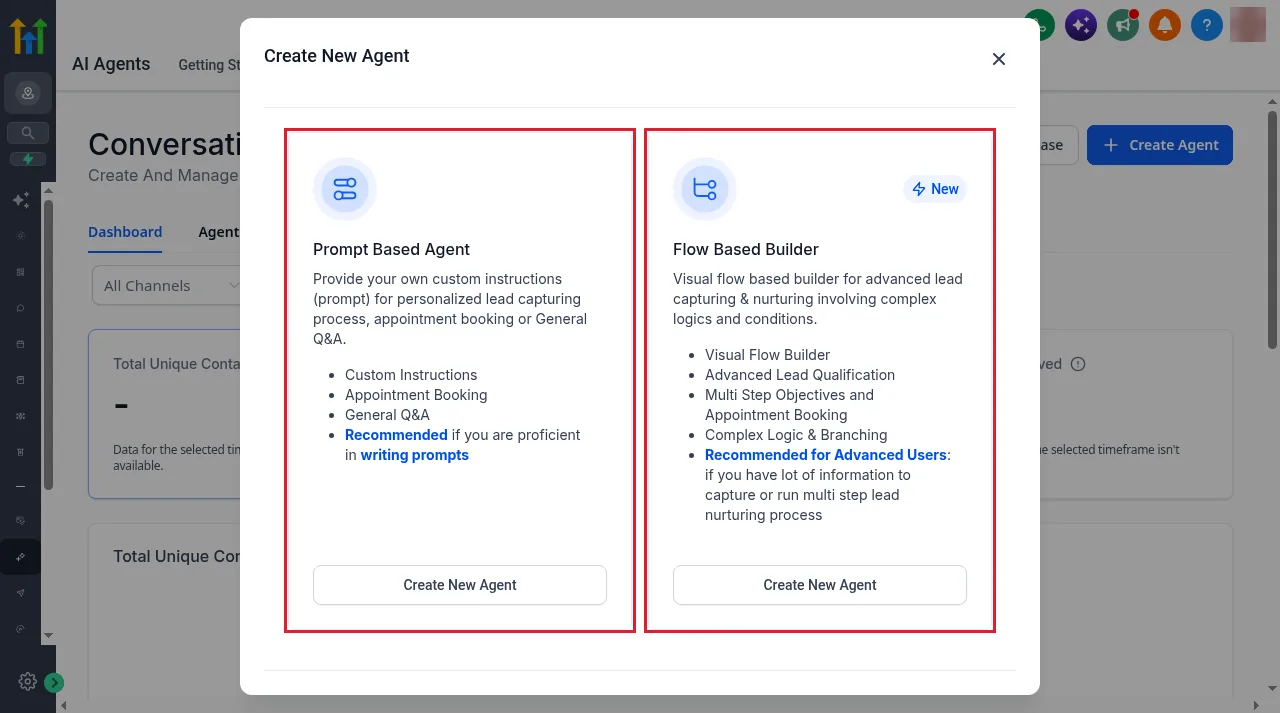
Creating an agent gives you two builders. Prompt Based Agent works from your own written instructions, for lead capture, booking or general questions. Flow Based Builder is a visual flow for multi-step qualification with logic and branching, and HighLevel recommends it for advanced users.
Voice AI
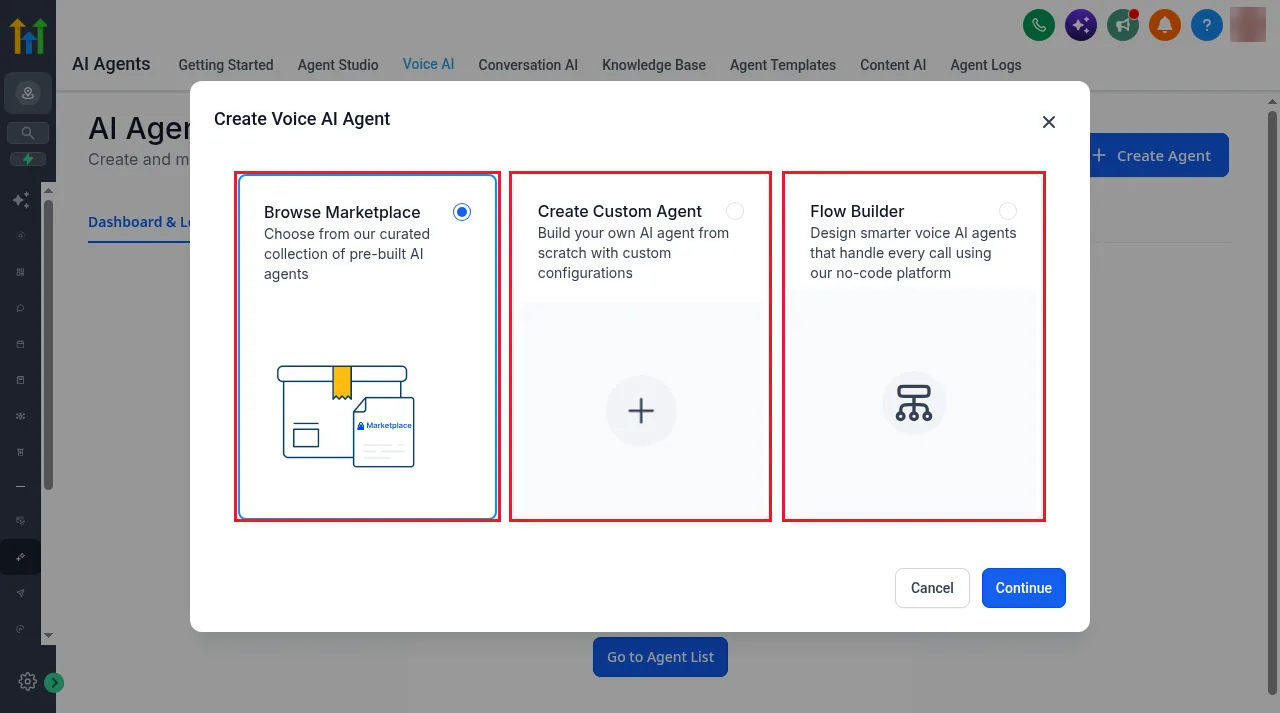
Voice AI is the phone agent. It can answer inbound calls, make outbound calls and run as a widget on your website. The Voice AI tab opens on a Dashboard & Logs view with an Agent List tab and a Create Agent button for building a new phone agent.
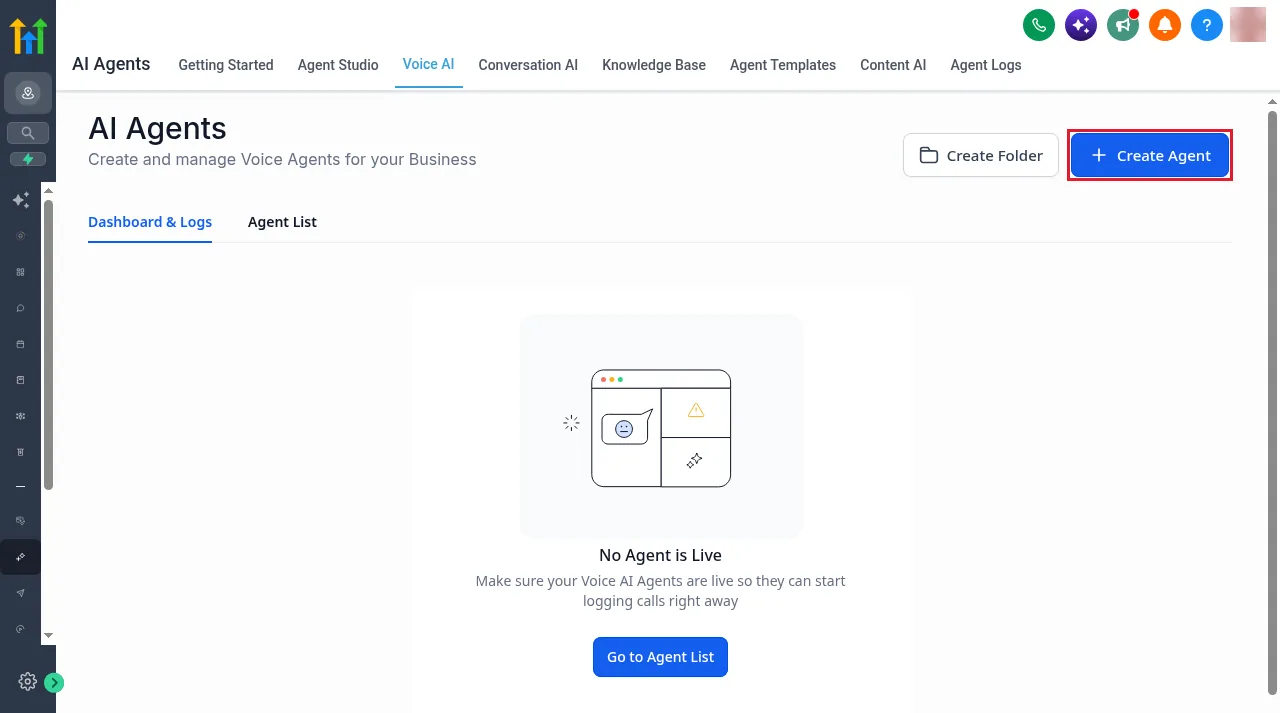
New voice agents start from one of three places: Browse Marketplace (pre-built agents), Create Custom Agent, or Flow Builder for a no-code call flow.
Inside the builder you set the voice, the language model and the language, write the agent's instructions and welcome message, and add actions to run during and after the call. A test panel lets you place a web call through your browser before you connect a phone number.
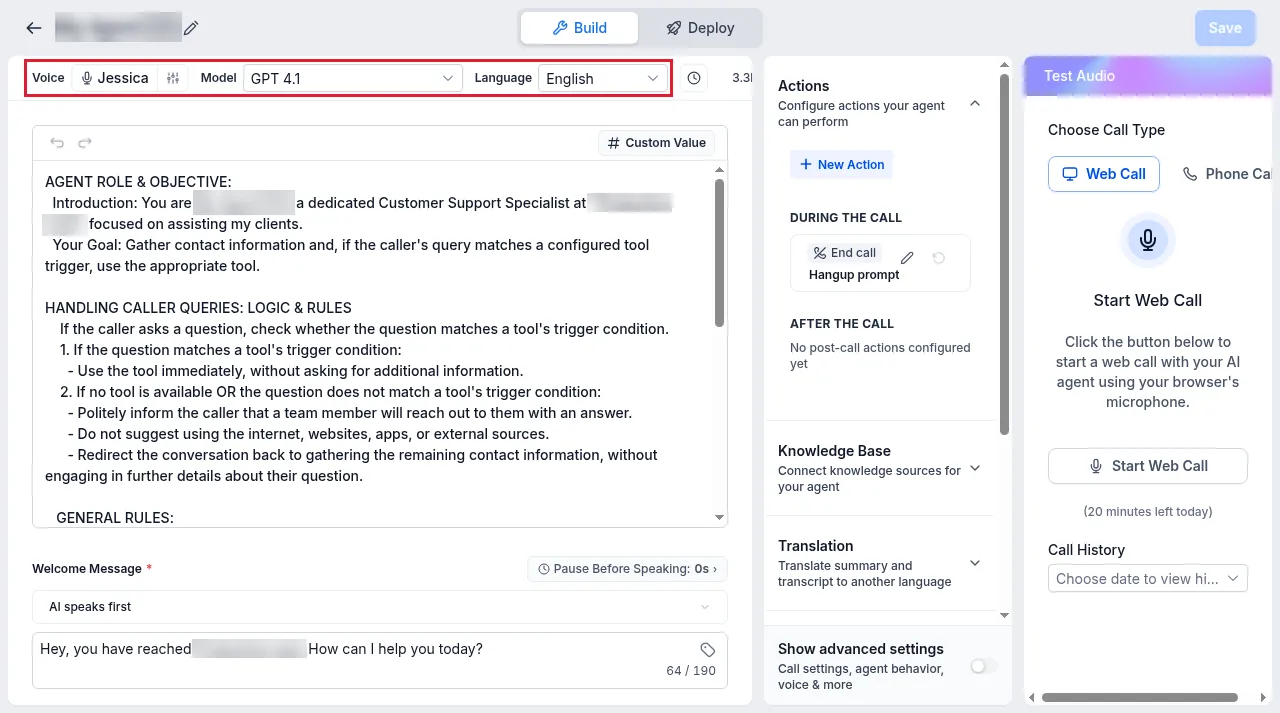
On pay per use, the builder also showed us an estimated cost per minute for the voice and model we had picked. For that setup it was roughly $0.112 to $0.128 a minute. That figure is specific to our choices. Pick a different voice or model and the estimate changes. HighLevel's published pay-per-use rates for Voice AI are $0.045 a minute for the voice engine, plus text to speech from $0.015 a minute, plus language model tokens, plus phone charges (HighLevel help: AI product pricing).
Reviews AI
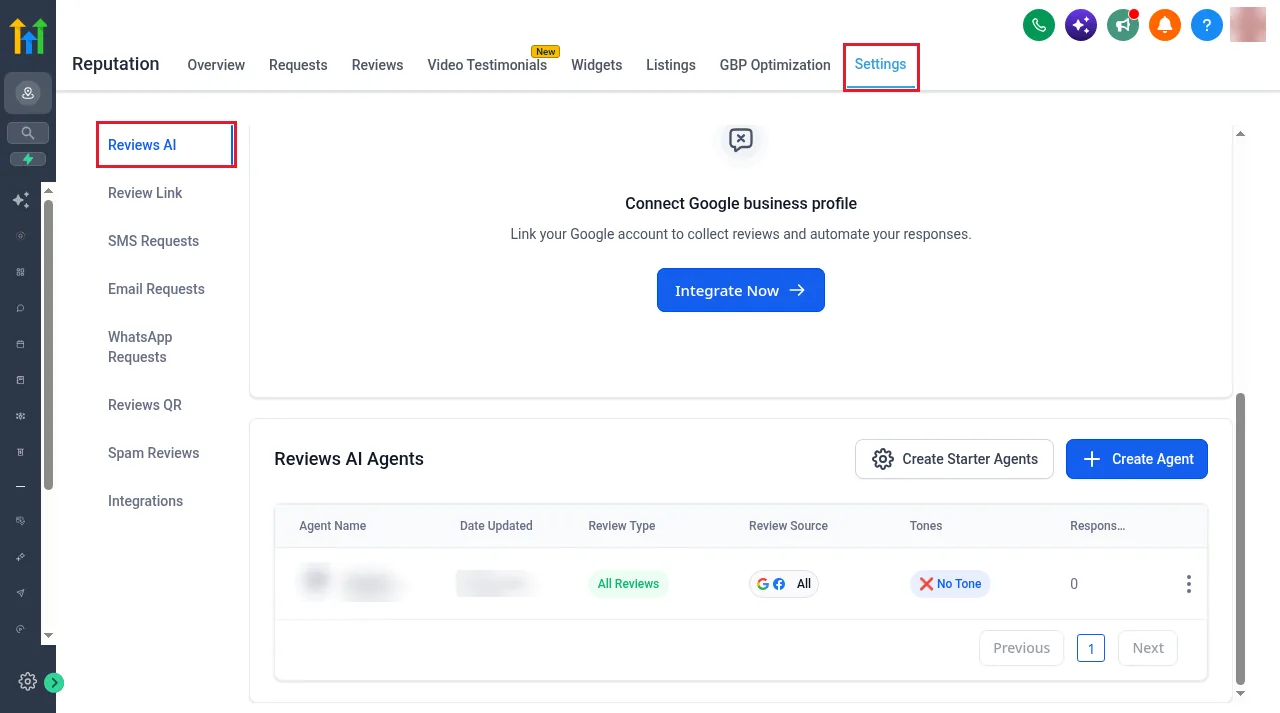
Reviews AI writes replies to your reviews. It lives under Reputation, then Settings, then Reviews AI. Replies are handled by Reviews AI agents. You create your own or start from HighLevel's starter agents, and each one has its own review type, review source and tone.
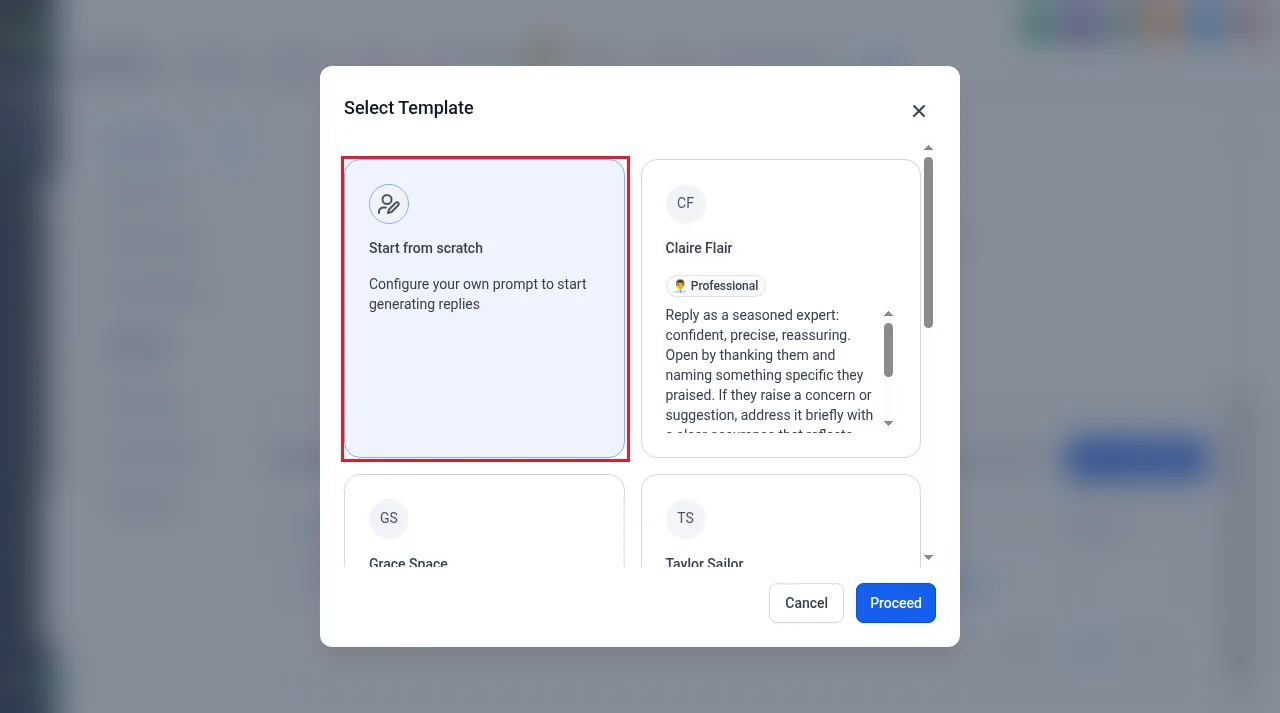
Reply styles come from templates, each with its own tone and instructions, or you can start from scratch with your own prompt.
Content AI
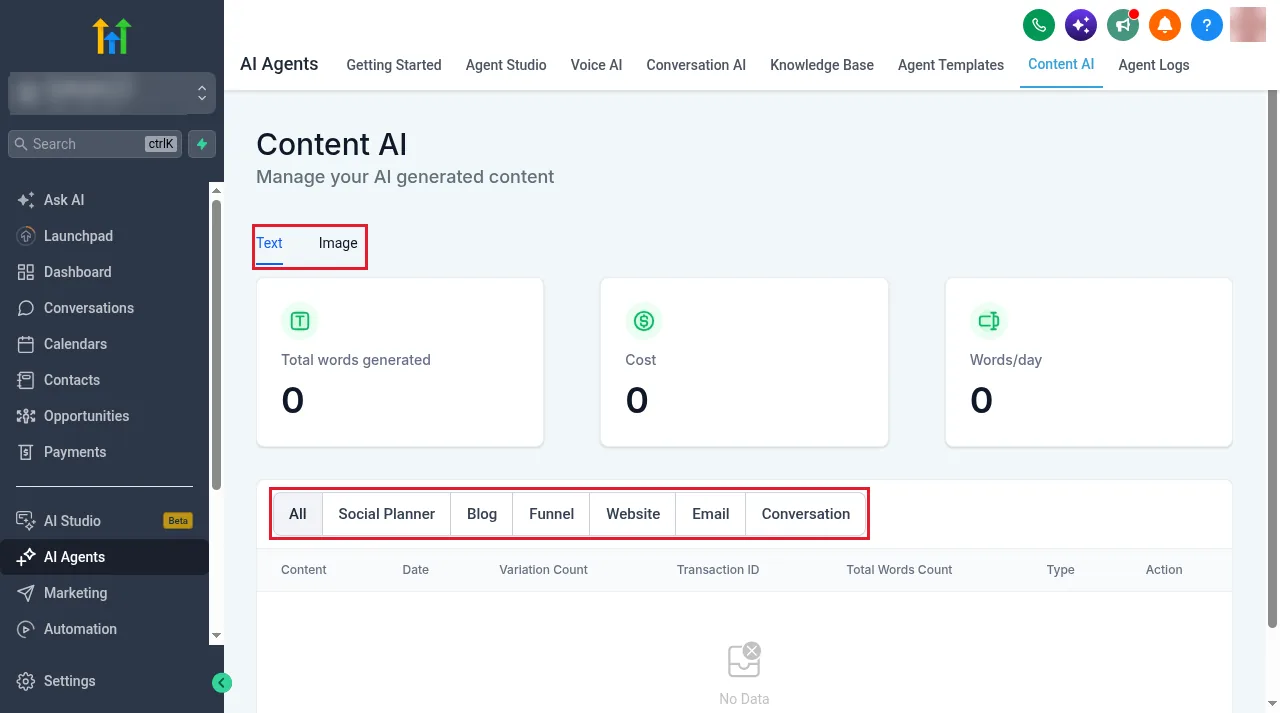
Content AI tracks the words and images generated across the social planner, blog, funnels, websites, email and conversations, along with what they cost. Content AI splits word and image generation into Text and Image tabs, with totals for words generated, cost and words per day.
Agent Studio and Managed Agents
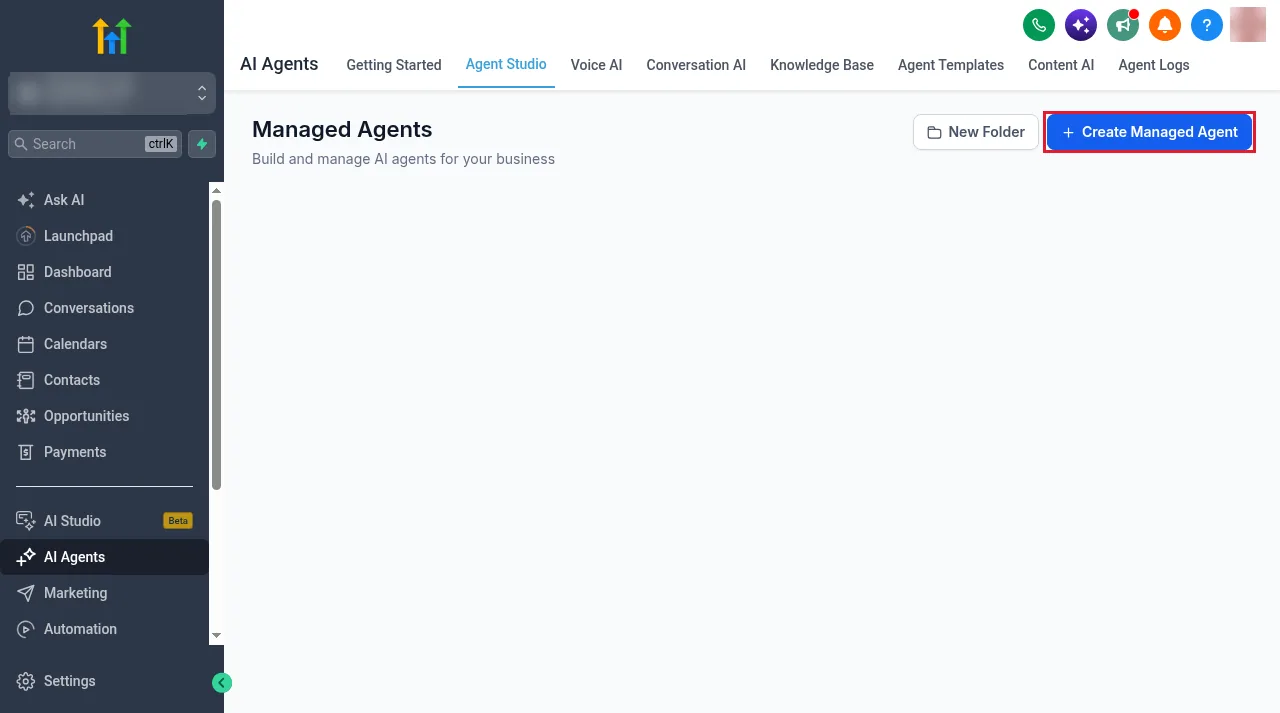
Agent Studio is where you build Managed Agents. These are prompt-based agents that you give a prompt, knowledge, web search and integrations, then run in chat or on triggers. Growth includes 100 Managed Agents runs a month and Unlimited includes 1,000. Agent Studio usage itself is billed at token cost on every plan, including Unlimited.
Ask AI and AI Studio
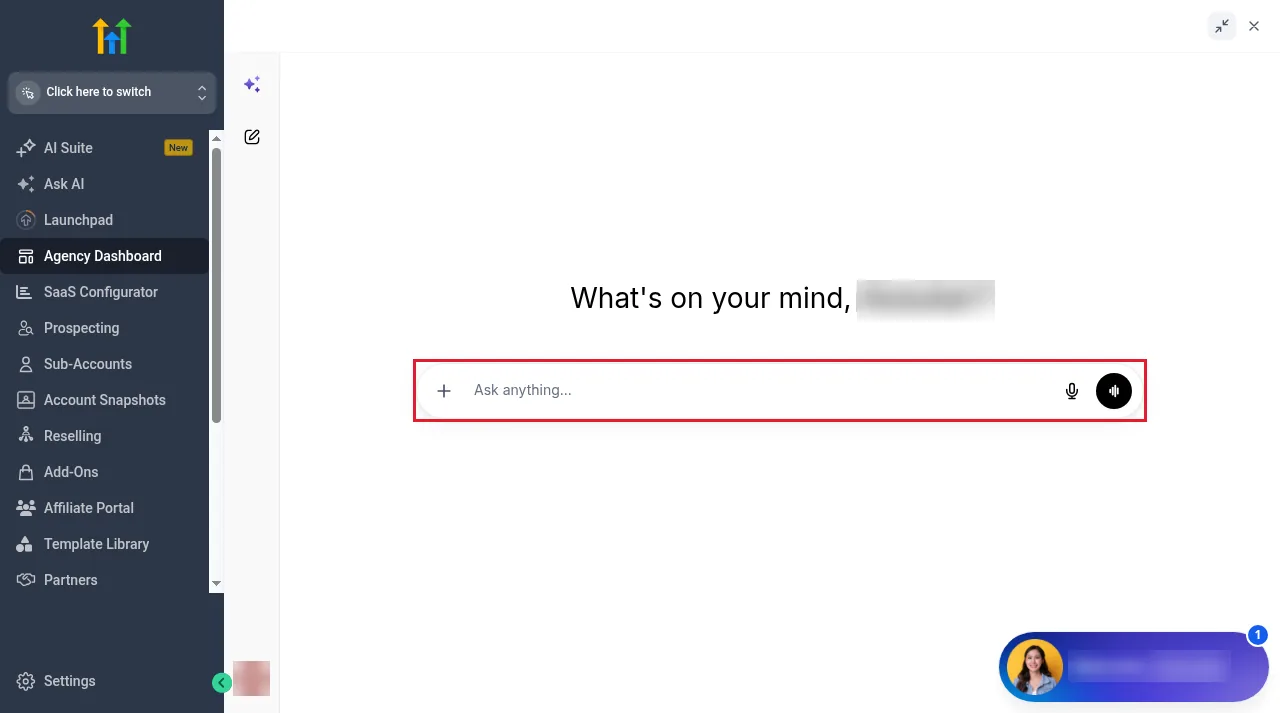
Ask AI is a chat assistant inside GoHighLevel for questions, content and insights. AI Studio is a builder where you describe what you want and it creates the project. Growth includes a set amount of Ask AI and AI Studio usage. Unlimited includes three times as much. Neither is unlimited on either plan. For the full build and publish steps, see our GoHighLevel AI Studio guide.
Funnel AI, Workflow AI and Email AI
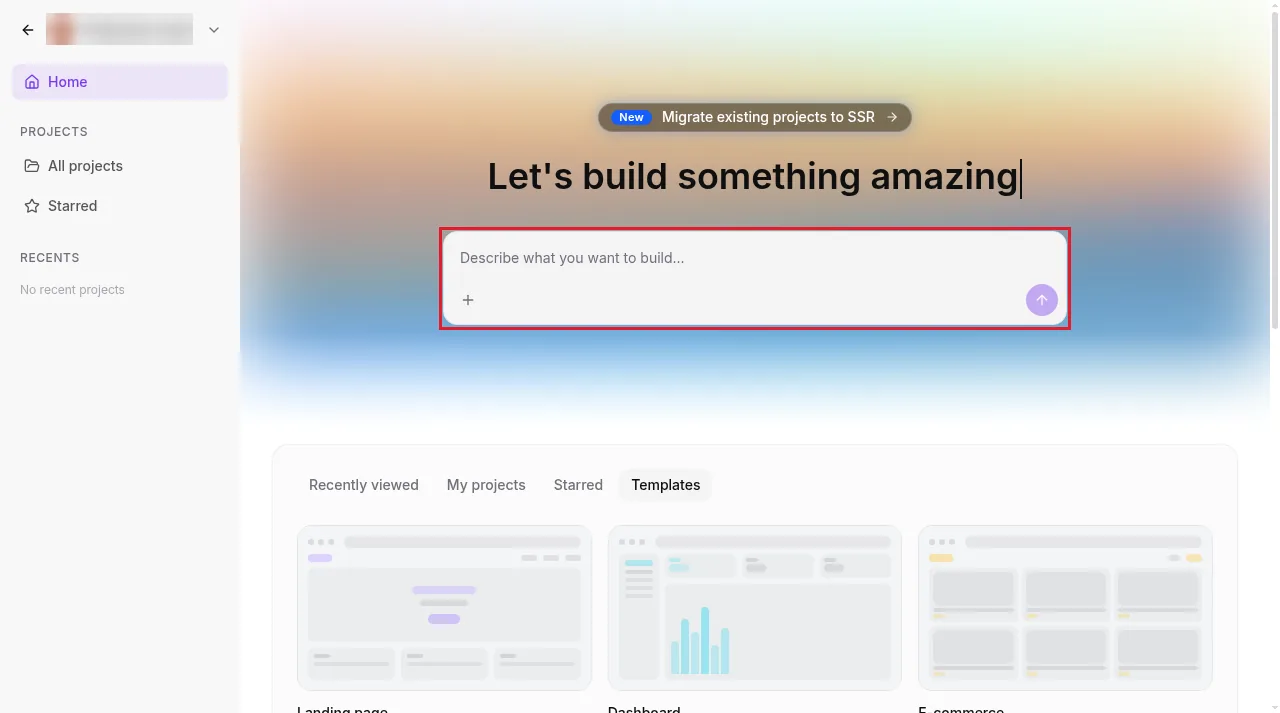
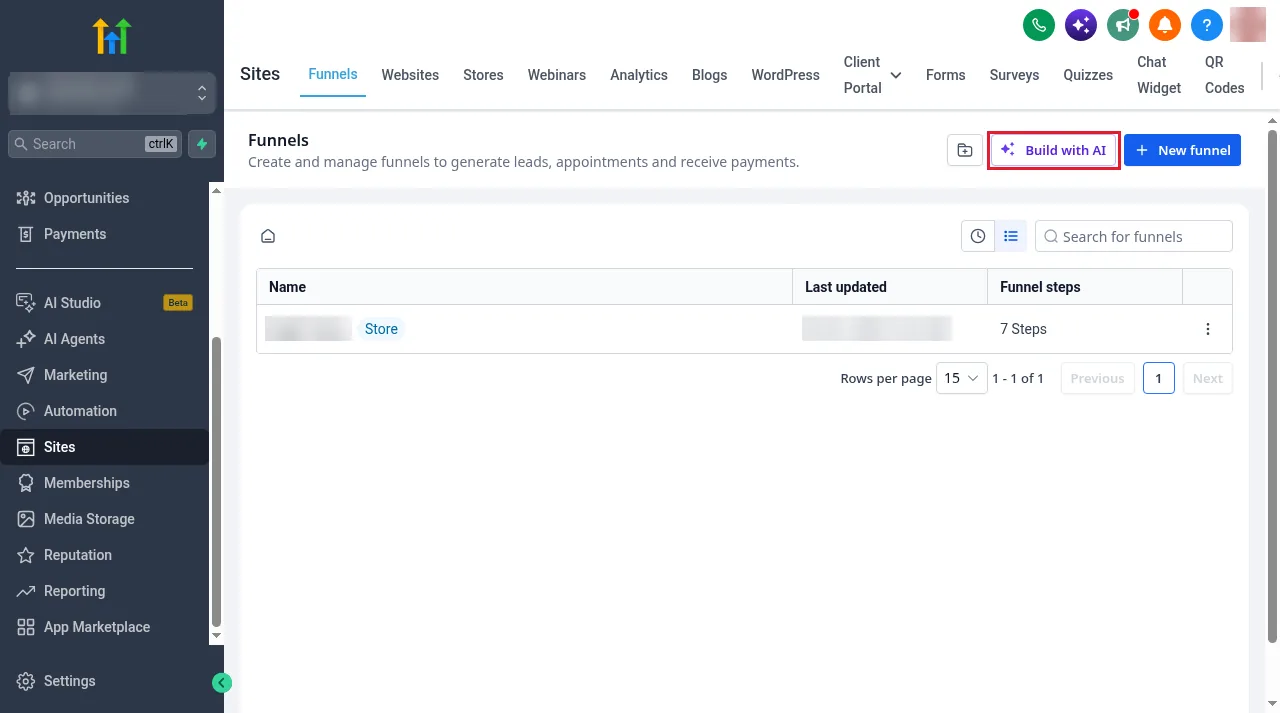
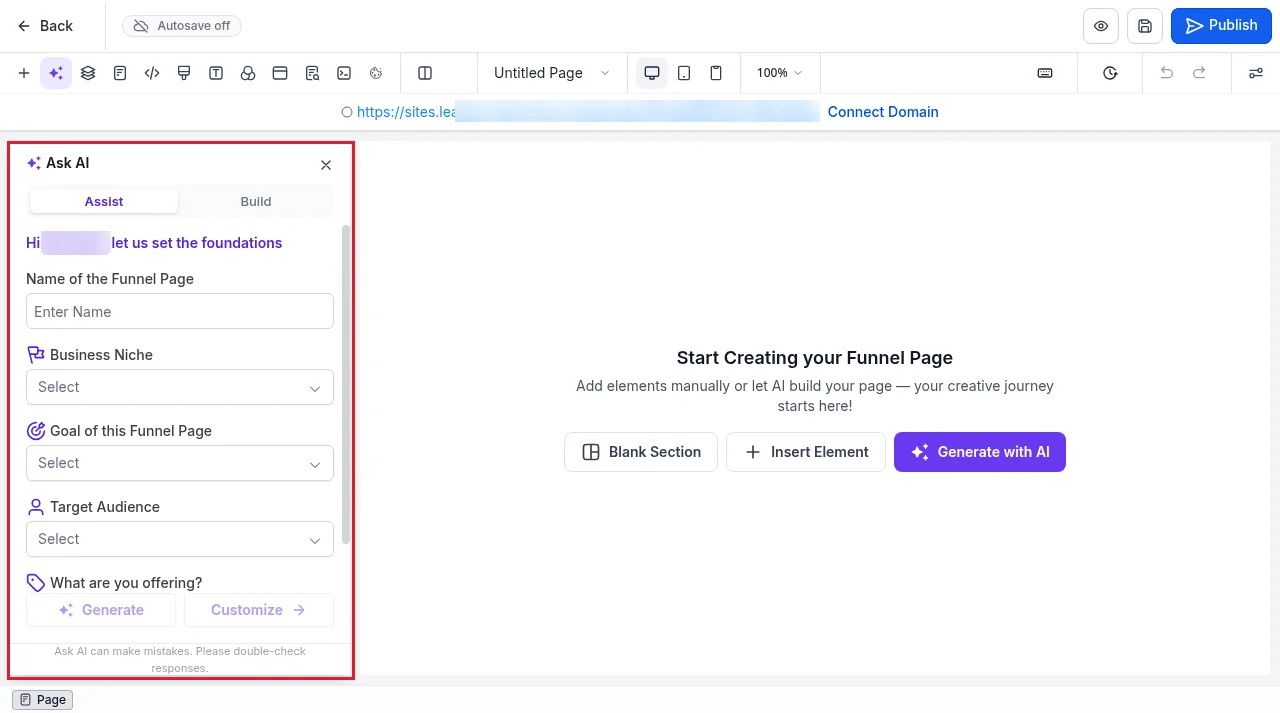
These are free on every plan, with or without AI Employee. In Sites, a Build with AI button sits next to New funnel. It opens the page builder with an Ask AI panel that asks for the page name, niche, goal, audience and offer, then generates the page. HighLevel limits Funnel and Website AI to 1,000 prompts a day under fair use.
AI Employee pricing: pay per use, Growth and Unlimited
HighLevel's pricing page lists AI Employee under optional add-ons: Growth at $50 a month per sub-account and Unlimited at $97 a month per sub-account. The plan picker in our account showed the same three choices: pay as you go (token cost only, no monthly fee), Growth and Unlimited, with Unlimited marked as most popular. This table combines the plan picker with HighLevel's AI product pricing article.
| Included | Pay per use | Growth, $50/mo | Unlimited, $97/mo |
|---|---|---|---|
| Conversation AI | Token cost | 1,000 replies a month | Unlimited |
| Voice AI (inbound, outbound, widget) | Voice engine + TTS + tokens | 100 minutes a month, shared | Unlimited |
| Reviews AI | $0.01 per reply | Unlimited | Unlimited |
| Content AI | $0.063 per image, $0.0945 per 1,000 words | Unlimited | Unlimited |
| Managed Agents | Token cost | 100 runs/mo | 1,000 runs/mo |
| Ask AI and AI Studio | Token cost | Usage included | 3x usage included |
| Funnel, Workflow and Email AI | Free | Free | Free |
| Agent Studio | Token cost | Token cost | Token cost |
| Phone charges | Separate | Separate | Separate |
Source: HighLevel help: AI product pricing. HighLevel notes that pricing, included usage and models can change, so check that article and the prices in your account before you quote a client. Our GoHighLevel pricing breakdown covers the platform plans and every other usage fee.
On pay per use, Conversation AI is billed by tokens, so the cost of each reply depends on the model and the length of the conversation. HighLevel lists GPT-5 at $1.25 per million input tokens and $10 per million output tokens, and GPT-5 Mini at $0.25 and $2.
Free 30 day trial + 2 months free on annual

See the real cost yourself Test the platform for a month, including the usage side, before you commit.
- Free trial
- 30 days
- Annual saving
- 2 months free
- In the trial
- Full access to your plan
What Unlimited covers, and what it doesn't
Unlimited covers Voice AI for inbound calls, outbound calls and the Voice AI website widget. HighLevel's help article states this directly: AI Employee Unlimited includes unlimited Voice AI minutes for inbound, outbound and widget use, subject to fair use, and "Unlimited does not refer only to Conversation AI" (HighLevel help: AI Employee access, rebilling and reselling).
Four things still cost extra, even on Unlimited:
- Phone charges. A Voice AI call has two parts: the AI, which Unlimited covers, and the phone call itself, which it doesn't. You still pay for call minutes, phone numbers and any SMS the AI sends afterwards.
- Agent Studio. Billed at token cost on every plan.
- Premium workflow actions. $0.01 each.
- Heavy use beyond fair use. HighLevel says it may throttle, limit or end access if usage goes past fair use.
If an Unlimited sub-account shows charges after Voice AI calls, check the category first. HighLevel's own troubleshooting advice is to compare AI usage charges with phone charges separately in the AI Suite usage dashboard. If you send texts from Conversation AI to US numbers, you also need A2P registration. Our A2P 10DLC guide walks through it.
The real cost per client: 1, 5 and 10 sub-accounts
Because AI Employee is charged per sub-account, the bill grows with every client you switch it on for. Starter allows up to three sub-accounts, so the 5 and 10 client examples use the $297 Unlimited platform plan. Totals are monthly and include the platform plan, with the AI Employee part in brackets. They exclude phone, SMS, Agent Studio and any Growth overage.
| Clients with AI | Platform plan | With Growth | With Unlimited |
|---|---|---|---|
| 1 | $97 | $147 ($50 AI) | $194 ($97 AI) |
| 5 | $297 | $547 ($250 AI) | $782 ($485 AI) |
| 10 | $297 | $797 ($500 AI) | $1,267 ($970 AI) |
For an agency, the add-on cost only matters if you absorb it. Agencies can resell AI Employee to clients instead (see reselling below). In our account, the default customer prices HighLevel suggested were $127 a month for Unlimited and $75 for Growth. Ten clients on Unlimited at that price would bring in $1,270 a month against $970 in cost.
The plan price covers the AI. The phone line, the numbers and the texts are still on you.
Growth or Unlimited: which plan to pick
Start with the account's call volume, because Voice AI is usually the biggest variable cost. Growth's 100 minutes are shared between inbound, outbound and widget calls. Once they run out, extra minutes are billed at pay-per-use rates.
As a rough guide, use the $0.112 to $0.128 a minute estimate our builder showed for one voice and model setup. At that rate, Growth's $50 is worth roughly 390 to 450 minutes of pay-per-use Voice AI. Unlimited's $97 is worth roughly 760 to 870 minutes. Your own voice and model choice will move these numbers, so check the estimate in your builder.
- Pay per use suits accounts that use AI occasionally: a few review replies, some content, the odd test call.
- Growth suits steady but modest use: under 100 voice minutes and 1,000 AI text replies a month, with unlimited Reviews AI and Content AI.
- Unlimited suits accounts with busy phones or AI answering most inbound messages, and any account where you would rather not watch a meter. It removes the Conversation AI and Voice AI caps, subject to fair use.
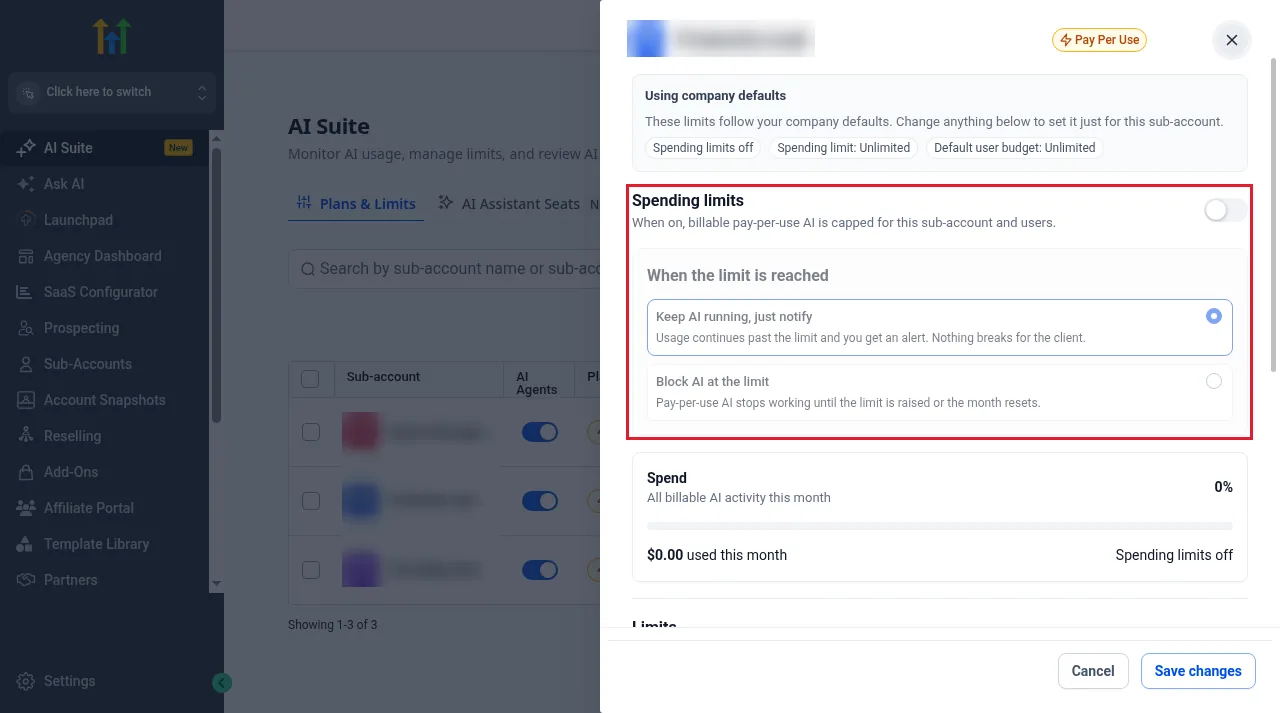
Whatever you choose, set a spending limit. The limits dialog in AI Suite controls what happens when pay-per-use AI hits its cap. Keep AI running, just notify lets usage carry on and sends you an alert. Block AI at the limit stops pay-per-use AI until the limit is raised or the month resets. The setup steps below include a screenshot of it.
How to turn on AI Employee, step by step
AI Employee is switched on at agency level first, then sub-account by sub-account. You need agency admin access.
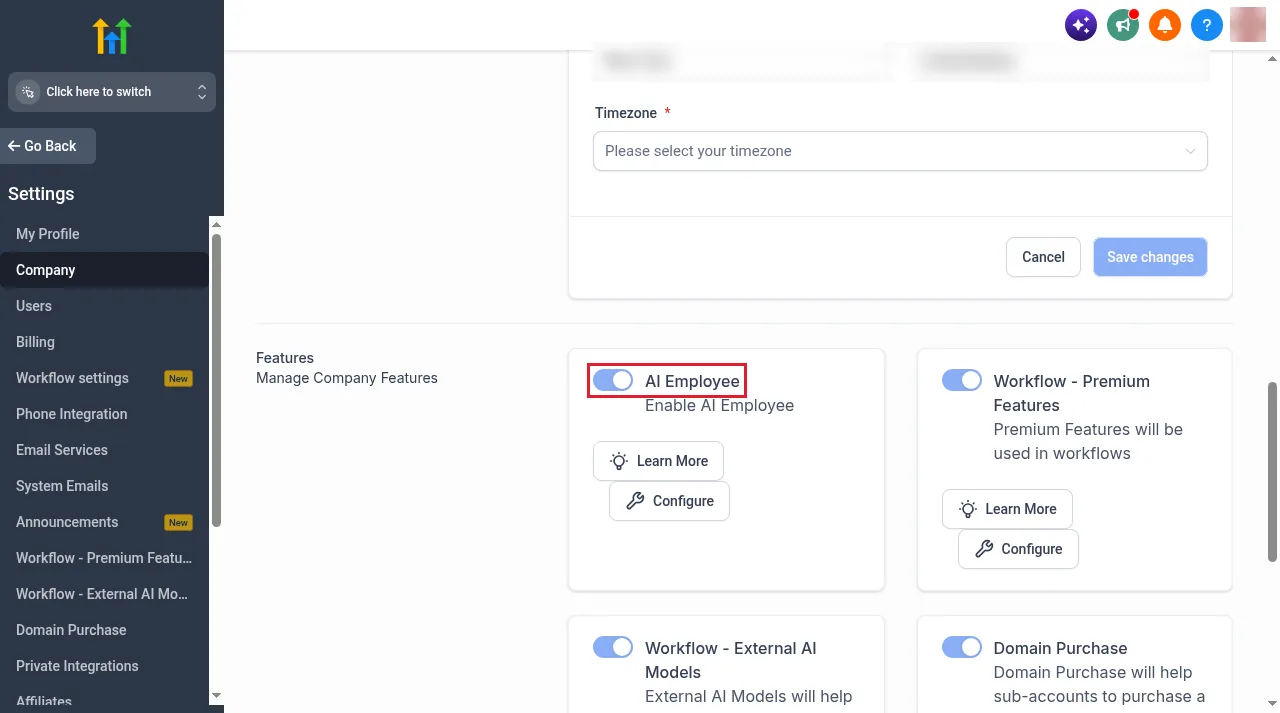
- Switch to Agency View, open Settings, then Company.
- Scroll to Features and turn on the AI Employee toggle. Configure takes you to the AI Employee settings.
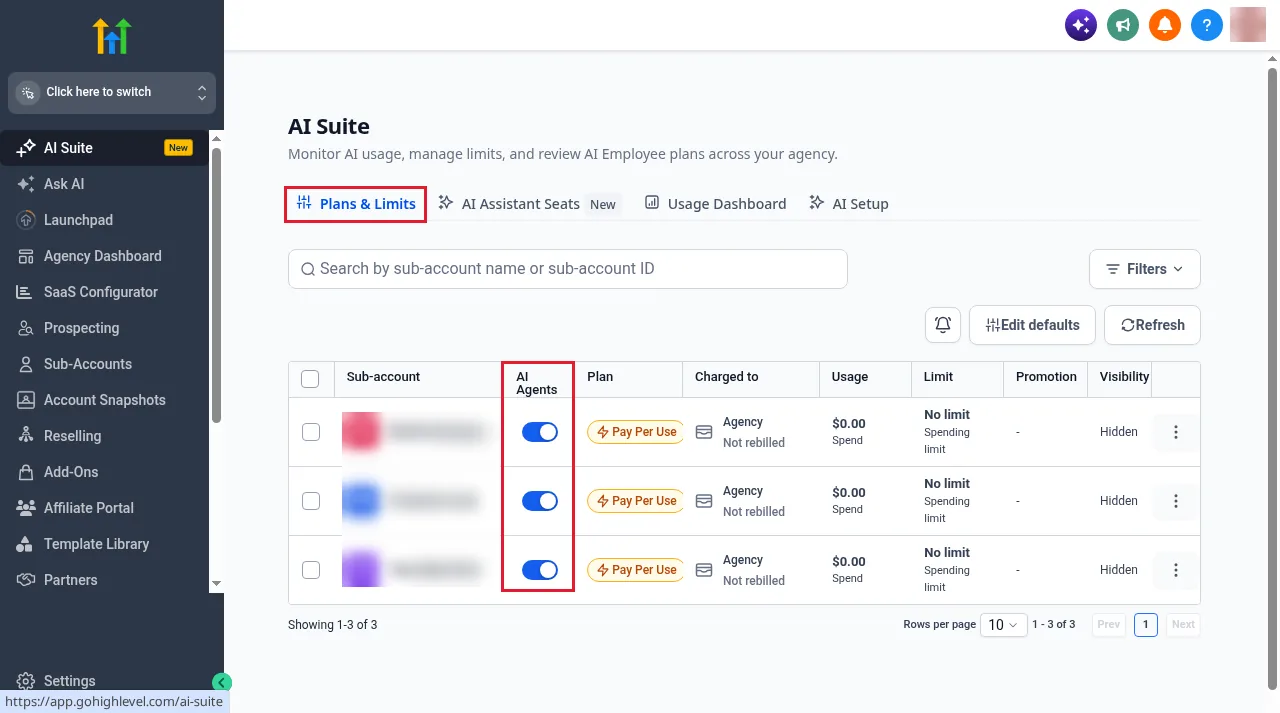
- Open AI Suite from the agency sidebar and go to Plans & Limits. Every sub-account is listed with its plan, who is charged, usage and spending limit.
- Find the client by name or sub-account ID and switch on the AI Agents toggle to give that sub-account access. The three-dot menu has the same option.
- Choose the plan. The plan picker shows pay as you go, AI Employee Growth and AI Employee Unlimited side by side. Select one and continue to billing.
- Set spending limits from the sub-account's row. You can cap billable pay-per-use AI for the sub-account and its users, and choose whether AI keeps running with an alert or stops when the cap is reached.
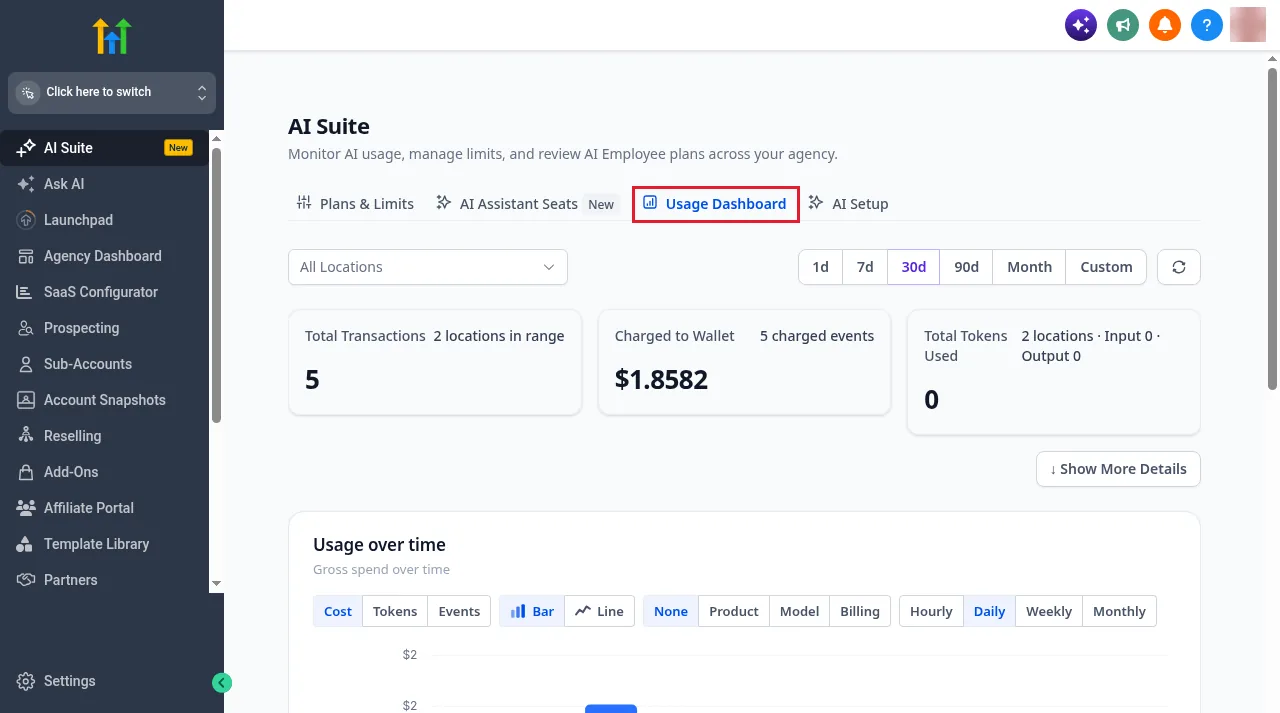
- Check spending in AI Suite, then Usage Dashboard. It shows transactions, the amount charged to your wallet and tokens used, with filters by location and date range.
Reselling and rebilling AI Employee to clients
There are two ways to charge clients for AI, and they are easy to mix up.
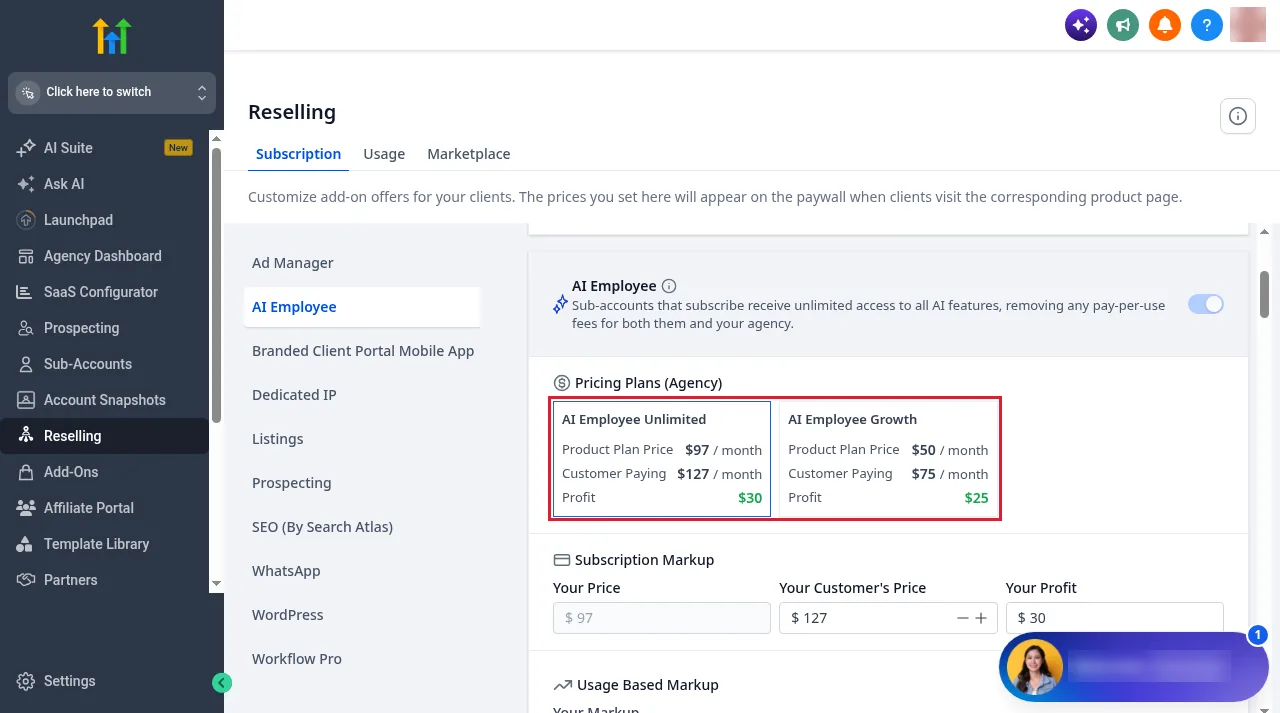
- Reselling sells Growth or Unlimited to the client as a monthly subscription at a price you set. Set it under Reselling, then Subscription, then AI Employee.
- Rebilling passes pay-per-use AI charges on to the client, with a markup or a fixed rate per message or minute. HighLevel's docs say rebilling AI Employee usage needs the $497 Agency Pro plan.
In our account, the reselling screen showed default suggested prices of $127 a month for Unlimited against a $97 cost ($30 profit) and $75 for Growth against $50 ($25 profit). These are defaults, and you can change the customer price to whatever suits your offer.
Pros and cons
Strengths
- One flat price covers voice, chat, reviews and content for a sub-account
- Unlimited includes inbound, outbound and widget Voice AI
- Growth gives quieter accounts a cheaper middle option
- Per sub-account control, spending limits and a usage dashboard
- Built-in reselling with suggested prices, so the cost can become margin
- Everything runs inside the CRM, calendars and workflows you already use
Weaknesses
- Charged per sub-account, so the bill grows with every client
- Phone charges are always extra, even on Unlimited
- Agent Studio stays pay per use on every plan
- "Unlimited" is subject to fair use
- Pricing is spread across several pages and changes over time
- Rebilling AI usage needs the $497 plan
Who AI Employee is for
A good fit if
- You run an agency and can resell AI to clients
- Your clients miss calls or leave leads waiting for replies
- A sub-account would use hundreds of Voice AI minutes a month
- You want reviews answered automatically across many locations
- You prefer a flat price to watching a wallet
Look elsewhere if
- You only use AI now and then. Pay per use is cheaper
- You are not on GoHighLevel. AI Employee can't be bought on its own
- You can't absorb or pass on a per-client monthly fee
- Your use is mainly Agent Studio, which no plan covers
- You need AI to run with no human checking it
On that last point, HighLevel's pricing page itself says AI features need setup and human oversight. Plan time to write good prompts, test the agents, and read through conversations in the first weeks.
Alternatives to AI Employee
- Pay per use inside GoHighLevel. The same tools with no monthly fee. This is the cheapest option for light use, and spending limits keep it predictable.
- A human assistant or answering service. Better for complex or sensitive calls, though you pay for people's time rather than a flat AI fee.
- Separate AI voice and chat tools. These can work outside GoHighLevel, but you have to connect them to your CRM and calendars yourself. AI Employee's main advantage is that everything already lives in the same account.
- An AI assistant for your team instead of your customers. If what you want is help working inside your GoHighLevel data, see our guide to connecting GoHighLevel to Claude with HighLevel's MCP server.
Is GoHighLevel AI Employee worth it?
For an agency with clients who get regular calls and messages, yes, usually on Unlimited. At the per-minute estimate our builder showed, $97 for unlimited inbound, outbound and widget calls beats per-minute billing once an account passes roughly 800 Voice AI minutes a month, and Growth covers the middle ground. The reselling settings make it easy to charge clients more than it costs you.
For a single business with low volume, often not. Pay per use with a spending limit costs less until usage is steady. Growth is the sensible first step once it is. And whichever plan you pick, budget for phone charges, because AI Employee never covers them.
The fair way to judge it is in your own account. Our link gives you a 30-day GoHighLevel trial instead of the 14 days on the public pricing page. HighLevel says usage fees can apply during the trial, so set a spending limit before you test Voice AI. Our 30-day free trial guide explains how the extended trial works, and the GoHighLevel review covers the platform as a whole.
Partner offerFree 30 day trial+ 2 months free on annual
- 30 days instead of the public 14
- Full access to the plan you choose
- Cancel any time before it ends
Common questions
How much does GoHighLevel AI Employee cost?
AI Employee Growth costs $50 a month and AI Employee Unlimited costs $97 a month, charged per sub-account where you turn it on, on top of your GoHighLevel plan. Without a plan, AI is billed pay per use with no monthly fee.
Is AI Employee included in the $97, $297 or $497 plan?
No. It is an optional add-on on every plan. Funnel AI, Workflow AI and Email AI are free on all plans, and the other AI tools are billed per use unless a sub-account has Growth or Unlimited.
What is the difference between AI Employee Growth and Unlimited?
Growth includes 1,000 Conversation AI replies, 100 Voice AI minutes and 100 Managed Agents runs a month, with unlimited Reviews AI and Content AI. Extra usage is billed at pay-per-use rates. Unlimited removes the Conversation AI and Voice AI caps, subject to fair use, and includes 1,000 Managed Agents runs and three times the Ask AI and AI Studio usage.
Does AI Employee Unlimited include outbound calls and the Voice AI widget?
Yes. HighLevel's help docs say Unlimited covers Voice AI for inbound calls, outbound calls and the website widget, subject to fair use.
Why do I still see Voice AI charges on the Unlimited plan?
Phone charges are separate. Unlimited covers the AI side of a call, but call minutes, phone numbers and texts are still billed. Compare AI charges and phone charges separately in the AI Suite usage dashboard.
What happens when a Growth sub-account uses up its allowance?
Extra usage is billed at pay-per-use rates. With a spending limit set, you choose whether AI keeps running and you get an alert, or pay-per-use AI stops until the limit is raised or the month resets.
Can agencies resell AI Employee to clients?
Yes. Under Reselling you set a monthly customer price for Growth or Unlimited. In our account the suggested defaults were $127 for Unlimited and $75 for Growth. Rebilling pay-per-use AI charges to clients needs the $497 Agency Pro plan.
Is there a free trial of AI Employee?
GoHighLevel's trial is 14 days on the public pricing page, or 30 days through our link, and usage fees can apply during the trial. HighLevel sometimes runs promotions with a free trial of AI Employee Unlimited for eligible sub-accounts. Check your AI Employee settings for any current offer.
The verdict
AI Employee gets 7.5 out of 10 from us. It doesn't make HighLevel's AI any smarter. It makes the AI cheaper and more predictable for accounts that use it heavily. Unlimited at $97 per sub-account is the plan to choose for busy clients, because it covers inbound, outbound and widget calls. Growth is a reasonable middle step. Pay per use is still the right answer for quiet accounts.
The catches are the ones that matter most for a budget: phone charges stay separate, Agent Studio is never included, and the cost multiplies with every client. Price AI Employee into what you charge clients, set spending limits, and test it on a real account during the trial before you commit.
AI Employee prices, allowances and usage rates are set by HighLevel and change from time to time. Check HighLevel's AI product pricing article and the prices in your own account before you quote a client.
Some links on this page are partner links. How that works is explained on our affiliate disclosure page.