A white label mobile app puts your agency's name and logo on your clients' phones instead of someone else's. In GoHighLevel it's a paid add-on, and HighLevel has moved it to a self-service Mobile App Customizer, so you brand and release the app yourself. Here's what it costs, what you need before you start, and how I set it up, using only what HighLevel publishes.
Short version
- It costs $497 a month or $1,491 a quarter as an add-on on top of your plan.
- It's not the $49 per sub-account Branded Client Portal App. That's a different product.
- You need your own Apple and Google organization developer accounts and a D-U-N-S number.
- You build it in Agency View, then Mobile App, and release it from the same place.
- Every change after launch needs a new build.
What the GoHighLevel white label mobile app is
It's your own branded version of the HighLevel mobile app, published to the App Store and Google Play under your name. Your clients and their staff use it to reply to conversations, check calendars and get notifications, without ever seeing HighLevel or LeadConnector.
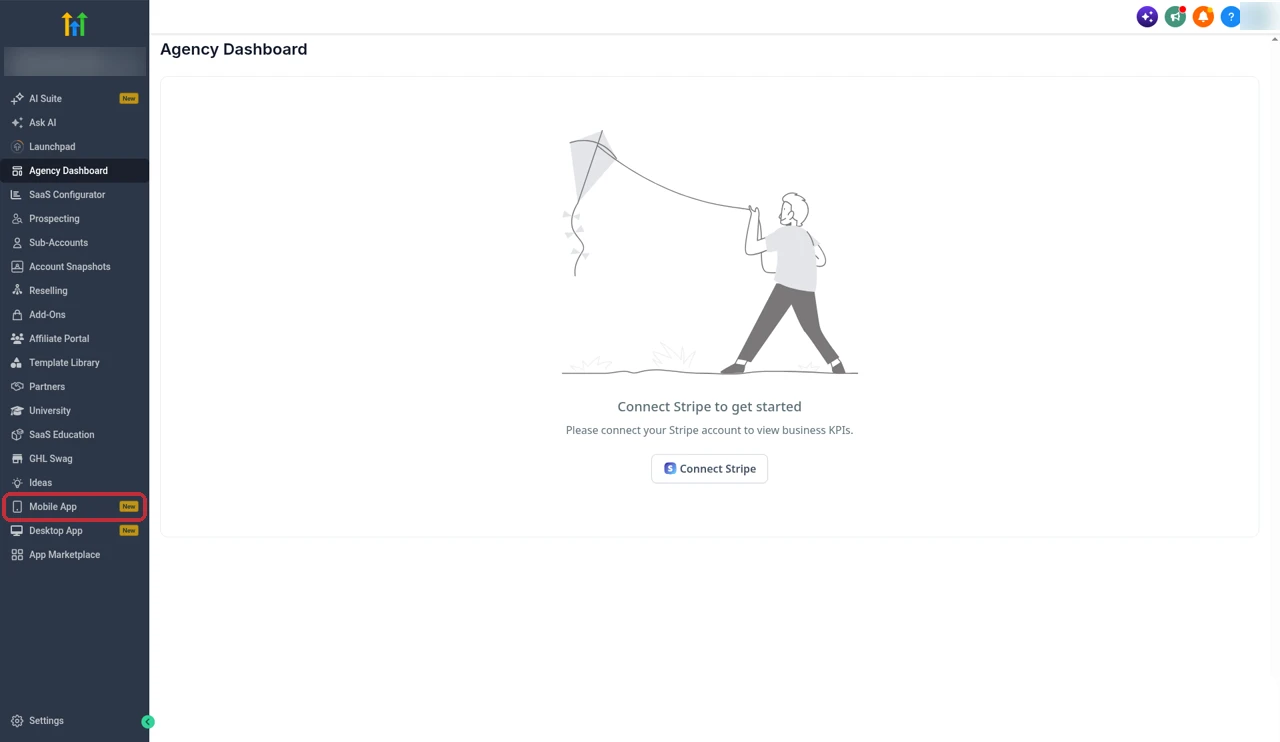
You'll find it in Agency View under Mobile App in the left menu.
The Mobile App page asks you to choose the app for your sub-accounts. There are three options: the HighLevel App and the Lead Connector App, both marked Lifetime Free, and the Custom Agency App with your brand guidelines, marked from $497 a month. The Custom Agency App is the white label one.
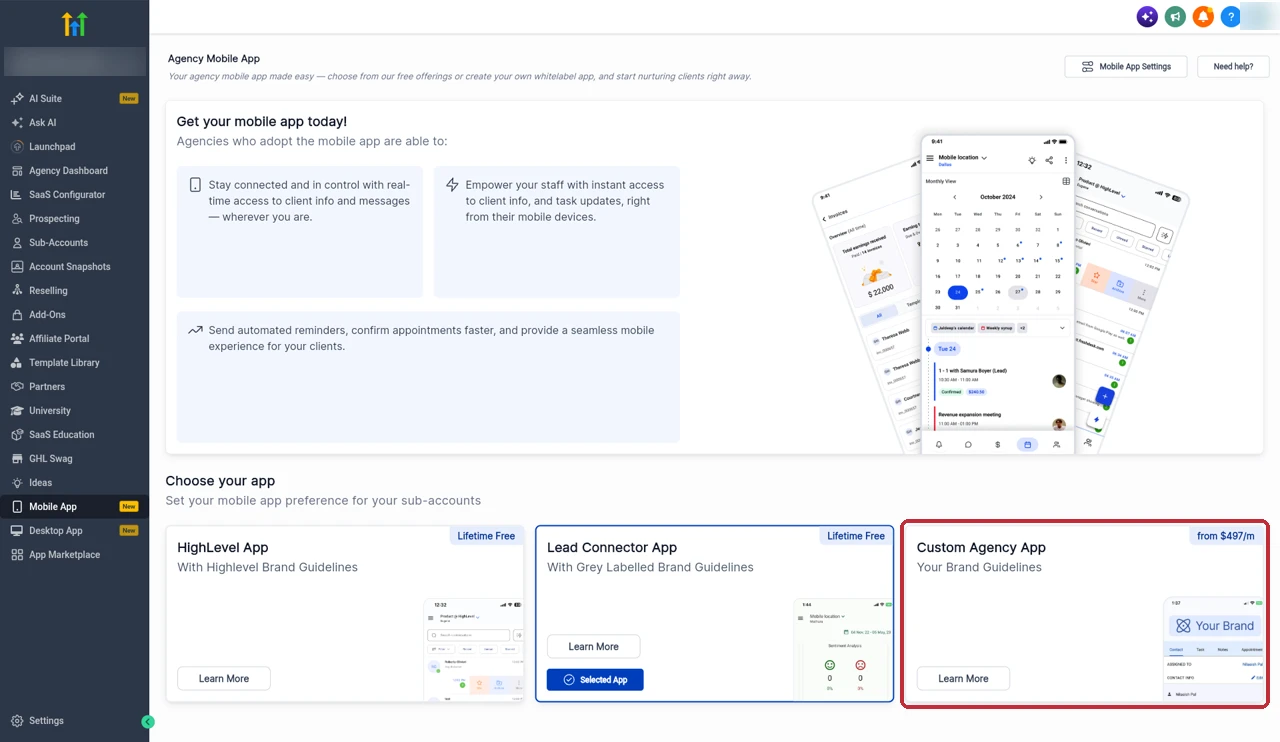
The page also sums up why agencies bother with a mobile app at all: staying in control of client info and messages from anywhere, giving staff instant access to client info and task updates, and sending automated reminders and appointment confirmations faster. All three options give you those features. What changes with the Custom Agency App is whose name is on it.
LeadConnector app vs your white label app
| LeadConnector app | White label app | |
|---|---|---|
| Name and icon in the stores | LeadConnector | Your own |
| Who publishes it | HighLevel | You, from your developer accounts |
| Developer accounts | Not needed | Apple and Google organization accounts |
| HighLevel cost | Free | $497 a month or $1,491 a quarter |
| Branding | Grey labelled | Your logo, colors, font, splash and login screens |
The free apps are fine to start with, and plenty of agencies run on LeadConnector for years. The catch is that your client searches the store for an app called LeadConnector, and the brand they see every day isn't yours. If you've put work into a white labelled desktop experience, with your own domain and your own sending domain, the mobile app is the one place that still shows someone else's name.
White label app vs Branded Client Portal App
These get mixed up all the time. HighLevel's pricing page lists them as two separate add-ons: the White label mobile app at $497 a month, and the Branded Client Portal App at $49 a month per sub-account. If you want one app with your agency brand for all your clients' teams, the white label mobile app is the one this guide covers.
How much it costs
HighLevel lists the white label mobile app at $497 a month, and its pricing guide also shows a quarterly option at $1,491 a quarter, which works out the same as three monthly payments. The pricing guide describes it as a branded mobile app experience for your clients or end users. The Mobile App page in my account shows the same starting price on the Custom Agency App card. It's an add-on, so it sits on top of your agency plan. The plans themselves are $97, $297 and $497 a month on HighLevel's pricing page, and my GoHighLevel pricing guide covers every add-on.

Then there are the store accounts. Google Play charges a one-time $25 registration fee for a developer account.
That's the full list of costs I can confirm from official sources: the add-on, your agency plan and the Google Play fee. Apple's enrollment is handled on Apple's side, so check the current terms there when you sign up.
Is it worth it? The math is simple. Divide the add-on cost by what you'd charge each client for a branded app, or by how much more you can charge for your whole package with it. That tells you how many clients you need to cover it. If you resell HighLevel under your own brand with SaaS mode, a branded app is the last piece that keeps your clients from ever seeing the HighLevel name.
What you can customize
The customizer covers the parts clients notice most:
- Essential branding: app name, logo, primary color and font.
- Splash screens: separate light and dark versions.
- Login screen: logo, title, subtitle and the button text.
- Navigation: top and bottom navigation, with a limit on how many modules fit.
- App drawer: the modules that don't fit in the main navigation.
- Custom modules: a title, URL and icon that opens in the app or the browser, shown only to the users or roles you pick.
HighLevel is clear that not every part of the mobile interface is freely editable, so treat this as branding and layout, not a custom-built app.
Custom modules are the most useful part for me. Because a module is just a title, URL and icon, I can add a link to a client's help page, booking page or community straight into the app, and show it only to the roles that need it. If you run a client community, my communities setup guide covers that side. I'd also get the branding files ready before you start: a clean square icon, light and dark versions of the logo, and your exact brand color, so you're not stopping halfway through to resize images.
Features inside the app
The app is built from modules you place in the navigation. The ones HighLevel names include Notifications, Conversations, Calendar, POS and Apps. Tap to Pay needs the POS, Invoices or Estimates module. Push notifications run through Firebase, which you set up when you link your Apple account. I think about the navigation from the client's side. A sales team lives in Conversations and Calendar, so those go in the bottom bar. A shop that takes payments in person needs POS close at hand. Notifications belong up front for almost everyone, because a reply they never see is a lead they lose. Everything else can sit in the App Drawer, one tap away. If your clients take bookings, my GoHighLevel calendar setup guide gets the calendars right before they start using them on their phones.
What you need before you start
This is where most of the work is, and none of it happens inside HighLevel. The app is published from your developer accounts, so Apple and Google need to know your business is real. That's why both stores want organization accounts rather than personal ones, and why the D-U-N-S number comes up for both. I get all of it ready before I open the customizer:
- D-U-N-S number for your business.
- Apple: an Apple Developer Program organization account with App Store Connect access, and Admin access to create an App Store Connect API key.
- Google: a Google Play Console organization account. Google asks for your legal business name, D-U-N-S number, business details, a public website verified in Google Search Console, a business Google account and government ID. HighLevel notes activation can take 24 to 48 hours.
- Firebase: config files for push notifications, analytics and crash reporting.
- Policy pages: public Privacy Policy and Terms URLs.
- Roles: Admin or App Manager on Apple, and Admin or Release Manager on Google.
- Subscription: the Custom Agency App subscription, monthly or quarterly, which turns on builds and publishing.
The policy pages matter more than people expect. Both stores show them on your listing, so put them on your own website with your business name, not a template that mentions someone else. And give the right people the right roles before you start. If the person doing the setup can't create API keys or release builds, you'll be stuck at the Channels step.
Free 30 day trial + 2 months free on annual

Look around GoHighLevel free for 30 days Open Agency View, check the Mobile App page and the rest of the platform before you pay.
- Free trial
- 30 days
- Annual saving
- 2 months free
- In the trial
- Full access to your plan
How I set up the white label app
Everything below happens inside the Mobile App Customizer, after you click into the Custom Agency App. I've written it from HighLevel's own setup guides.
Create the app and brand it
- In Agency View, open Mobile App and choose the Custom Agency App.
- Enter your App Name and Domain. The bundle ID is generated for you.
- Open Customisation, then Branding.
- Upload the app icon and the login and splash logos, in light and dark versions.
- Set your primary color and font.
Set the login screen, navigation and app drawer
- Set the login screen logo, title, subtitle and button text.
- Under Core Navigation, choose a Bottom Nav with 4 or 5 items, or a Left Drawer.
- Add the modules you want up front, such as Conversations, Calendar and Notifications.
- Put everything else in the App Drawer.
- Add any custom modules with a title, URL and icon, and choose who can see them.
Fill in the store profile and connect the stores
- Go to Distribution, then Profile.
- Choose your countries, default language and categories, and write a short description.
- Open Channels and connect your stores. A green Connected label means it worked.
- For Apple, add your App Store Connect API key (the .p8 file, Key ID and Issuer ID), a unique bundle identifier that matches Firebase, and your Firebase config files.
- For Google Play, upload the service account JSON credentials file.
Download the .p8 key and keep it safe. Apple only lets you download it once.
Choose the subscription, build and release
- Open Subscription and pick Monthly or Quarterly.
- Go to Build & Release and click Create App.
- Choose an Internal build first, add a changelog and submit.
- Watch Live Build Status. You can continue in the background while it runs.
- When the internal build checks out, create a Production build and submit it to the stores.
Pushing updates after launch
Changes in the customizer don't reach your clients by themselves. Every update needs a new build. I keep two rules: never change the bundle or package IDs, and always run an Internal build before a Production one. Use Update in the customizer when you're ready to release the next version.
The Internal build is your safety net. It lets you and your team install the new version and click through the navigation, login screen and custom modules before any client sees it. I batch small changes together, like a new module and a color tweak, so I'm not running a build for every little thing. Write a clear changelog each time too, so you know later what went out in which version.
Common build and submission problems
Most build problems come back to the store accounts, not the app itself. When something goes wrong, I check the connection details first, then the roles, then the IDs. These are the ones HighLevel's own troubleshooting guide points to:
- Build fails. Click View Progress to see where it stopped, fix it, then Retry.
- Store setup not ready. HighLevel's Agency App Manager checks your store setup before a build, so finish both developer accounts first.
- Apple won't connect. Check the API key, Key ID, Issuer ID and that the bundle identifier matches Firebase.
- Google won't connect. Check the service account JSON file and the Release Manager or Admin role.
- Changed IDs. Changing the bundle or package ID breaks the link to the live app. Leave them alone.
Who should get it
| Get it if | Skip it for now if |
|---|---|
| You sell HighLevel under your own brand | You have only a few clients |
| Clients use the app every day | Clients rarely open the mobile app |
| Branding is part of what you sell | LeadConnector branding is fine for you |
| You can set up Apple and Google org accounts | You don't have a D-U-N-S number yet |
The white label app makes the most sense for agencies that already present HighLevel as their own product. If clients log in to your domain, get emails from your brand and pay you directly, a branded app finishes the picture. If they already know they're using HighLevel, the free apps give them the same features.
If you're still building your client base, the free LeadConnector app does the job. Get your snapshots and offer working first, then add the branded app when it pays for itself.
Partner offerFree 30 day trial+ 2 months free on annual
- 30 days instead of the public 14
- Full access to the plan you choose
- Cancel any time before it ends
Common questions
How much does the GoHighLevel white label mobile app cost?
HighLevel lists the white label mobile app as an optional add-on at $497 a month, or $1,491 a quarter. That is on top of your agency plan. You also pay for your own developer accounts, and Google Play charges a one-time $25 registration fee.
Is the white label app the same as the Branded Client Portal App?
No. They are separate add-ons on HighLevel's pricing page. The white label mobile app is $497 a month for your own branded agency app. The Branded Client Portal App is $49 a month per sub-account.
What's the difference between LeadConnector and a white label app?
LeadConnector is HighLevel's free, grey labelled app that your clients download from the stores. A white label app, which HighLevel calls the Custom Agency App, is published under your own name, icon and developer accounts, so clients see your brand.
Do I need my own Apple and Google developer accounts?
Yes. HighLevel requires an Apple Developer Program organization account with App Store Connect access and a Google Play Console organization account. The app is published from your accounts, not HighLevel's.
Do I need a D-U-N-S number?
Yes. HighLevel lists a D-U-N-S number as a prerequisite for Apple, and Google also asks for one when you set up an organization developer account.
What can I customize in the app?
You can set the app name, logo, primary color and font, light and dark splash screens, the login screen, the top and bottom navigation, the app drawer and custom modules that open a URL. HighLevel says not every part of the interface is freely editable.
Does the white label app support push notifications?
Yes. Push notifications run through Firebase, so you add Firebase config files when you link your Apple account. Notifications is also one of the modules you can put in the navigation.
How do I push updates after the app is live?
Make your changes in the Mobile App Customizer and create a new build. Changes only reach the app with a new build. Keep the bundle and package IDs the same, and test with an Internal build before a Production release.
The verdict
The white label mobile app is the finishing touch for an agency that sells HighLevel as its own product. Your clients get your name and logo on their phones, and you control the branding, navigation and releases yourself.
Most of the work is the paperwork, not the app. Get your D-U-N-S number and both developer accounts ready first, then the customizer takes you from branding to an Internal build in one place.
Checked against HighLevel's pricing page, pricing guide, and its help guides on the Mobile App Customizer, promoting and customizing the app, customizing the white label app, linking App Store Connect, setting up a Google developer account and troubleshooting app builds, plus screens from our own GoHighLevel account.
Some links on this page are partner links. How that works is explained on our affiliate disclosure page.