
An all-in-one CRM and marketing platform. Pipelines, two-way texting, calling, email, funnels, calendars and workflows, with client sub-accounts for agencies.
See GoHighLevel pricing
Field service software for home service businesses. Scheduling, routing, quotes, invoices, payments and a mobile app for your crew.
See Jobber pricingIf you run a home service business, or an agency that markets them, you've probably come across both of these. They look like rivals, but they solve different problems. Jobber runs the work once a customer says yes. GoHighLevel finds those customers and keeps talking to them until they do. In this comparison I go through pricing, scheduling, quotes, invoicing, CRM and automation, and then show how the native integration lets you use both.
Short version
- Jobber is field service software: scheduling, routing, GPS tracking, quotes, invoices and a crew app.
- GoHighLevel is a CRM and marketing platform: pipelines, texting, email, calls, funnels and workflows.
- Jobber starts at $29 to $49 a month for one user, depending on billing. GoHighLevel starts at $97 a month plus usage.
- Both offer a 14-day free trial.
- There's a native integration that syncs client data both ways, so many businesses run both.
The short answer
Pick Jobber if your biggest headache is the work itself: booking jobs, sending crews to the right place, quoting on site and getting paid. That's what it's built for, and GoHighLevel doesn't try to match it there.
Pick GoHighLevel if your biggest headache is getting and keeping customers: answering leads fast, following up, chasing reviews and running campaigns. Jobber has some of this, mostly as paid add-ons, but it's not its core.
If you need both, you can have both. HighLevel and Jobber have an official integration, so leads you win in GoHighLevel can flow into Jobber and client updates in Jobber show up in GoHighLevel.
Pick GoHighLevel if- You need a CRM and sales pipeline
- You text, call and email leads
- You run ads, funnels and campaigns
- You want reviews and follow-ups automated
- You're an agency with several clients
Pick Jobber if- You schedule and dispatch crews
- You need routing and GPS tracking
- You quote and invoice on site
- You track time and job costs
- Your team works from a mobile app
GoHighLevel vs Jobber at a glance
| GoHighLevel | Jobber | |
|---|---|---|
| What it is | CRM and marketing platform | Field service management software |
| Starting price | $97 a month, or $970 a year | $29 to $49 a month for Core, depending on billing |
| Billing options | Monthly or annual | Monthly, monthly with a 1-year commitment, or annual prepaid |
| Users | Unlimited users on every plan | 1 user on Core, Connect and Grow, 5 on Plus, then larger team tiers |
| Free trial | 14 days on any plan | 14 days of Grow, no credit card |
| Scheduling and dispatch | Booking calendars | Scheduling, routing, GPS tracking, crew scheduling |
| Quotes and invoices | Invoices in Payments | Quotes, rich quotes, invoices and online payments |
| CRM and pipelines | Built in on every plan | Client hub, plus a Pipeline add-on |
| SMS and email marketing | Built in, billed by usage | Two-way SMS on Grow, Marketing Suite add-on |
| Automation | Workflows on every plan | Reminders and follow-ups, custom automations on Grow |
| White label and SaaS | Sub-accounts, SaaS Mode, white label app | Not offered on the pricing page |
| Mobile app | LeadConnector app, white label app add-on | iOS and Android app for you and your team |
| Integrations | App Marketplace, API, native Jobber integration | 100+ apps, including QuickBooks Online, Xero, Zapier and Gusto |
What each platform is built for
Jobber is built around the job. A client asks for work, you send a quote, it gets approved, the job goes on the schedule, a crew member does it with the mobile app, and an invoice goes out. Everything in Jobber supports that loop, from routing and GPS tracking to checklists, time tracking and job costing.
GoHighLevel is built around the customer conversation. A lead fills in a form, calls or messages you, lands in a pipeline and gets followed up by text, email or an AI agent until they book. GoHighLevel is also built for agencies, so each client can have their own sub-account with their own contacts, pipelines, phone numbers and workflows.
That's why the overlap is smaller than it looks. Both can book an appointment and send an invoice, but each one is far deeper on its own side of the business.
Free 30 day trial + 2 months free on annual
Run your lead follow-up on a 30 day trial Set up a pipeline, a booking calendar and a follow-up workflow before you pay.
- Free trial
- 30 days
- Annual saving
- 2 months free
- In the trial
- Full access to your plan
Pricing compared
Jobber plans and billing options
Jobber is the only one of the two with three ways to pay. You can pay monthly with no commitment, monthly with a 1-year commitment, or a year up front. Here are the prices for the smallest team size on each plan, in USD and before sales tax.
| Plan | Users | Monthly, no commitment | Monthly, 1-year commitment | Annual prepaid, per month |
|---|---|---|---|---|
| Core | 1 | $49 | $39 | $29 |
| Connect | 1 | $139 | $119 | $99 |
| Grow | 1 | $199 | $169 | $149 |
| Plus | 5 | $499 | $439 | $399 |
Core covers the basics: online booking and scheduling, quotes, invoices with online payments, a website, reporting and access to more than 100 apps. Connect adds automated reminders, automatic payments, checklists, quote and invoice follow-ups, QuickBooks Online sync and time and expense tracking. Grow adds rich quotes with optional line items, automatic time tracking, job costing, two-way SMS in the US, Canada and the UK, and custom workflow automations. Plus adds unlimited media, crew scheduling, expense capture, custom reports, Pipeline, Marketing Suite and Receptionist, plus onboarding and Premium Support.
Prices change with team size. On no commitment or annual prepaid billing, Connect is $199 or $149 for 5 users, $299 or $229 for 10 and $399 or $299 for 15. Grow is $299 or $229 for 5 users, $399 or $299 for 10 and $499 or $399 for 15. Plus is $599 or $449 for 10 users and $699 or $529 for 15. Teams of 16 or more have to contact sales. You'll find all of it on Jobber's pricing page.
GoHighLevel plans
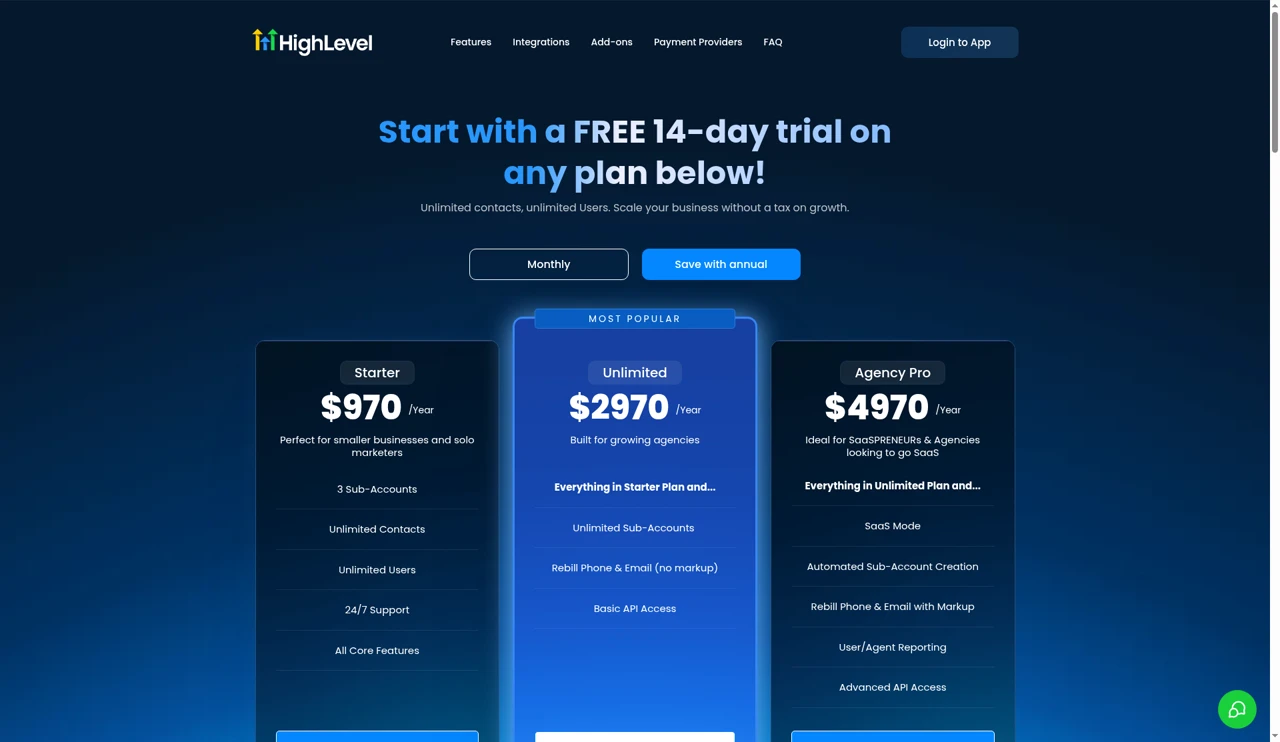
| Plan | Monthly | Annual | What stands out |
|---|---|---|---|
| Starter | $97 | $970 | 3 sub-accounts, unlimited contacts and users |
| Unlimited | $297 | $2,970 | Unlimited sub-accounts |
| Agency Pro | $497 | $4,970 | SaaS Mode and rebilling with markup |
GoHighLevel doesn't charge by user, and every plan has a 14-day free trial. The plans are on GoHighLevel's pricing page, and my GoHighLevel pricing guide explains what each one really costs.
Extra costs to plan for
- Jobber users: extra users are $29 a month each.
- Jobber add-ons: Marketing Suite is $99 a month, Receptionist (AI) is $29 a month and Pipeline is $49 a month. Pipeline is included on Plus.
- Jobber payment fees: 2.9% + 30¢ for cards, 2.7% + 30¢ for Tap to Pay, 1% for ACH in the US, and 1% extra for instant payouts.
- GoHighLevel usage: phone, SMS, email and AI are charged by usage on top of the plan. My GoHighLevel SMS pricing guide covers the texting side.
- GoHighLevel add-ons: the white label mobile app is $497 a month, and the Branded Client Portal App is $49 a month per sub-account.
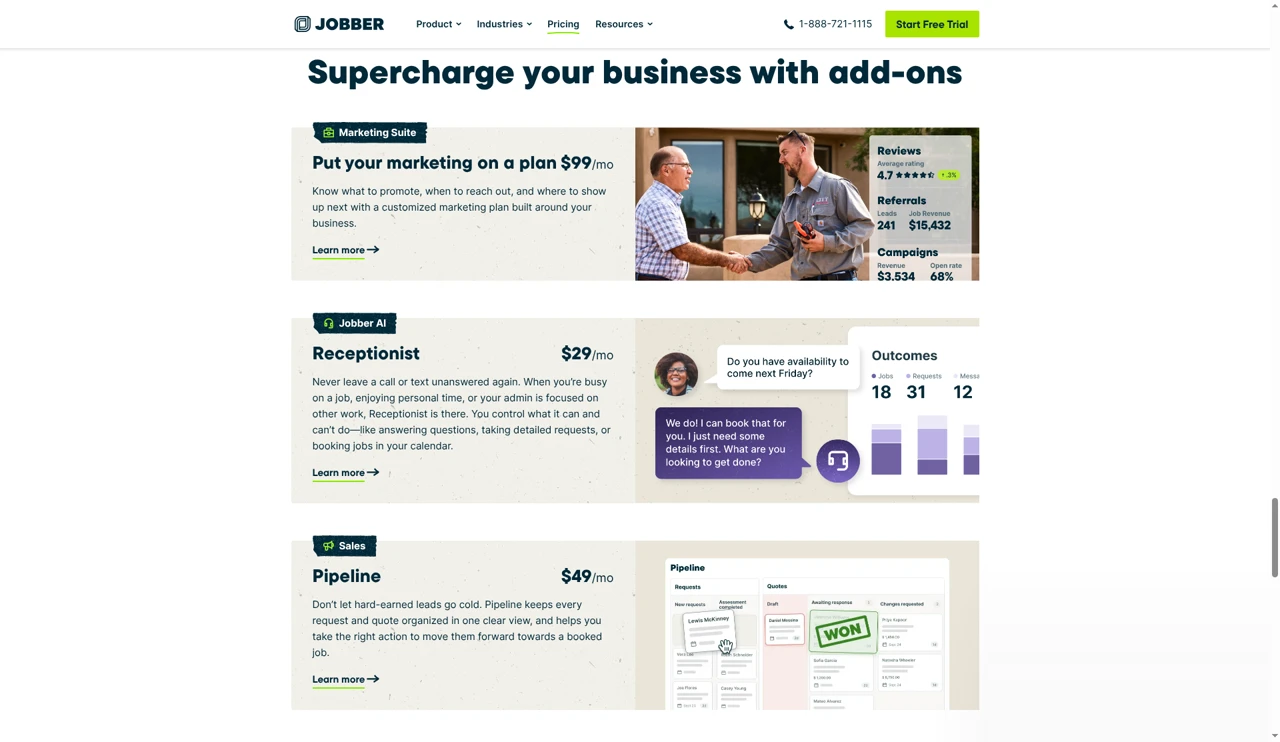
What a 1-person and a 5-person team would pay
These come straight from the list prices above, before tax, payment fees and GoHighLevel usage.
| Team | Jobber | GoHighLevel |
|---|---|---|
| 1 person | Core $29 to $49 a month. Grow $149 to $199 a month | Starter $97 a month, or $970 a year |
| 5 people | Connect $149 to $199 a month. Grow $229 to $299 a month. Plus $399 to $499 a month | Starter $97 a month, because users are unlimited |
For a one-person business that mainly needs to schedule and invoice, Jobber is the cheaper start. As the team grows, Jobber's price climbs with it, while GoHighLevel's plan stays the same and your usage becomes the variable.
Pricing
Jobber is cheaper for small teams that mostly need job tools. GoHighLevel doesn't charge per user, but usage adds up.
Field service scheduling and dispatch
This is Jobber's home ground. Its plans include online booking and scheduling, and it adds routing, GPS tracking and crew scheduling for teams in the field. The plan feature table groups scheduling, routing and GPS tracking together under Job Tracking.
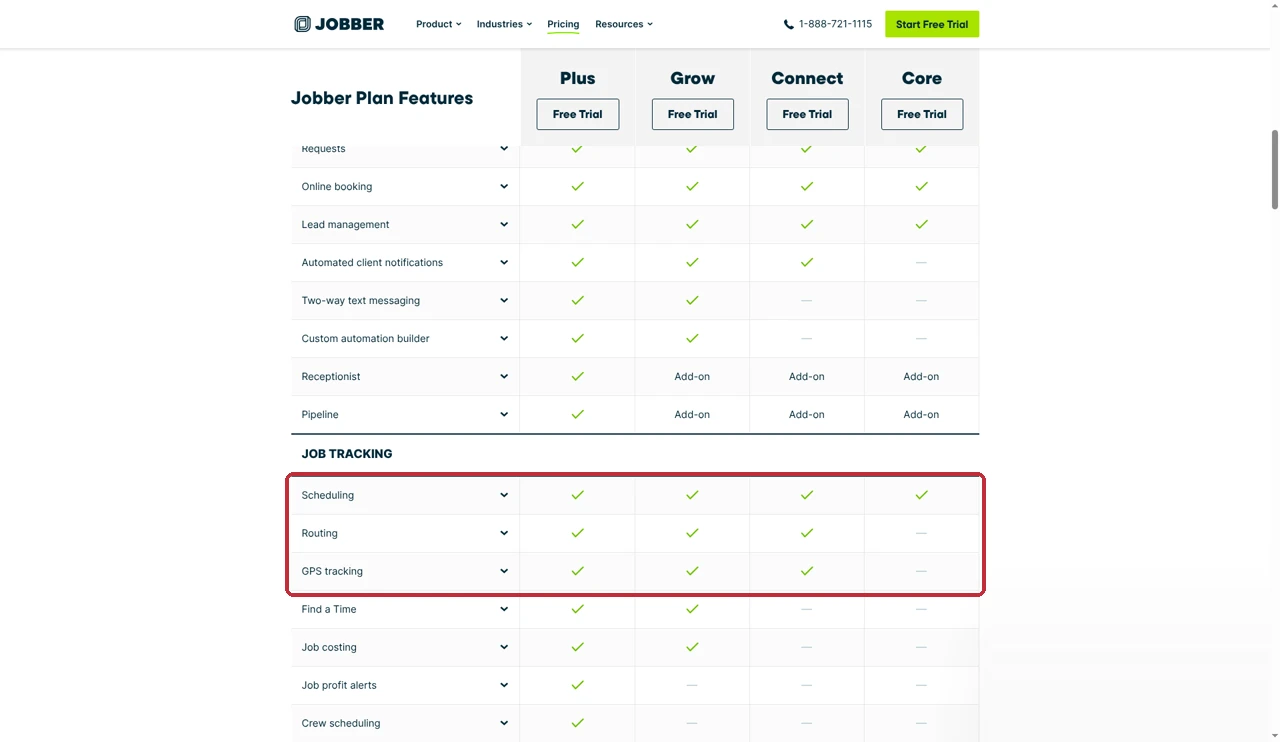
GoHighLevel has calendars, and they're good for what they do. Customers can book into a calendar from a form, a website or a text, and reminders go out on their own. But they're built for appointments, not for dispatching crews. I haven't found routing, GPS crew tracking or job costing in GoHighLevel. My GoHighLevel calendar setup guide shows what the calendars can do.
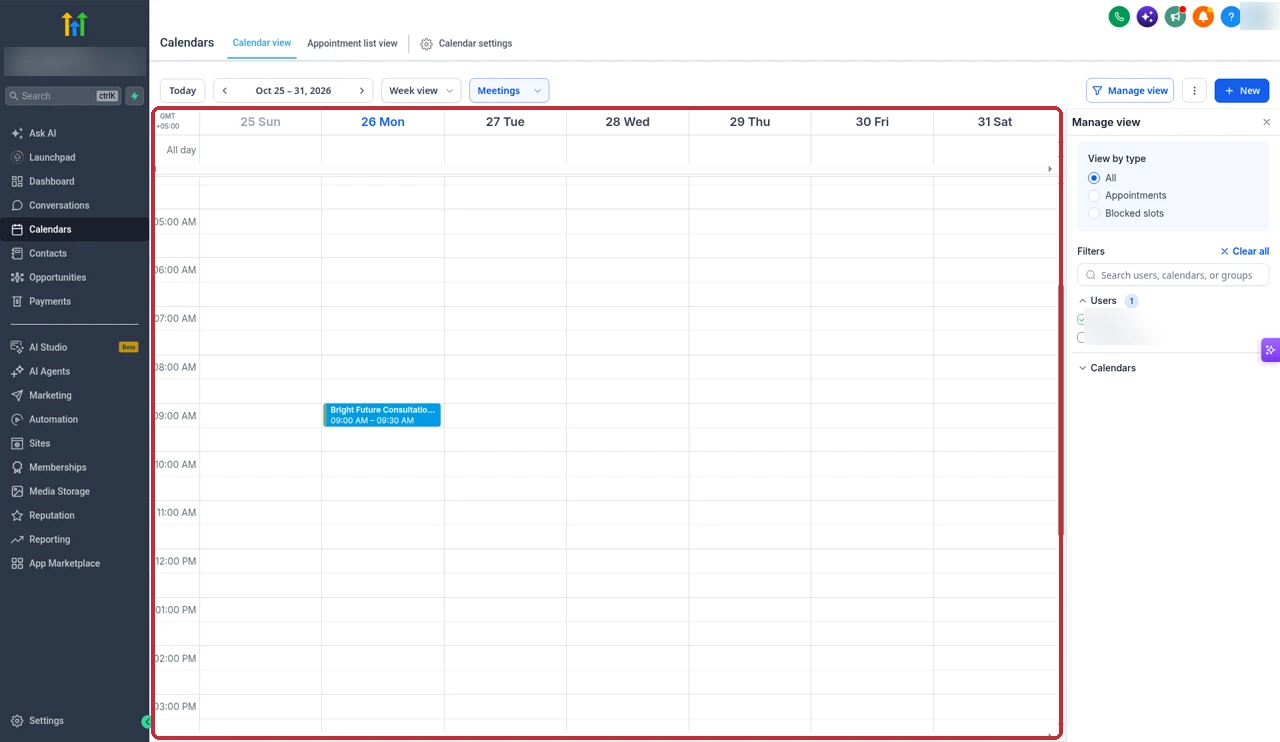
Scheduling and dispatch
Jobber has routing, GPS tracking and crew scheduling. GoHighLevel has booking calendars.
Quotes and estimates
Jobber includes quotes on every plan, with quote follow-ups on Connect and rich quotes with optional line items on Grow. That makes it easy to offer a client a good, better and best choice and let them pick.
GoHighLevel isn't built around quoting jobs on site. Its Payments area is focused on invoices and collecting payment, so if detailed job quotes matter to you, Jobber is the better fit.
Quotes
Jobber's quoting is built for service jobs, with follow-ups and optional line items.
Invoicing and payments
Both send invoices and take online payments. Jobber includes invoices and online payments on every plan, automatic payments and invoice follow-ups from Connect, and syncs with QuickBooks Online and Xero. Its own payment fees are listed above.
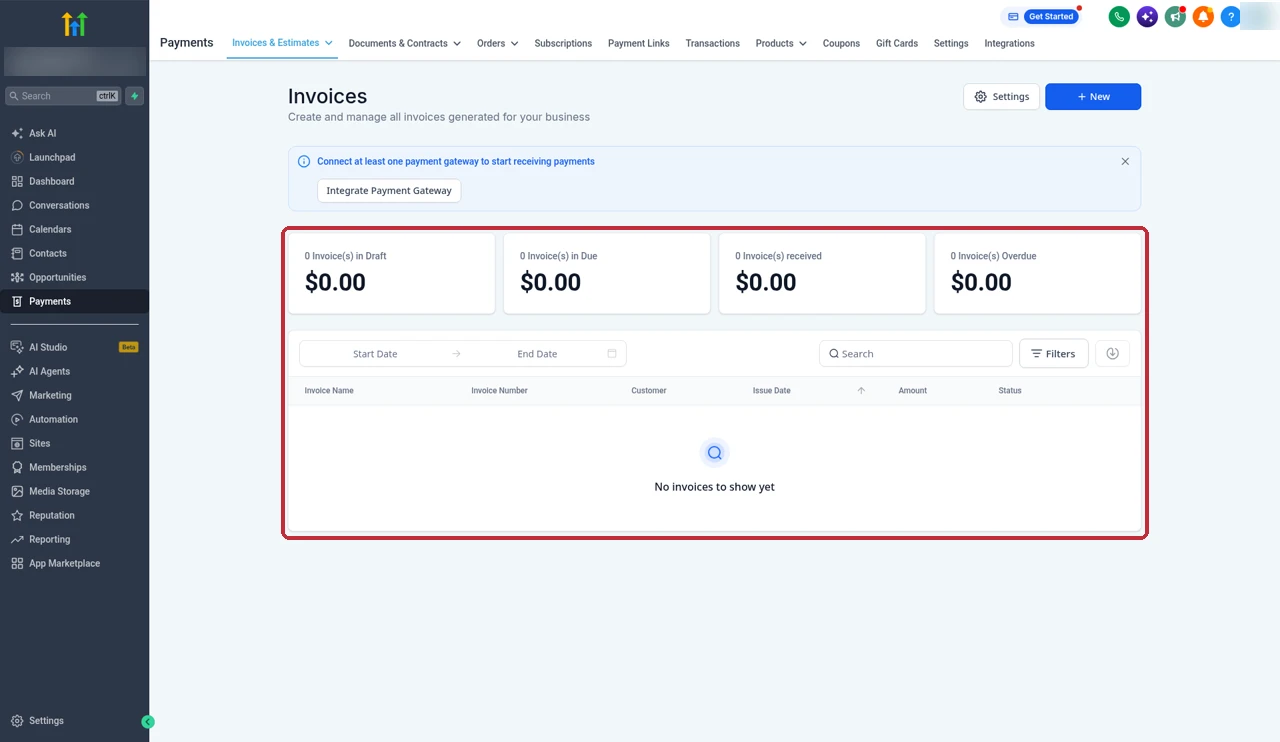
GoHighLevel invoices live under Payments, then Invoices. You connect your own payment gateway, so the card fees are whatever that processor charges. It also has a native QuickBooks Online integration.
Invoicing and payments
Both do the job. Jobber ties invoices to the work, and GoHighLevel ties them to the customer record.
CRM and pipelines
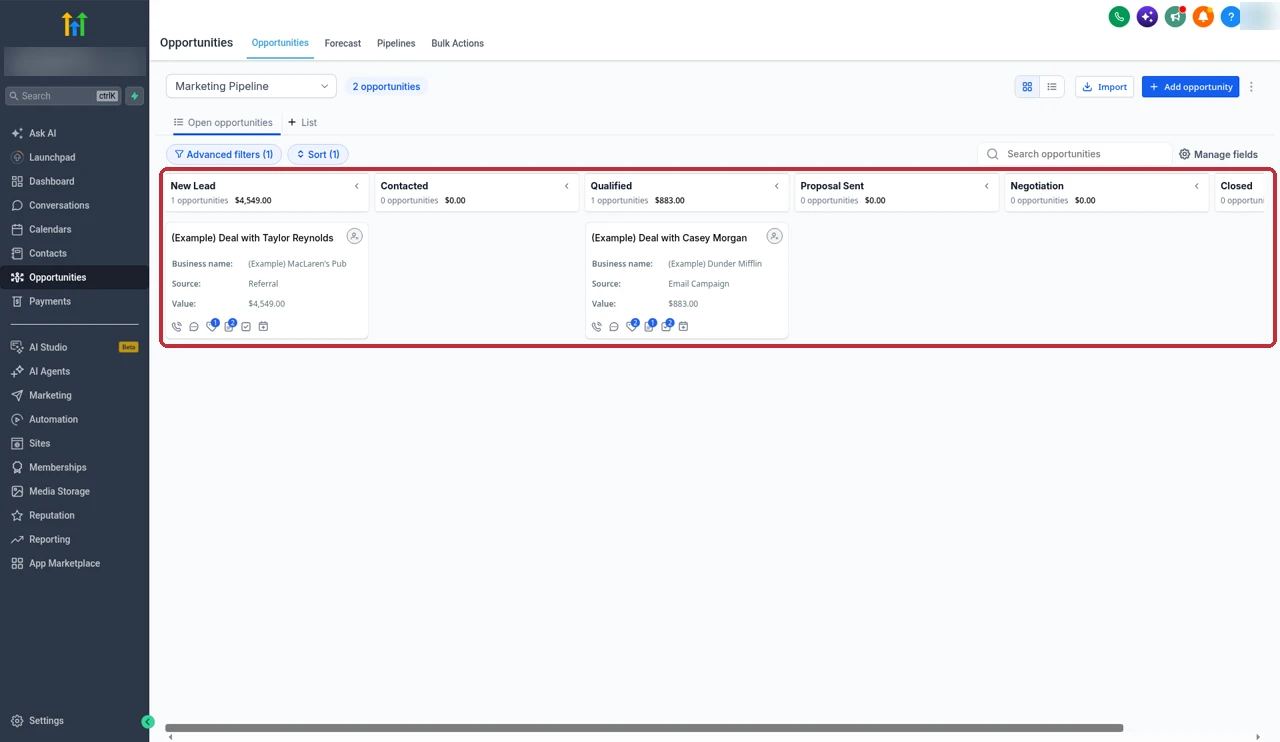
GoHighLevel's CRM is the core of the platform. Every contact has a full history of calls, texts, emails and form fills, and opportunities move through pipelines with stages you set up yourself.
Jobber keeps a client record and a client hub where customers can see their quotes and invoices. Its Pipeline feature is a $49 a month add-on, included on Plus.
CRM and pipelines
GoHighLevel's CRM and pipelines come with every plan and go much deeper.
Marketing and automation
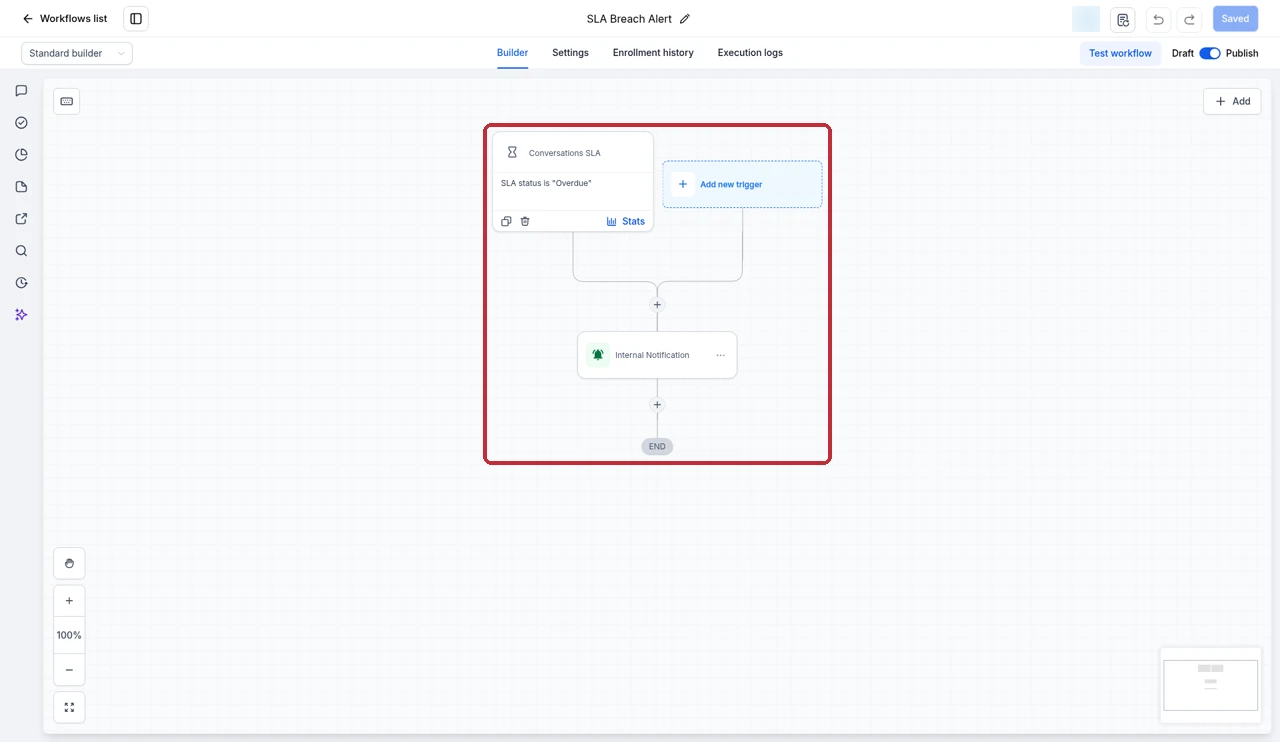
This is where GoHighLevel pulls ahead. Workflows can react to almost anything a lead does and reply by text, email or voice, move deals, tag contacts and ask for reviews. Email and SMS campaigns, funnels and websites are part of every plan. My GoHighLevel workflow templates guide has recipes I build for clients.
Jobber covers the automation that sits around the job: automated reminders, quote and invoice follow-ups and, on Grow, custom workflow automations. For campaigns and reviews, there's the Marketing Suite add-on at $99 a month.
Marketing and automation
GoHighLevel's workflows, campaigns and pipelines are built in. Jobber sells marketing as an add-on.
AI receptionist and voice
Both now offer an AI that answers calls. Jobber's Receptionist is a $29 a month add-on. GoHighLevel has Voice AI for phone calls and Conversation AI for texts and chat, billed by usage. I cover them in my GoHighLevel Voice AI guide and Conversation AI guide.
I'd pick based on where the call should end up. If you want the AI tied to your CRM, pipelines and follow-up, GoHighLevel's tools sit right in that system. If you mainly want calls turned into Jobber requests, Jobber's add-on keeps it in one place.
White label, agencies and SaaS
This one isn't close. GoHighLevel was built for agencies. Each client gets their own sub-account, you can copy a whole setup to new clients with snapshots, and Agency Pro adds SaaS Mode so you can resell the platform under your own brand.
Jobber's pricing page doesn't offer a white label or reseller option. It's software for the service business itself.
White label and agencies
GoHighLevel is built for agencies and white label. Jobber doesn't offer it on its pricing page.
Mobile apps
Jobber's iOS and Android app is made for people in the field. Crew members can see their schedule, find the job, and you can quote, invoice and get paid on site. Jobber also notes the app is available in Spanish for team members.
I use GoHighLevel's mobile app mainly for answering leads on the go. Agencies can also put their own brand on it with the white label mobile app add-on.
Mobile apps
Jobber's app is made for crews in the field. GoHighLevel's is made for sales and follow-up.
Using both: the GoHighLevel Jobber integration
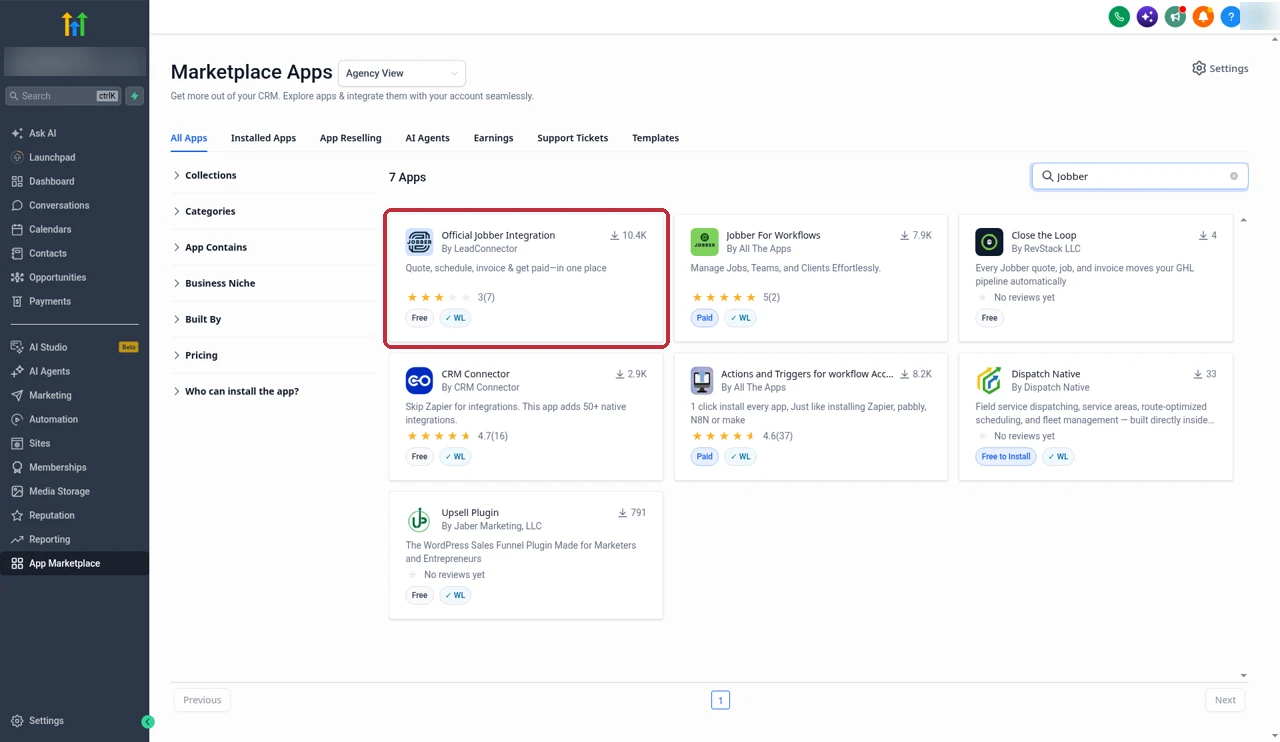
HighLevel and Jobber have an official partnership, and the integration is listed in GoHighLevel's App Marketplace as Official Jobber Integration by LeadConnector. HighLevel describes the idea simply: leads in HighLevel flow into Jobber, and client updates in Jobber show up in HighLevel. Agencies can also deploy it across client accounts in bulk.
What syncs
According to HighLevel's help doc, the integration:
- Syncs client data both ways, including names, emails, phone numbers and addresses.
- Matches records by the Jobber client ID.
- Imports historic clients from a date you choose, then keeps syncing live.
- Comes with a snapshot of prebuilt workflows and templates.
HighLevel's docs describe client data. They don't say that jobs, quotes or invoices sync, so I wouldn't plan around that until you've tested it.
How to connect it
- In your GoHighLevel sub-account, open the App Marketplace and search for Jobber.
- Open Official Jobber Integration by LeadConnector.
- Install it. You'll be asked to approve the connection in Jobber.
- Choose the date to import historic clients from.
- Load the snapshot if you want HighLevel's prebuilt workflows and templates.
Before rolling it out to every client, I'd check that one client syncs properly.
For the full walkthrough, see HighLevel's Jobber help doc.
Which should you pick?
Here's how I'd decide, based on what your business needs most.
| If this sounds like you | Pick | Why |
|---|---|---|
| You send crews to job sites every day | Jobber | Routing, GPS tracking and crew scheduling |
| You need quotes and invoices done fast in the field | Jobber | Quoting, invoicing and payments from the mobile app |
| Most of your leads come from ads, forms and calls | GoHighLevel | CRM, pipelines and instant follow-up |
| You want texts, emails and review requests on autopilot | GoHighLevel | Workflows and campaigns on every plan |
| You're an agency serving home service clients | GoHighLevel | Sub-accounts, snapshots, SaaS Mode and white label |
| You win leads online and run crews in the field | Both | The native integration keeps client data in sync |
Partner offerFree 30 day trial+ 2 months free on annual
- 30 days instead of the public 14
- Full access to the plan you choose
- Cancel any time before it ends
Common questions
Is GoHighLevel better than Jobber?
Not for running jobs. Jobber is built for field service work: scheduling, routing, GPS tracking, quotes, invoices and a crew app. GoHighLevel is better at winning and nurturing customers, with a full CRM, pipelines, two-way texting, email marketing and workflows. Which one is better depends on where your business loses time or money.
Can GoHighLevel replace Jobber for scheduling and dispatch?
Only for simple appointment booking. GoHighLevel has calendars that customers can book into, but it doesn't have Jobber's routing, GPS tracking, crew scheduling or job costing. If you send crews out to job sites every day, I'd keep Jobber for that part.
Does Jobber integrate with GoHighLevel?
Yes. There's a native integration, listed in the GoHighLevel App Marketplace as Official Jobber Integration by LeadConnector. HighLevel's help doc says it syncs client data both ways, including names, emails, phone numbers and addresses, matched by the Jobber client ID.
Which is cheaper, Jobber or GoHighLevel?
For one person, Jobber Core is cheaper, from $29 a month on annual prepaid billing or $49 with no commitment. GoHighLevel starts at $97 a month. For bigger teams the gap closes, because Jobber charges by users and GoHighLevel plans don't, but GoHighLevel adds usage charges for texts, calls, email and AI.
Does Jobber have a free trial?
Yes. Jobber's pricing page offers a 14-day free trial of the Grow plan with no credit card needed. GoHighLevel also has a 14-day free trial on any plan.
Can I white label Jobber like GoHighLevel?
Jobber's pricing page doesn't offer any white label or reseller option. GoHighLevel is built for that, with client sub-accounts, SaaS Mode on Agency Pro and a white label mobile app add-on.
Which has better marketing automation?
GoHighLevel. Workflows, email and SMS campaigns, pipelines and AI tools are part of every plan. Jobber has custom workflow automations on Grow and a Marketing Suite add-on for $99 a month, but marketing isn't its core.
Can I use GoHighLevel and Jobber together?
Yes, and for many home service businesses that's the best setup. GoHighLevel captures and follows up with leads, Jobber runs the jobs, and the native integration keeps client details in sync between them.
The verdict
Jobber wins at running the work. Scheduling, routing, GPS tracking, quotes, invoices and a crew app make it the better choice for the day-to-day of a field service business.
GoHighLevel wins at getting and keeping customers. Its CRM, pipelines, texting, email, workflows and agency tools are far deeper than anything Jobber offers, even with its add-ons.
If you need both sides, use both. The native integration keeps client details in sync, so GoHighLevel can win the job and Jobber can do it.
Prices and features come from Jobber's pricing page, HighLevel's pricing page, HighLevel's Jobber help doc and its Jobber partnership post, plus screens from our own GoHighLevel account. Both companies change their plans from time to time, so check their sites before you buy.
Some links on this page are partner links. How that works is explained on our affiliate disclosure page.