
An all-in-one CRM for agencies. Contacts, pipelines, two-way texting, calling, funnels and built-in workflows, with client sub-accounts.
Try GoHighLevel free for 30 days
A workflow automation tool. Connects apps and APIs with a visual editor, code when you want it, cloud or self-hosted, priced per run.
See n8n pricingPeople compare GoHighLevel and n8n because both have a workflow builder. That's where the overlap ends. GoHighLevel is a CRM and marketing platform whose workflows act on its own contacts, deals, messages and calendars. n8n is an automation engine that connects apps to each other and has no CRM at all. I use them together, so in this comparison I'll cover pricing, executions, webhooks and self-hosting, then show exactly how I wire one to the other.
Short version
- They aren't direct rivals. GoHighLevel runs your CRM and messaging. n8n connects outside systems.
- GoHighLevel costs $97 to $497 a month plus usage. n8n Cloud costs $24 to $960 a month on monthly billing, and its Community Edition is free to self-host.
- n8n charges per workflow execution, however many steps it has. GoHighLevel charges for premium actions like webhooks once a sub-account uses its 100 free runs.
- For most agencies, the best answer is both: GoHighLevel as the source of truth, n8n for the integrations around it.
The short answer
If you need to capture leads, text and email them, book calls and track deals, you need GoHighLevel, and its built-in workflows will handle most of your automation. n8n can't do that job, because it doesn't store contacts or send messages on its own.
If you need to move data between many apps, call APIs, transform data or run AI agents across several tools, n8n is the stronger builder. It's cheaper per run at volume, and you can self-host it.
For most agencies, the best setup is both. GoHighLevel stays in charge of the client and the conversation, and n8n handles everything that has to leave or enter GoHighLevel.
Pick GoHighLevel if- You need a CRM, inbox and pipelines
- You text, call or email leads
- You build funnels, calendars or courses
- You manage clients in sub-accounts
- Your team isn't technical
Pick n8n if- You connect many apps and APIs
- You need loops, branching data or code
- You run high volumes of automations
- You want to self-host your automation
- You already have a CRM you're happy with
GoHighLevel vs n8n at a glance
| GoHighLevel | n8n | |
|---|---|---|
| What it is | CRM and marketing platform | Workflow automation tool |
| CRM and contacts | Built in, unlimited contacts | None |
| Email and SMS sending | Built in, billed by usage | Through connected apps only |
| Automation model | Workflows acting on CRM records | Workflows connecting apps and APIs |
| Integrations | Native features, marketplace apps, API | Official nodes for 2,000+ apps, plus HTTP requests |
| Code | Limited | Code nodes when you need them |
| Self-hosting | No | Free Community Edition |
| Pricing basis | Monthly plan plus usage and premium actions | Workflow executions per month |
| Client accounts and white label | Sub-accounts, SaaS Mode on Agency Pro | No |
| Trial | 14 days, or 30 through the Bootcamp offer | Free Cloud trial, no credit card |
What each platform actually is
GoHighLevel is where the client lives. Each sub-account has its own contacts, pipelines, conversations, calendars, funnels and phone numbers, and its workflows react to what happens there: a form is filled in, a reply arrives, a deal moves, an appointment is booked. Because the data and the messaging are in the same place, a workflow can text a lead in one step without connecting anything.
n8n is the plumbing between apps. A workflow starts from a trigger, such as a webhook, a schedule or an event in another app, and passes data through nodes that read, change and send it. It doesn't care which CRM you use. On its own, though, it has nowhere to keep a lead and no way to text one.

Pricing compared
GoHighLevel plans and premium executions

| Plan | Monthly | What stands out |
|---|---|---|
| Starter | $97 | 3 sub-accounts, unlimited contacts and users, workflow automation |
| Unlimited | $297 | Unlimited sub-accounts, basic API, rebill phone and email at cost |
| Agency Pro | $497 | Advanced API, SaaS Mode, rebill with markup |
Every plan includes workflow automation and API access, with unlimited contacts and users. You can compare them on GoHighLevel's pricing page, and texts, calls, email and AI are billed from the agency wallet on top.
Some workflow steps are premium. Inbound Webhook triggers, Custom Webhook actions, Google Sheets, Slack and marketplace app actions all count as premium executions. Each sub-account gets 100 free premium executions for life, then pays $0.01 each. If you run a lot of them, Workflow Pro is cheaper:
| Workflow Pro | Monthly | Included | Each extra run |
|---|---|---|---|
| Starter | $10 | 10,000 | $0.008 |
| Growth | $25 | 30,000 | $0.006 |
| Scale | $50 | 65,000 | $0.004 |
Standard actions, like sending an SMS or updating a contact, don't use this allowance. My GoHighLevel pricing guide covers every other add-on.
n8n Cloud plans and executions

| Plan | Monthly | Executions a month | What stands out |
|---|---|---|---|
| Starter | $24 | 2,500 | 1 shared project, 5 concurrent executions, AI and MCP nodes |
| Pro | $60 | 10,000 | 3 shared projects, up to 50 concurrent, admin roles, workflow history |
| Business | $960 | 40,000 | Self-hosted only. SSO and LDAP, environments, queue mode, Git |
| Enterprise | Contact sales | Custom | Compliance and governance features |
Every n8n plan has unlimited users, unlimited workflows and every integration. You pay for workflow executions, and one execution is one full run, however many steps it has. As n8n puts it, if it doesn't run, you don't pay. Paying yearly saves about 17%, and teams with fewer than 20 employees can apply for the Start-up plan, which is 50% off Business. Prices are on n8n's pricing page.
Self-hosted Community Edition
n8n's Community Edition is free and self-hosted. The license costs nothing, but you pay for the server, and you own updates, backups, security and uptime. For a technical team that's a fair trade. For most marketing agencies, Cloud is the safer start.
Pricing model
GoHighLevel bundles automation into the plan. n8n is cheaper per run at volume, and free if you self-host.
What you'd actually pay
Here's what a month of webhook-driven runs costs in one GoHighLevel sub-account, against the n8n plan that covers the same number of runs. GoHighLevel figures ignore the 100 free lifetime runs, and both exclude GoHighLevel's plan and messaging usage, so treat them as approximate.
| Runs a month | GoHighLevel at $0.01 | GoHighLevel Workflow Pro | n8n Cloud |
|---|---|---|---|
| 5,000 | $50 | $10 Starter | $60 Pro |
| 30,000 | $300 | $25 Growth | Above Pro's 10,000, so a bigger Pro tier or $960 Business |
| 100,000 | $1,000 | $50 Scale plus 35,000 extra runs at $0.004, about $190 | Above Business, so Enterprise or self-hosted |
Two things stand out. First, GoHighLevel's Workflow Pro makes premium runs cheap, so cost alone isn't a reason to move webhooks out of GoHighLevel. Second, when you use both tools, you pay both: the Custom Webhook step counts as a GoHighLevel premium execution, and the run it starts counts as an n8n execution.
Free 30 day trial + 2 months free on annual
Test your automations on a 30 day trial Build the workflows, fire real webhooks and see your premium execution count before you pay.
- Free trial
- 30 days
- Annual saving
- 2 months free
- In the trial
- Full access to your plan
Automation builders head to head
Triggers and actions
GoHighLevel's triggers come from the CRM: form submissions, replies, appointment status, pipeline stage changes, payments, tags and more. Its actions send texts and emails, update contacts, move deals, add tasks and hand conversations to AI. My guide to GoHighLevel workflow templates shows ten I build for clients.
n8n's triggers can be a webhook, a schedule, a form or an event in almost any app it connects to, and its actions can be any node or any HTTP request.
Triggers and actions
GoHighLevel for CRM events. n8n for everything outside the CRM.
Data handling, loops and code
This is where n8n pulls ahead. It handles lists of items, branches, merges and loops naturally, lets you reshape data between nodes, and has code nodes for anything a node can't do. GoHighLevel workflows are built for one contact at a time and keep logic simple, which suits marketing teams but limits heavy data work.
Data and code
n8n handles complex data and custom logic far better.
Error handling and logs
n8n keeps an execution log for every run, showing the data at each node, with retention set by plan. You can rerun failed executions and route errors to their own workflow. GoHighLevel shows each contact's path through a workflow and its execution history, which is easier to read for a single lead but gives you less control when something fails at scale.
Error handling
n8n gives you deeper logs and more control over failures.
Ease for a team
GoHighLevel's builder is easier for a marketing team. Triggers and actions use CRM language, and its AI builder can draft a workflow from a prompt. n8n is visual too, but you'll be dealing with JSON, API credentials and data mapping sooner or later.
Ease for a team
GoHighLevel is easier for non-technical staff.
Integrations and API
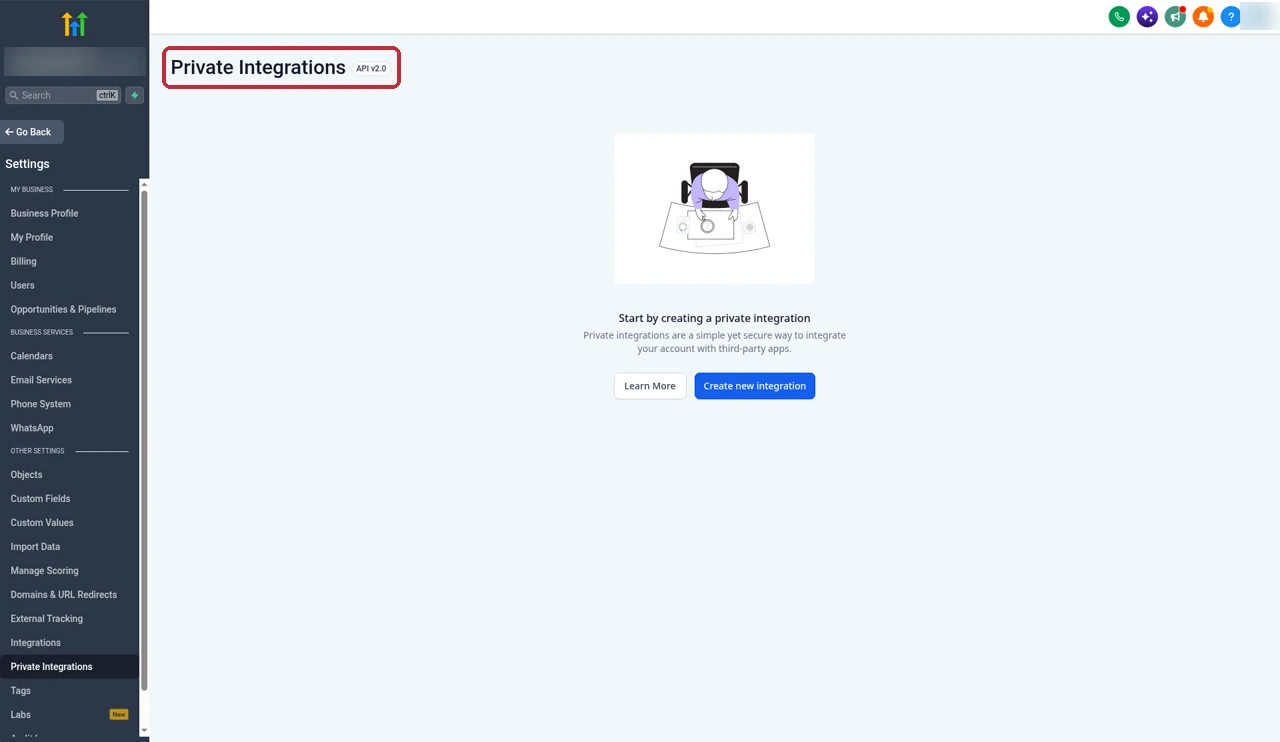
GoHighLevel connects to outside tools in three ways: its native features, marketplace apps, and its API. Private Integrations, under sub-account settings, give you a scoped token for API v2.0, so you don't have to build a full marketplace app to call your own account. Unlimited lists basic API access, and Agency Pro adds the advanced API.
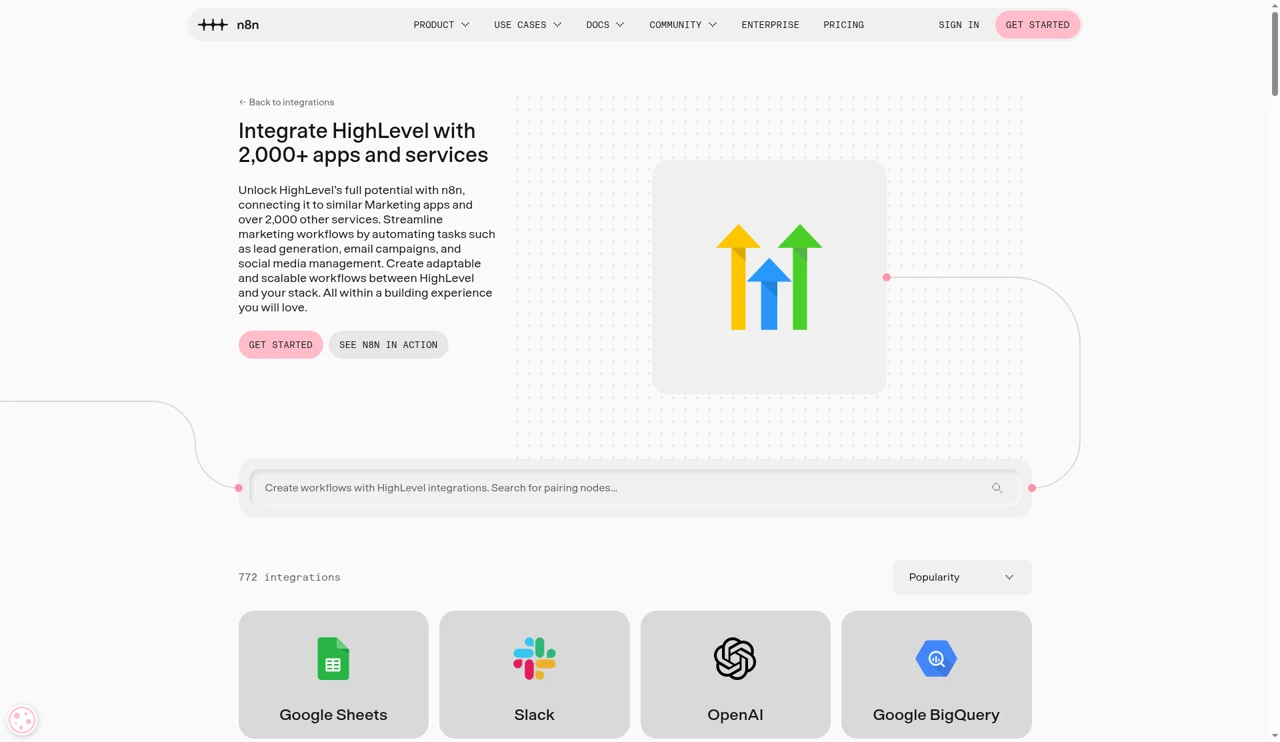
n8n says it integrates with more than 2,000 apps and services, with official nodes for many of them and an HTTP Request node for anything else. Its official HighLevel integration is the reason this pairing works so well.
Integrations
n8n connects to far more outside tools.
AI and agents
GoHighLevel's AI works with your leads directly. Conversation AI replies to texts and chats, Voice AI answers calls, and the AI Employee bundles them together. AI Studio adds agent building inside the platform.
n8n lists agents, MCP and AI nodes on every plan, so you can build an agent that calls several tools, reads documents or queries a database, using AI models you choose. If you want an AI assistant to work on GoHighLevel data from outside, my guide to connecting GoHighLevel to Claude shows another route.
AI and agents
GoHighLevel for AI that talks to leads. n8n for agents that work across tools.
Agencies: sub-accounts, snapshots and white label
This one isn't close. GoHighLevel gives every client a sub-account with its own CRM and workflows. Snapshots copy a full setup, workflows included, into a new client in minutes, and my snapshots guide shows how. Agency Pro adds SaaS Mode, so you can resell the platform under your own brand.
n8n has projects for organising work, but no client accounts, no snapshots and no reselling. If you build n8n workflows for clients, each one is yours to copy, credential and maintain by hand.
Agencies
GoHighLevel is built for agencies. n8n isn't.
Can n8n replace GoHighLevel?
No. n8n has no CRM, no inbox, no phone numbers, no email or SMS sending of its own, no funnels, calendars or courses. To replace GoHighLevel with n8n you'd need a CRM, an email service, an SMS provider, a page builder and a booking tool, then wire them together and maintain all of it. That's a lot of moving parts for an agency. If you're looking for a different all-in-one, my GoHighLevel alternatives roundup is a better place to start.
How to use GoHighLevel and n8n together
GoHighLevel to n8n: Custom Webhook action
To send data out, add a Custom Webhook action to a GoHighLevel workflow and point it at the production URL of an n8n Webhook node. You choose the method and map the contact fields you want into the request. It's a premium action, so it counts toward your premium executions.

n8n to GoHighLevel: HighLevel node or Inbound Webhook
To send data back, the easiest route is n8n's HighLevel node. It has 17 actions across contacts, opportunities, tasks and calendars, including creating or updating a contact, booking an appointment and getting free slots.
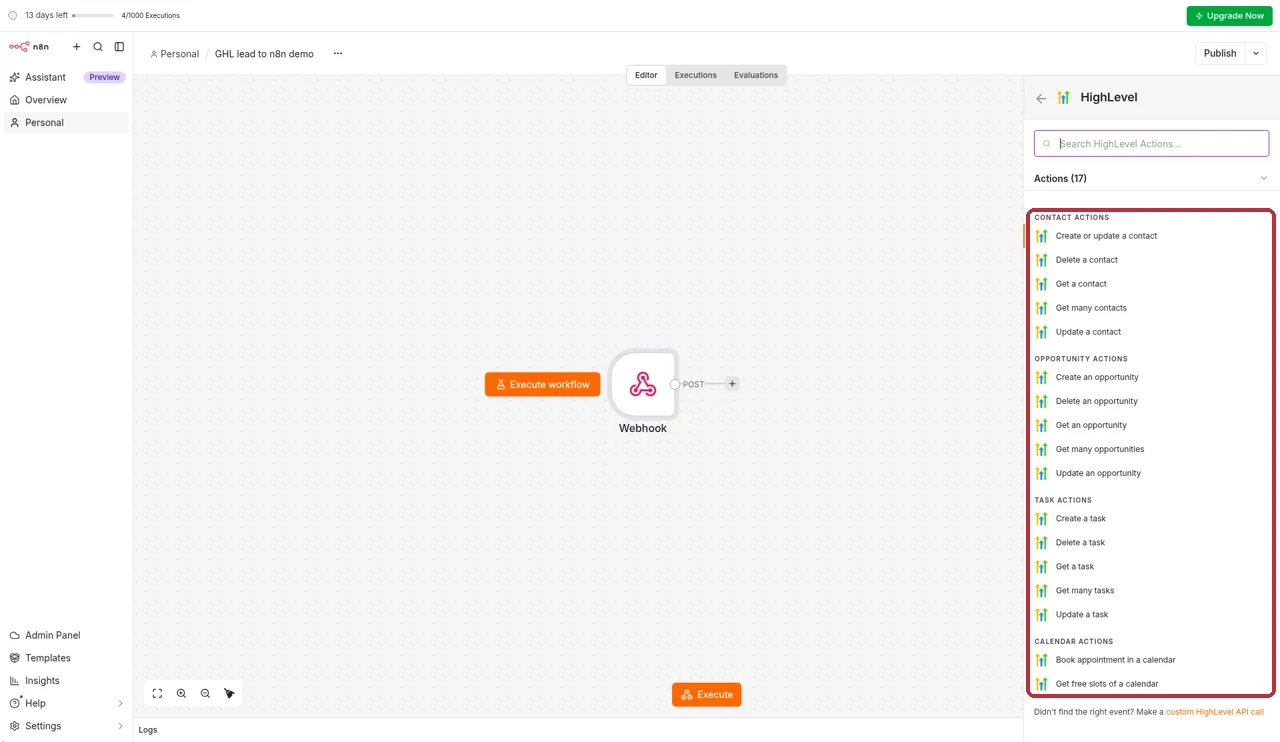
For a quick demo, I built a simple n8n workflow: a Webhook node receives lead details and passes them to the HighLevel node, which creates or updates the contact in GoHighLevel.

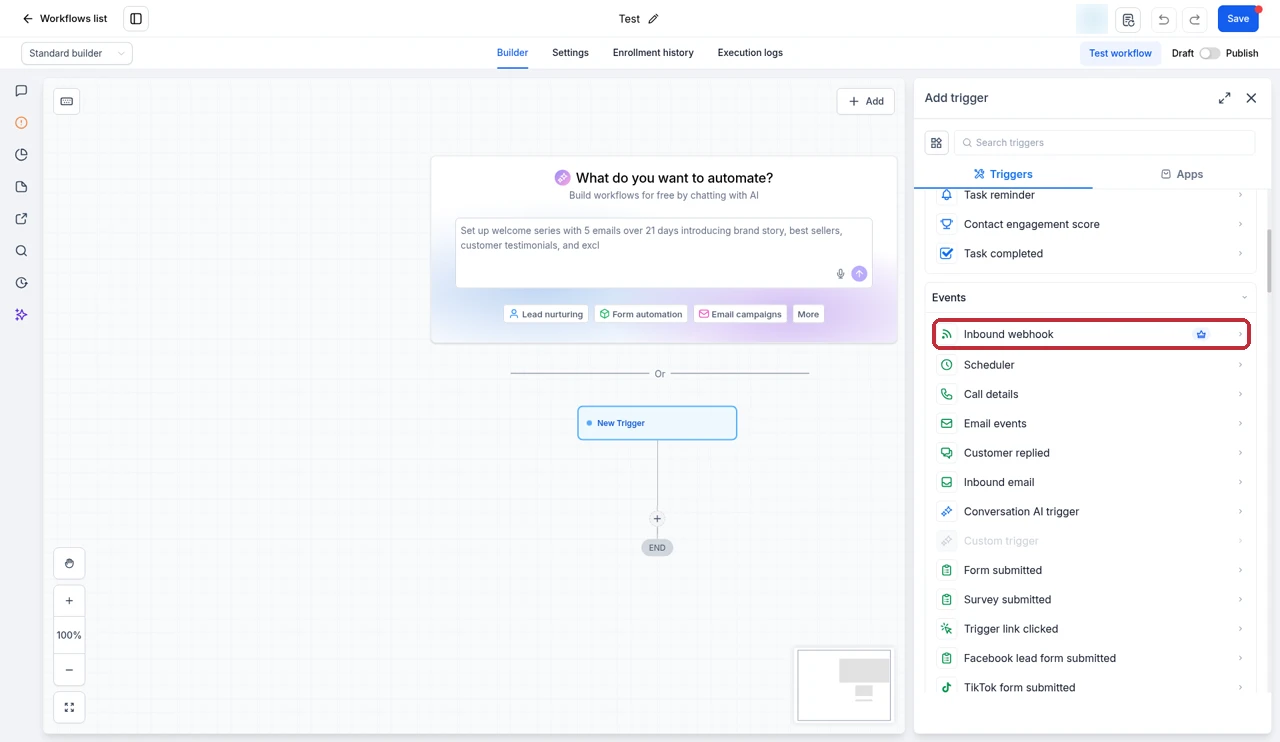
The other route is a GoHighLevel Inbound Webhook trigger. It accepts POST, GET or PUT requests with a JSON body, and starts a workflow in GoHighLevel. To create or update a contact, the payload needs an email or a phone number. It's also premium, so it counts as a premium execution each time it fires.
Three practical examples
Enrich a new lead. A form submission in GoHighLevel fires a Custom Webhook to n8n, which looks the company up in another service, then writes the extra fields back through the HighLevel node.
Sync to a sheet or warehouse. When a deal is won, GoHighLevel sends the details to n8n, which reshapes the data and adds a row to a spreadsheet or database your reporting tool reads.
Alert the team. When a high-value lead replies, n8n posts a formatted message in Slack with a link to the contact.
My rules for running both
GoHighLevel stays the source of truth for contacts, deals and conversations. n8n reads and writes, but never keeps its own copy of the client. When an n8n run fails, it adds a tag to the contact in GoHighLevel, so someone sees it in the CRM. And anything GoHighLevel can do natively stays in GoHighLevel, because every handoff is another execution and another place to break.
Which should own each job?
Here's how I split common jobs between the two.
| Job | Owner | Why |
|---|---|---|
| Text a lead when they fill in a form | GoHighLevel | Native trigger and SMS action, no second tool |
| Move a deal when an appointment is booked | GoHighLevel | Pipelines and calendars live in the CRM |
| Copy every new client to new sub-accounts | GoHighLevel | Snapshots carry workflows across accounts |
| Enrich a new lead with data from another service | n8n | HTTP requests and data mapping are its strength |
| Sync contacts to a database or warehouse | n8n | Hundreds of nodes plus code when you need it |
| Post a team alert in Slack with custom formatting | Either | GoHighLevel has a premium Slack action, n8n has a Slack node |
| Run AI agents that call several outside tools | n8n | Agent, MCP and AI nodes on every plan |
| Reply to leads with AI on SMS and chat | GoHighLevel | Conversation AI works inside the inbox |
Common questions
Can n8n replace GoHighLevel?
No. n8n is an automation tool, not a CRM. It has no contact database, pipelines, inbox, phone numbers, funnels, calendars or courses of its own. It can move data between apps and call their APIs, but you still need something like GoHighLevel to store leads and talk to them.
Is n8n better than GoHighLevel workflows?
For connecting outside apps, transforming data and running custom code, yes. For anything that happens inside your CRM, like texting a lead, moving a deal or booking an appointment, GoHighLevel's own workflows are simpler and don't need a second tool. Most setups work best with GoHighLevel handling CRM jobs and n8n handling integrations.
Is n8n free?
The self-hosted Community Edition is free to use, but you pay for the server and handle updates, backups and security yourself. n8n Cloud starts at $24 a month on monthly billing for 2,500 executions, and there's a free trial with no credit card.
How do I connect n8n to GoHighLevel?
Use n8n's official HighLevel node, which can create or update contacts, opportunities and tasks and book appointments. To send data from GoHighLevel to n8n, add a Custom Webhook action in a workflow pointing at an n8n Webhook node. To send data the other way, call the HighLevel node or post to a GoHighLevel Inbound Webhook trigger.
Do GoHighLevel webhooks cost extra?
Yes. Inbound Webhook triggers and Custom Webhook actions are premium workflow features. Each sub-account gets 100 free premium executions for life, then they cost $0.01 each, or you can buy a Workflow Pro plan from $10 a month for 10,000 executions. Standard actions don't use the premium allowance.
What counts as an execution in n8n?
One execution is one full run of a workflow, however many steps it has. A 3-step workflow and a 30-step workflow both count as one execution each time they run, and n8n says that if a workflow doesn't run, you don't pay.
Should an agency use both?
Often, yes. GoHighLevel runs each client's CRM, messaging and pipelines, and snapshots copy that setup to new sub-accounts. n8n is worth adding when clients need data synced with tools GoHighLevel doesn't connect to natively, or logic that's awkward to build in GoHighLevel workflows.
n8n or Zapier for GoHighLevel?
Both connect to GoHighLevel. n8n charges per workflow run rather than per step, can be self-hosted, and handles code and complex logic well, so it usually suits heavier or more technical automations. Zapier is quicker to learn for simple two-app connections.
Partner offerFree 30 day trial+ 2 months free on annual
- 30 days instead of the public 14
- Full access to the plan you choose
- Cancel any time before it ends
The verdict
GoHighLevel wins if you need a CRM that sells for you. Leads, conversations, pipelines, calendars and the workflows that tie them together all live in one place, and snapshots carry that setup to every client.
n8n wins as an integration engine. It connects more apps, handles data and code better, charges per run rather than per step, and you can self-host it.
You don't have to choose. Start with GoHighLevel's own workflows, and add n8n when a job needs to leave the CRM. That's the setup I'd recommend to most agencies.
Prices and limits come from HighLevel's pricing page and help center, and from n8n's pricing page, help center and HighLevel integration page, plus screens from our own GoHighLevel and n8n accounts. Both companies change their plans from time to time, so check their sites before you buy.
Some links on this page are partner links. How that works is explained on our affiliate disclosure page.